Mobile app
GreekManage has native iOS and Android apps. They are Capacitor wrappers around the same web app — the screens, data, and behaviour are identical, with the addition of passkey sign-in, biometric unlock, and a connection-loss banner.
Install
iOS (TestFlight or App Store)
Most orgs distribute the iOS app through TestFlight while the App Store listing matures.
- Install TestFlight from the App Store.
- Open the invite link from your org admin (or scan the QR code they shared).
- Tap Accept, then Install.
If your org has the production App Store version live, search “GreekManage” in the App Store and install directly.
Android (Google Play or APK)
- Open the Play Store invite link from your org.
- Tap Install.
If your org distributes via APK directly, follow their internal instructions for sideloading.
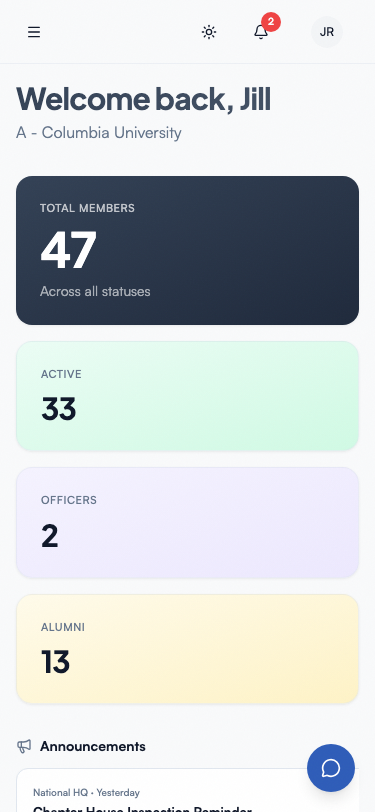 GreekManage on iOS — dashboard with bulletins.
First-time sign-in
- Open the app.
- Enter your email. The app detects whether your org uses SSO.
- Sign in with email/password or your SSO provider.
- Allow notifications when prompted — your device will receive notifications you’ve opted into in Notifications → Preferences.
Sign in with a passkey
A passkey you registered on the web automatically works in the mobile app and vice versa. iOS Associated Domains and Android Digital Asset Links are configured for app.greekmanage.com, so passkeys created on the web are recognised by both native apps.
- On the sign-in screen, tap Sign in with a passkey.
- Your phone prompts you to choose a saved passkey for
app.greekmanage.comand confirm with Face ID, Touch ID, or your phone’s PIN. - You’re signed in.
To register a new passkey from mobile, sign in once with email/password and open Account Settings → Passkeys.
→ See Signing in for the full walkthrough.
Enable biometric unlock
After your first successful sign-in:
- Open Account Settings.
- Find the Face ID / Touch ID (or fingerprint) card and enable it.
- Confirm with your device’s biometric.
You’ll stay signed in. The next time you open the app, biometric unlock replaces the password screen.
Notifications
Notifications you’ve subscribed to in Notifications → Preferences are also delivered as push notifications to mobile devices once you’ve granted notification permission. Specific events available for notifications depend on which modules your org has enabled (Engage, Compliance, Billing, Elections, etc.).
The full set of currently-supported notification events lives in your account’s Notifications → Preferences page — that’s the source of truth, not this page.
When the connection drops
If your device goes offline, a red banner appears at the top of the app: No internet connection. The app does not currently cache writes for later sync — actions like sending a message, posting a comment, or submitting a form will fail until you’re back online. The banner disappears automatically once connectivity returns.
Updating
Updates ship through TestFlight, the App Store, or the Play Store. Install them the same way you install any other app update from those stores. There is no in-app “Update required” enforcement today; you can stay on an older version until the next time you choose to update.
Related
Last verified against v0.62.1 (2026-05-10).