Reading bulletins
Bulletins are the announcement channel your national HQ and regional leadership use to push read-only updates to members. They appear at the top of your dashboard when active and disappear on their own when they expire.
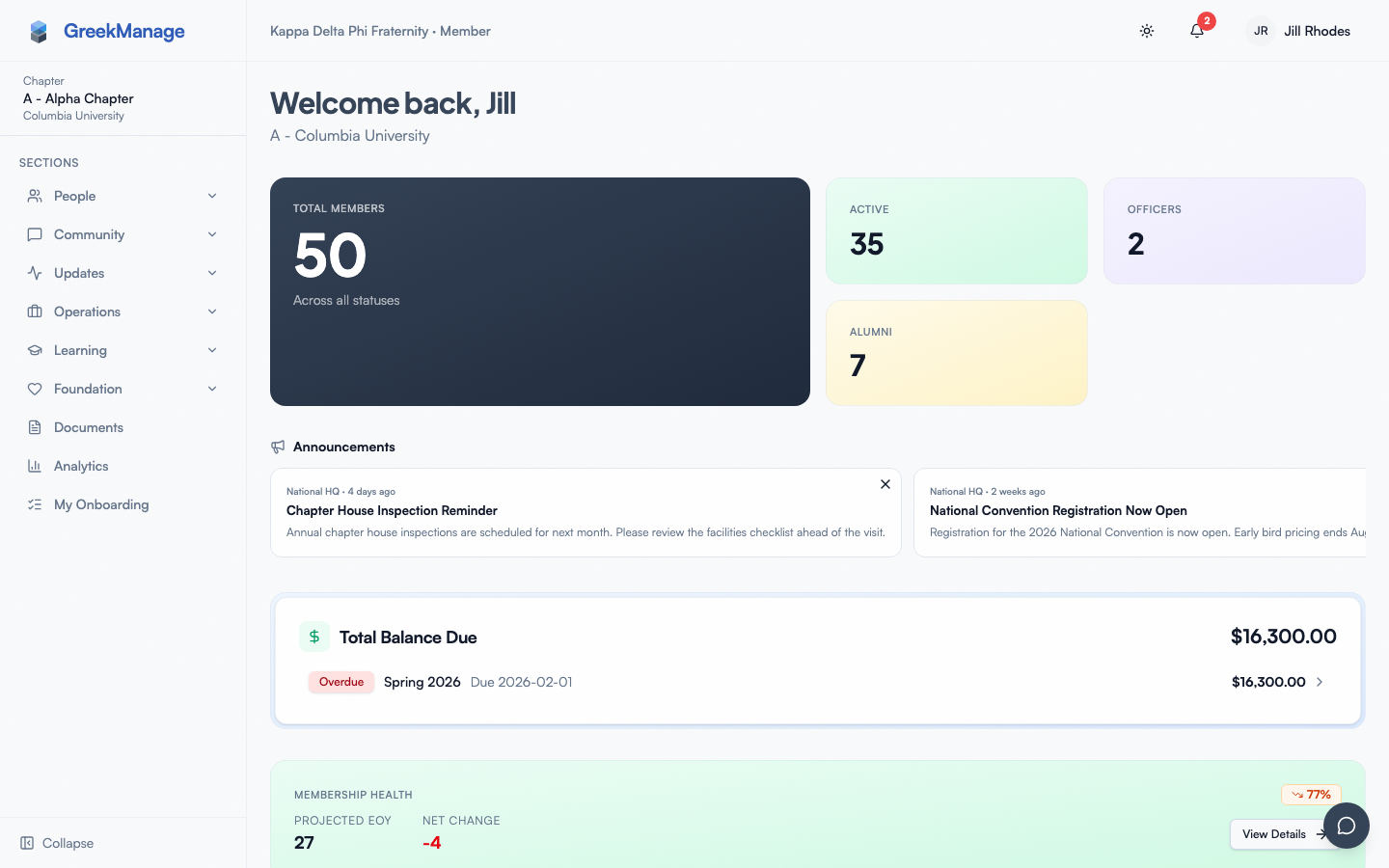 dashboard with the bulletin banner pinned at the top
Where you see bulletins
The Announcements section sits near the top of your chapter dashboard. It contains up to four bulletins at a time:
- One pinned bulletin as a full card (only if leadership pinned something).
- Up to three recent bulletins in a horizontally scrollable strip below.
Each card shows the source (National HQ or Regional), the publish date, the title, and a short preview of the content.
Scope — what shows up for whom
Bulletins target one of three audiences:
- Org-wide — visible to every member of the organization, regardless of chapter or region.
- Regional — visible only to members in chapters that belong to that region.
- Chapter-scoped — visible only to members of a specific chapter (added v0.63.29).
The card's pre-title label tells you which is which: "National HQ" for org-wide, "Regional" for regional, "Chapter" for chapter-scoped.
Lifecycle from your point of view
- Appears — when leadership publishes a bulletin, it goes live immediately at its publish time and starts showing on your dashboard.
- Pinned — leadership can pin a single bulletin so it stays at the top of the list. Pinned bulletins outrank publish-date ordering.
- Expires — bulletins have an optional expiry date. Once that date passes, the bulletin stops appearing on dashboards automatically — you don't need to do anything.
Dismiss a bulletin (per-member)
Each bulletin card now shows an X in the top-right corner. Click it to dismiss the bulletin for you only — your own dashboard hides it on next render and won't show it again, even though it remains published and visible to everyone else who hasn't dismissed it.
Dismissal is per-member and reversible: admins viewing the bulletin in management surfaces always see it, and you can "un-dismiss" via DELETE /api/bulletins/<id>/dismiss/ if you have direct API access (no UI restore today; if you want it back, ask leadership to re-publish or wait for a fresh bulletin).
Dismissals don't affect the system's published / pinned / expired lifecycle — your dismissal is purely a personal hide.
What's inside a bulletin
Org bulletins are authored in a rich-text editor — they can contain headings, bold / italic, bulleted and numbered lists, links, and inline images. On the dashboard you see a truncated text preview (HTML stripped, three lines max). To read the full bulletin, open the announcements feed.
Foundation bulletins are a separate, plainer channel used by your org's foundation arm to communicate with donors. They are plain text only and live inside the Foundation module — they don't appear in the dashboard Announcements section described here.
Errors and edge cases
- A bulletin you expected isn't there. Confirm it was published (not still a draft), that its publish date isn't in the future, and that its expiry hasn't passed.
- A regional bulletin you can see, a chapter-mate cannot. Regional bulletins are scoped to the chapter's region — if you and your chapter-mate are in different regions, you'll see different regional cards.
- Old bulletins. The dashboard surfaces the pinned card plus the three most recent. To browse beyond that, your org may surface a fuller bulletin archive elsewhere; check your sidebar.
Mobile differences
On iOS and Android the bulletin banner sits at the very top of the scrollable dashboard. The recent strip uses horizontal swipe instead of scroll buttons. Pull-to-refresh re-fetches the latest bulletins.
What officers and admins see that you don't
- Org admins and regional admins author, pin, schedule, and expire bulletins.
- Admins see a dedicated bulletins management page; members see only the published, in-window cards.
- The rich-text editor (with TipTap) is admin-side. Members never edit a bulletin.
Related
- Your dashboard — where bulletins surface.
- Notifications — get pings when a new bulletin lands.
Last verified against v0.63.39 (2026-06-26). Per-member dismissal shipped v0.63.27; chapter-scoped targeting v0.63.29.