Dues & invoices
GreekManage can bill dues in one of two modes, chosen by your org admin:
- Bill the chapter (the default, and how it has always worked): the chapter receives one invoice per billing period, covering all member types and head counts, and chapter officers pay it through the org’s configured processor.
- Bill each member (added in v0.73.42, with the member-facing pages in v0.73.43): the organization issues one invoice per member at that member’s own rate, and you pay it yourself.
Which mode your org uses determines what this page means for you. If you are unsure, look at your sidebar: Operations → My Dues shows your own balance whenever you have one.
My Dues — your own balance
When your org bills per member, Operations → My Dues is your page. It shows:
- Your balance, largest and first, with your lifetime billed and paid totals beside it.
- An activity ledger beneath it — every invoice, payment, discount and applied credit in date order, with a running balance.
- A Pay button, shown only when you actually owe something. It targets your oldest overdue invoice first, so paying chases the debt that is accruing late fees rather than the newest one.
- Your invoice history, paginated, with each invoice’s status.
Discounts are itemized for you — it is your money and your reason, so if a hardship or scholarship discount was applied you see what it was. Your officers do not (see below).
Notification links about a new invoice open this page with that invoice already selected.
If you transferred chapters, the chapter you left bills the term you transferred in, and your new chapter starts billing you the next term. You’re never billed for the same term by both chapters. Anything you still owe the old chapter stays with it, and you see and pay it here. Your balance includes it, and each invoice is labelled Billed by chapter so you can tell them apart. A payment plan on that old balance stops when the transfer is approved, so pay what’s left from here. Any credit you had at the old chapter stays there; ask National if it should follow you.
If your org bills the chapter instead, this page says so rather than showing you a balance. It will not tell you $0.00 — that would be a false reassurance, because your chapter is still invoiced for its dues and still collects from its members. Ask your treasurer what you owe. The same applies on the officer side: a chapter billed as a whole shows no “Members’ balance” figure at all, because there is no such figure, rather than a zero.
If a request for your account fails — most often because you hold more than one membership, so the platform cannot tell which account you mean — the page tells you what went wrong instead of loading indefinitely.
Asking to pay in instalments
If your organization allows it, you can ask to pay an invoice in instalments instead of all at once.
Payment plans are off unless your organization turns them on, so if you see no Request a payment plan button on your My Dues page, your org is not taking new requests. Ask your treasurer.
That only governs asking. If your org switches plans off after you already have one, your approved schedule and your past requests stay on the page — the plan you were granted is still in force, so the page keeps showing you the dates you are held to.
Requesting a plan
On Operations → My Dues, under Payment plans, choose Request a payment plan. You’ll be asked for:
- Which invoice the plan is for
- Number of instalments
- First payment offered ($) — the down payment you can make now
- Why you need a plan — a short justification, and it is required
Your organization sets limits on what it will consider — a maximum number of instalments, how long the plan may run, and a minimum first payment. You can submit a request outside those limits, but read the next section before you rely on one.
While you’re waiting
Submitting a request does not grant it. An admin at your organization reviews it and decides.
There is one thing a pending request does do: if it is inside your organization’s limits, it pauses the overdue clock on that invoice while it waits, so the invoice won’t be marked overdue and you won’t get a dunning notice in the meantime.
That pause has two limits worth knowing:
- A request outside your org’s limits earns no pause at all. The invoice keeps accruing exactly as if you had not asked.
- The pause runs out on its own. It is tied to your invoice’s original due date, not to when you asked, so requesting late does not buy you extra time. If nobody has reviewed your request by the time it lapses, the invoice resumes accruing and the notices resume — even though your request is still pending.
So a payment plan request is not a way to park an invoice indefinitely. If yours is close to lapsing and still unanswered, chase your admin.
Seeing your schedule
Once a plan is approved, Your approved payment plan appears on My Dues with each instalment, its amount and its date.
Two things about an approved plan:
- It does not change what you owe. A plan is a schedule, not a discount. Your balance is still the same money, just organized into dated pieces.
- Instalments are paid manually. Approving a plan does not set up automatic collection and nothing is charged to a card on a schedule. You pay each instalment yourself, and it is recorded like any other payment.
An officer may also submit a request on your behalf. That is only a convenience — it does not approve anything, and an admin still reviews it.
How dues flow through GreekManage
- Your org admin sets dues rates by member type (Undergrad, Associate, Alumni, etc.) and a billing cadence (monthly, quarterly, semesterly, annually).
- At the start of each billing period, GreekManage generates one invoice per chapter, computed as
head count by member type × rate by member type. - The invoice gets a unique ID, an issued date, a due date (commonly net-30 from issuance), a status (Unpaid → Partial → Paid, or Overdue if past due date), and a balance due in cents.
- Chapter officers open the invoice from Operations → Billing, review line items, and submit payment via the org’s configured processor (Stripe, Braintree, Square, or PayPal).
- After payment, the processor calls a webhook back to GreekManage; the invoice status updates to Paid (or Partial if it was a partial payment), and your chapter dashboard’s Dues Balance card reflects the new state within a minute.
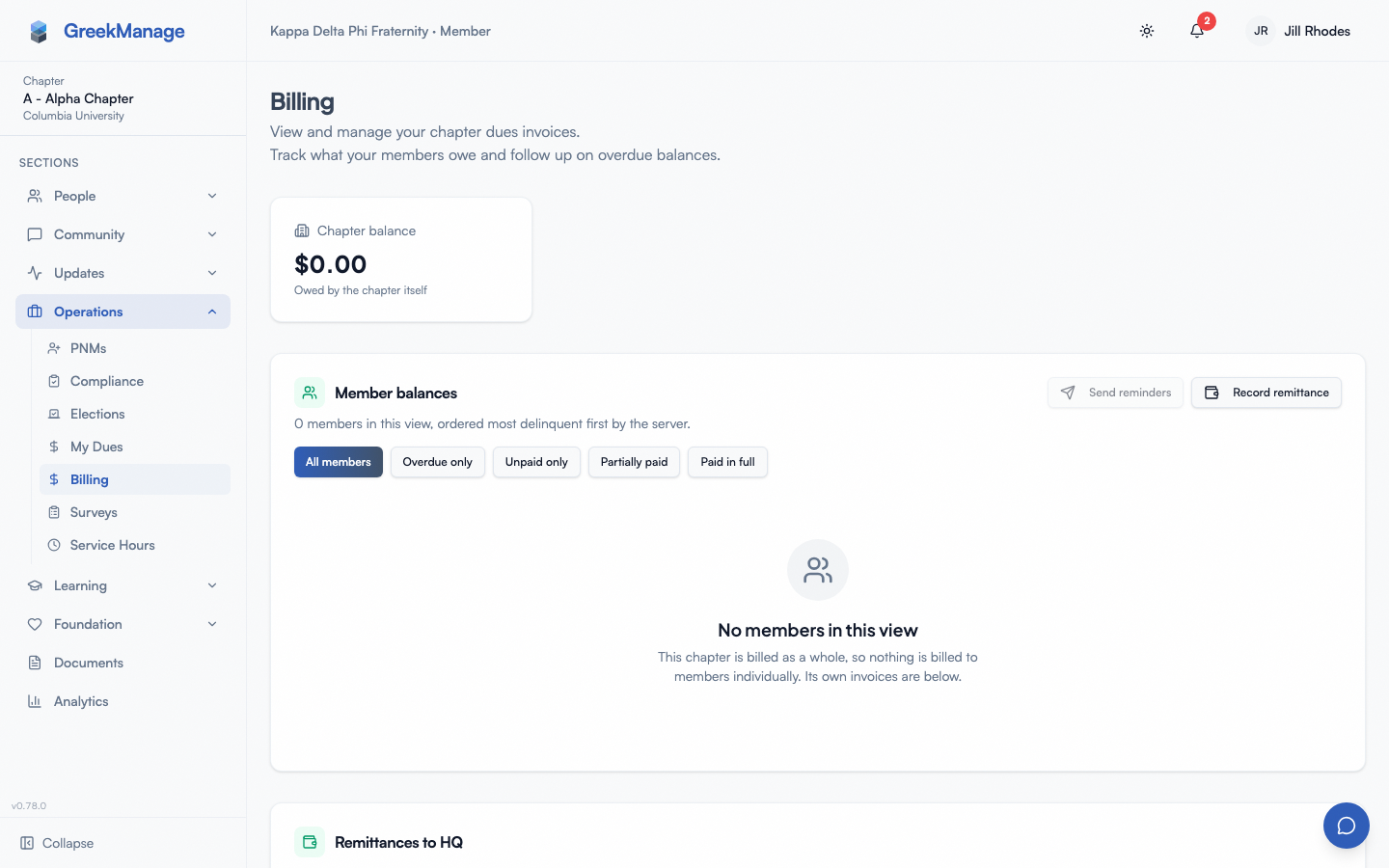 The chapter billing page (visible to chapter officers only).
the dues balance card on the chapter dashboard as a regular member sees it
What you see as a regular member
The Dues Balance card on your dashboard
This is the primary member-facing surface for dues. It appears in your chapter dashboard if:
- Your org has the Operations module enabled, and
- At least one chapter invoice exists.
The card shows:
- The current billing period label (e.g. “Spring 2026”).
- The balance due in dollars (a chapter total, not your share).
- The due date.
- A status badge:
| Status | Color | Meaning |
|---|---|---|
| Unpaid | Amber | Invoice generated, no payment yet |
| Partial | Orange | Some payment received, balance remaining |
| Paid | Emerald | Fully settled |
| Overdue | Red | Past the due date with balance remaining |
The card auto-refreshes every 60 seconds so when your treasurer pays, the badge flips within a minute.
A View Invoice button on the card links to /chapter/billing/invoices/[id], which is officer-only. If your org bills per member, use Operations → My Dues instead — that is your own balance, and it is the page notification links now open.
Reading dues announcements
Bulletins from your officers (in the Announcements banner on the dashboard) are the most common way you’ll hear about dues directly: “Spring dues are $X per active. Payment plan signups due Friday.” That communication channel is separate from the invoice system itself — the system tracks the chapter-total invoice, while the bulletins describe per-member expectations from your treasurer.
Ask the chatbot
If your org has the AI Services module enabled, start a GreekManageAI chat from the unified messaging/AI panel (the floating icon, bottom-right) and ask questions like:
- “When are dues due?”
- “What’s the dues balance on my chapter?”
- “Is the spring invoice paid?”
The bot reads the invoice records the same way the dashboard card does, so it’ll quote the same period, due date, and status.
What you don’t have access to in v0.62.1
- Per-member invoice. There’s no individual invoice line for “your share”. Your share is collected by your chapter treasurer outside the app (Venmo, Zelle, a check).
- Self-service payment. You can’t pay your share through GreekManage. The integrated Pay Now flow is for chapter officers paying the chapter-total invoice on the chapter’s behalf.
- Refund flow. Refunds are processed by your chapter officer or org admin through the underlying processor. Talk to your treasurer.
- Payment history visible to members. The list of past invoices and payment receipts is gated behind officer permissions. Ask your treasurer for a summary if you need one.
How chapter officers pay (member context)
You’re not the audience for this flow, but knowing how it works helps you understand what you’re seeing:
- Officer opens Operations → Billing.
- The table shows every invoice for the chapter — period, issued date, due date, total, balance, status, and a View action.
- Clicking View opens the invoice detail with line items per member type.
- Officer clicks Pay Now to open the Payment modal, which loads the correct payment form for the org’s processor:
| Processor | Embedded form |
|---|---|
| Stripe | Stripe Elements card field with Apple Pay / Google Pay where supported |
| Braintree | Braintree drop-in UI (card + PayPal + Venmo where enabled) |
| Square | Square Web Payments SDK |
| PayPal | PayPal Smart Buttons |
- The modal shows a “Secure payment processing” footer with a shield icon while the form is active.
- Submitting the payment switches the modal to a processing spinner (“Processing Payment — Please wait while we process your payment…”).
- On success: a green checkmark and “Payment Successful — Your payment has been processed.” Closing the modal triggers a refetch and the Dues Balance card updates.
- On failure: a red alert with the decline message; officer can retry.
- Bank (ACH) payments — offered when the org’s Stripe account has US bank accounts enabled — behave differently after submit: the modal shows “Bank payment on its way” instead of a success checkmark, because a bank transfer takes 3–5 business days to clear. The invoice stays Unpaid/Partial and the payment shows as Pending in the officer’s Payment History until it settles; nobody needs to pay again in the meantime.
The processor selection is made once by your org admin in Org Settings. Each chapter sees the same one — there’s no per-chapter override.
Payment processor differences (from a member POV)
You don’t choose a processor as a member, but if you’re curious why your chapter takes payments a particular way:
- Stripe — most common; supports credit/debit, ACH where enabled (bank payments settle in 3–5 business days and read as pending until they clear), Apple Pay, Google Pay. Fastest setup for the org admin.
- Braintree — owned by PayPal; supports PayPal balance, Venmo (US), and cards under one integration.
- Square — strong fit for chapters that already run Square Point of Sale at events.
- PayPal — PayPal Smart Buttons; familiar UX for members who pay other Greek organizations through PayPal already.
Apple Pay, Google Pay, ACH, and other rails are supported only to the extent the chosen processor offers them — see your processor’s documentation.
Receipts
After a successful payment, your treasurer typically receives:
- A receipt email from the processor (Stripe, PayPal, etc.) at the email registered for the processor’s account.
- An updated invoice record in GreekManage with the new balance reflected.
GreekManage doesn’t email each chapter member a receipt — only the payer (officer) gets the processor’s confirmation. If you need a receipt for personal records (your share of the dues), your treasurer can forward it.
For donations to the org’s Foundation (separate from chapter dues), donors do get an individual receipt email — but that’s the Foundation module, not the dues system. See Donations for the donor-side view.
Refunds
There is no self-service refund flow in v0.62.1. If your chapter overpaid or you need your individual share refunded:
- Contact your chapter treasurer.
- The treasurer (or org admin) issues the refund through the underlying processor’s dashboard.
- The refund webhook updates the invoice balance in GreekManage; status may flip from Paid back to Partial.
Mobile differences
- The Dues Balance card on your dashboard renders the same on mobile, stacked into a single column.
- The chapter Billing page that officers use is also mobile-responsive — table rows reflow to stacked cards on phone widths.
- Payment modal embeds (Stripe Elements, etc.) work in the native app via the in-app web view; Apple Pay and Google Pay pop the native sheet for biometric confirmation.
What officers and admins see that you don’t
- Chapter officers and presidents see the full Billing table with every invoice, click into detail views, trigger payments, and see payment history.
- National admins see every chapter’s invoices in their org, can generate new billing periods, configure dues rates and the payment processor, see export totals, and trigger XLSX exports of invoice data.
- Foundation admins are completely separate — they handle org-level fundraising, not chapter dues.
The sidebar Billing item under Operations is visible to everyone with Operations enabled, but the page itself returns “Access denied” for non-officer members.
Errors and edge cases
| Situation | What you see |
|---|---|
| Org admin hasn’t configured a payment processor | Officers see “Payment Unavailable — No payment processor has been configured for your organization. Please contact your national administrator…” |
| Invoice hasn’t been generated yet for the period | No Dues Balance card on the dashboard |
| Payment is processing | Card shows the old status until the webhook fires; the underlying officer-side modal shows processing. A bank (ACH) payment shows “Bank payment on its way” instead and the invoice stays Unpaid/Partial for the 3–5 business days the transfer takes to clear |
| Webhook fails | Status may stay “Unpaid” even after payment cleared the processor — the officer needs to manually reconcile via the processor’s dashboard |
| Invoice was generated with the wrong head count | Officer must contact the org admin; there’s no member-driven correction |
Troubleshooting
- The dashboard says Unpaid but my treasurer told me they paid. Webhook may not have fired yet. Wait a minute and refresh. If still Unpaid after 30 minutes, the treasurer should check the processor dashboard.
- The Dues Balance card disappeared. Either Operations is now disabled at the org level, or no invoice exists for the current period.
- I want to pay my share via the app. Not supported in v0.62.1. Pay your treasurer directly.
- The View Invoice link gave me an error. That’s expected — invoice detail and payment require officer permissions.
- I think the invoice amount is wrong. Contact your treasurer or chapter president. They can escalate to the org admin who configured the rates.
Related
- Dues & billing (org admins) — rate configuration, billing periods, processors
- Donations — Foundation donations (separate from dues)
- Module: Operations
Last verified against v0.62.1 (2026-05-11). Floating chatbot-only widget replaced by the unified messaging+AI panel (same bottom-right icon), v0.65.23 (2026-07-05).