Learning courses & certificates
Learning is GreekManage’s built-in LMS. Your org or chapter can assign courses on hazing prevention, financial literacy, leadership, philanthropy, and more. This page covers how to take a course, what quiz questions look like, and what to expect with certificates and deadlines.
Where to find your courses
In your sidebar: My Learning.
The dashboard organizes your enrollments into three tabs:
- In Progress — courses you’ve started or that haven’t been opened yet (anything not completed / failed / expired).
- Completed — courses you’ve finished successfully.
- Overdue — assigned courses past their due date that you haven’t yet completed.
There is no Transcript tab in v0.62.1 — the previous docs claim was incorrect. A separate My Certificates button in the top-right opens the certificate list.
Each course shows as a card with:
- Course title.
- A status badge (Not Started / In Progress / Completed / Failed / Expired) — overdue enrollments override the badge with a red Overdue chip.
- A progress bar (0–100%).
- The due date (or “No due date”).
- An Open or Start button.
The Overdue tab title shows a count when you have overdue enrollments (e.g. Overdue (3)).
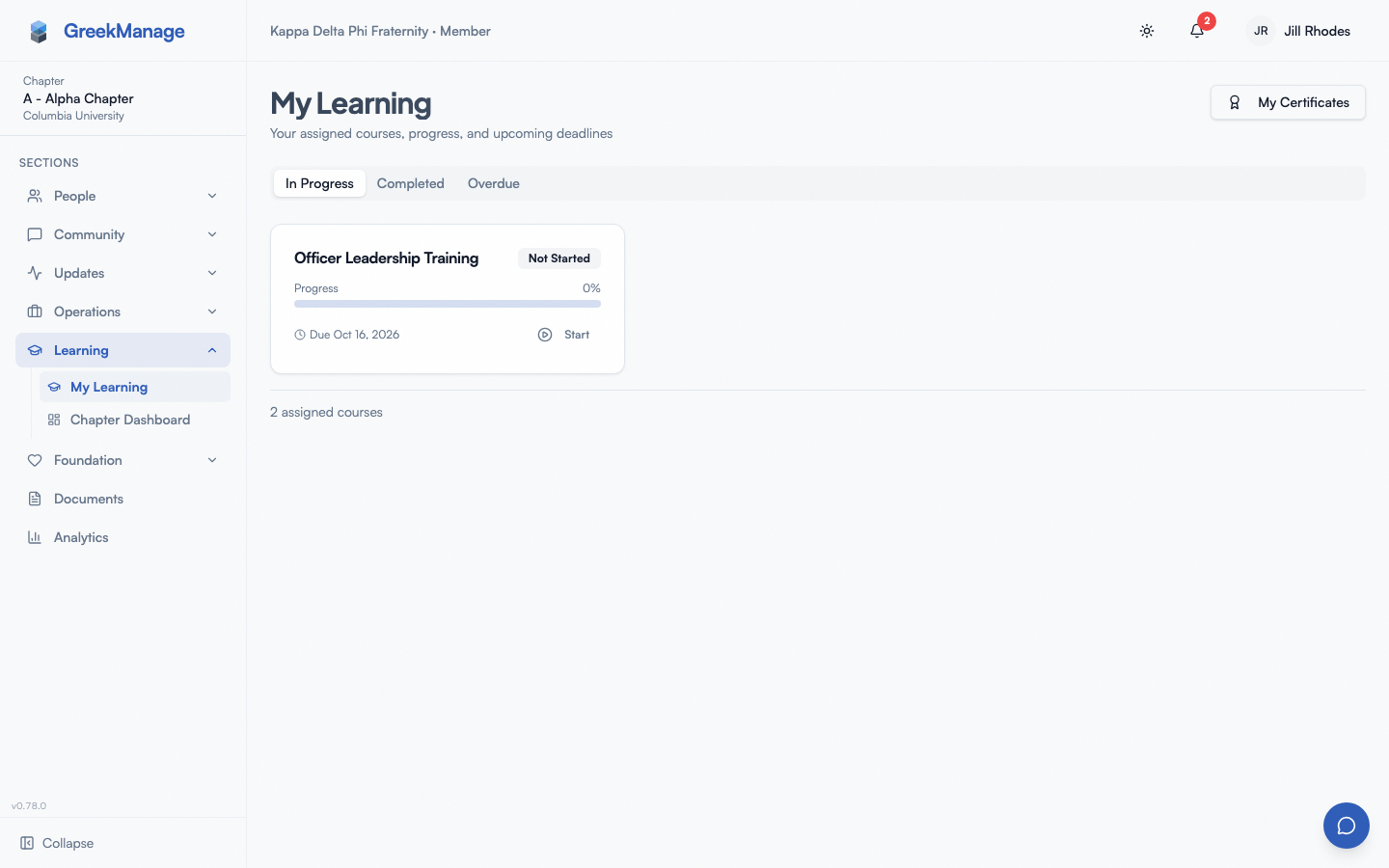 My Learning page with assigned courses and progress bars.
Take a course
- Click an enrollment card.
- The course viewer opens with the module list on the left and the current lesson or quiz on the right.
- Work through lessons in order — your last-viewed lesson is remembered so you can leave and return where you stopped.
- Each lesson is marked complete as you finish it; the progress bar reflects this.
- When you reach a quiz, complete it before moving on (if the quiz is required).
Lesson types
The platform supports five lesson content types. The viewer renders each differently:
| Type | What it is |
|---|---|
| Rich Text | TipTap-formatted text content with headings, lists, links, images, callouts |
| Video | An OEmbed-compatible video URL (YouTube, Vimeo, etc.) rendered inline |
| Document | A PDF or PowerPoint file. PDFs render inline; PowerPoint and Word files are auto-converted to PDF via LibreOffice for inline preview |
| Image | A single image with optional caption |
| External Link | A link that opens in a new tab — useful for off-platform resources or required articles |
Document conversion runs asynchronously. If you hit a Document lesson that says it’s still processing, the conversion status is Pending. Once it flips to Ready, refresh and the inline PDF preview appears.
Quizzes
Quizzes attach either to a course module (end-of-module check) or directly to the course (final exam). The course author configures per-quiz:
- Passing score percent (default 80%).
- Max attempts (default 3 attempts).
- Time limit in minutes (0 = no limit).
- Shuffle questions (off by default).
There are five question types:
| Type | How it’s graded |
|---|---|
| Multiple Choice | One correct option. Full points if you pick it, zero otherwise. |
| True / False | Like multiple choice with two options. |
| Multi-Select | Multiple correct options. Partial credit = (correct selected − wrong selected) / total correct, floored at zero, multiplied by the question’s point value. So picking 2 out of 3 correct with 1 wrong nets you (2 − 1) / 3 ≈ 33% of the points. |
| Short Answer | Exact match (case-insensitive, whitespace-stripped) against any answer in the question’s accepted list. |
| Free Form | Long-form text. Requires manual grading — your answer doesn’t auto-score; an officer or course author grades it later. The attempt’s overall score is computed from the auto-gradable questions until the free-form is graded. |
Your progress is saved automatically as you answer questions. You can navigate forward and backward with the arrow buttons.
Multiple attempts
If the quiz allows it, your final score is the highest of any passed attempt. The max-attempts cap is per quiz, so once you’ve used all your attempts the quiz locks for that enrollment.
An attempt is only started when you ask for one. Finishing a quiz shows your result and nothing else — press Retake quiz to spend another attempt. If you come back to a quiz you have already submitted, the page offers you a retake rather than dropping you straight into a blank one, so you always know which sitting you are on.
Pass / fail
Each quiz has its own passing-score threshold. If the course requires the quiz to progress, you can’t continue past it until you pass. If the quiz is ungraded (used as a check-in), the course unlocks regardless of score.
Earn a certificate
When you complete a course that has a certificate template attached, GreekManage generates a PDF certificate.
- From My Learning, click My Certificates in the top-right.
- The list shows every certificate you’ve earned with course title, date issued, and a Download action.
- Click Download to save the PDF.
Each certificate has a verification link printed on it — anyone with the URL can confirm authenticity. The link maps to a public endpoint that re-verifies the certificate hash on demand.
In v0.62.1 there is no one-click LinkedIn share — the previous docs claim was incorrect. To share to LinkedIn, upload the PDF as a “License & Certification” entry on your LinkedIn profile and paste the verification URL as the credential URL.
Deadlines and reminders
If your enrollment has a due date, the system fires deadline reminders at:
- 7 days before due
- 3 days before due
- 1 day before due
Each reminder is sent once per window, so you don’t get it twice.
If the deadline passes without completion, the platform fires a single Course Overdue notification. After that, the enrollment shows in the Overdue tab and on chapter / org dashboards for officers to see.
What “overdue” actually means
- Your enrollment status is not automatically flipped to a failure state when overdue — it stays whatever it was (Not Started or In Progress).
- Overdue is purely a display state computed from
due_date < now()AND status not in (completed, failed, expired). - You can still open and finish an overdue course. Doing so flips it to Completed and removes it from the Overdue tab.
- Officers and admins see your overdue courses in compliance / completion dashboards. Some orgs use overdue status to trigger compliance flags.
If you transfer chapters
When you transfer to another chapter in your organization:
- Courses you completed come with you. They show on the Completed tab with Completed at chapter before your transfer, and your certificates stay under My Certificates.
- Courses you hadn’t finished stay with your old chapter. If your new chapter requires them, they’re assigned to you there.
- Anything your new chapter requires is due no earlier than 30 days after your transfer, even if it was already due for everyone else.
Re-take a course
If your org re-assigns a course (e.g. annual recertification), it’ll appear again in your enrollment list with a new due date and a fresh set of attempts. Your previous certificate is preserved on the My Certificates list.
Tips
- Use captions when videos include audio — most embedded videos carry the captions from the source platform.
- Don’t leave a quiz half-open. Time-limited quizzes count elapsed wall-clock time, not active time. Switching tabs doesn’t pause the timer.
- Refreshing mid-quiz is safe. Reloading resumes the attempt you already have open; it never spends a new one.
- Mobile works. Courses, quizzes, document viewers, and certificate downloads all run on iOS and Android.
Mobile differences
- Quiz answers save more frequently on mobile to handle network interruptions.
- PDF preview uses the device’s native PDF viewer on iOS (where in-WebView PDF rendering is unreliable in older versions).
- Push notifications for deadline reminders and overdue alerts arrive through the OS notification system.
- Certificate downloads save to the device’s Files app on iOS or the Downloads folder on Android.
- On iOS, the quiz-taker page loads its attempt inline with the enrollment fetch (not a separate request) so spotty connections behind certain corporate proxies don’t drop the start-attempt POST.
What officers see that you don’t
If you’re a chapter officer, the org runs Learning differently for you:
- A chapter dashboard under Learning shows completion rates, overdue counts, and per-member progress for your chapter.
- A grading queue lists free-form answers awaiting manual grading. Officers grade by reading the answer, entering a points value, and optionally adding feedback.
- Officers and admins can re-assign a course to specific members, chapters, or roles.
Regional admins and national admins see the same plus org-wide dashboards.
Errors and edge cases
- “You’ve used your max attempts.” The quiz is locked at the configured attempt cap. Officers can grant a fresh attempt manually if they choose.
- “This course has no required quizzes — completion is automatic.” Some courses are pure content (no quiz). Reading all lessons completes them.
- “Conversion failed.” Document conversion via LibreOffice can fail on corrupted or password-protected files. The author needs to re-upload a clean copy.
- Enrollment shows Failed. You exhausted attempts on a required quiz and didn’t pass. Contact your officer about a manual override or re-enrollment.
Troubleshooting
- My progress bar didn’t move after finishing a lesson. Lessons mark complete on the lesson-complete event; if your network call failed, the lesson stays incomplete. Reload and try again.
- I can’t find my certificate. Confirm the course actually had a certificate template attached — not every course generates one. Click My Certificates to verify.
- The verification URL on my certificate doesn’t load. The URL is public but requires your platform DNS to resolve. If your org has a custom domain, the URL uses that domain — confirm the host is reachable.
- A required course never appeared in my list. Course assignments are processed in the background. Newly-assigned courses can take a moment to show up; refresh after a minute.
Related
- Module: Learning
- Notifications — alerts for assigned, due-soon, and overdue courses
Last verified against v0.62.1 (2026-05-11).