Mentorship & alumni
Stay connected with alumni — search the directory, browse the career board, surface AI-suggested mentors, and (if you're an alumna/alumnus) control how much your record exposes.
New alumnus? Start with the Alumni — getting started walkthrough for setting up your privacy settings, mentor profile, and alumni-only forum access.
Alumni directory
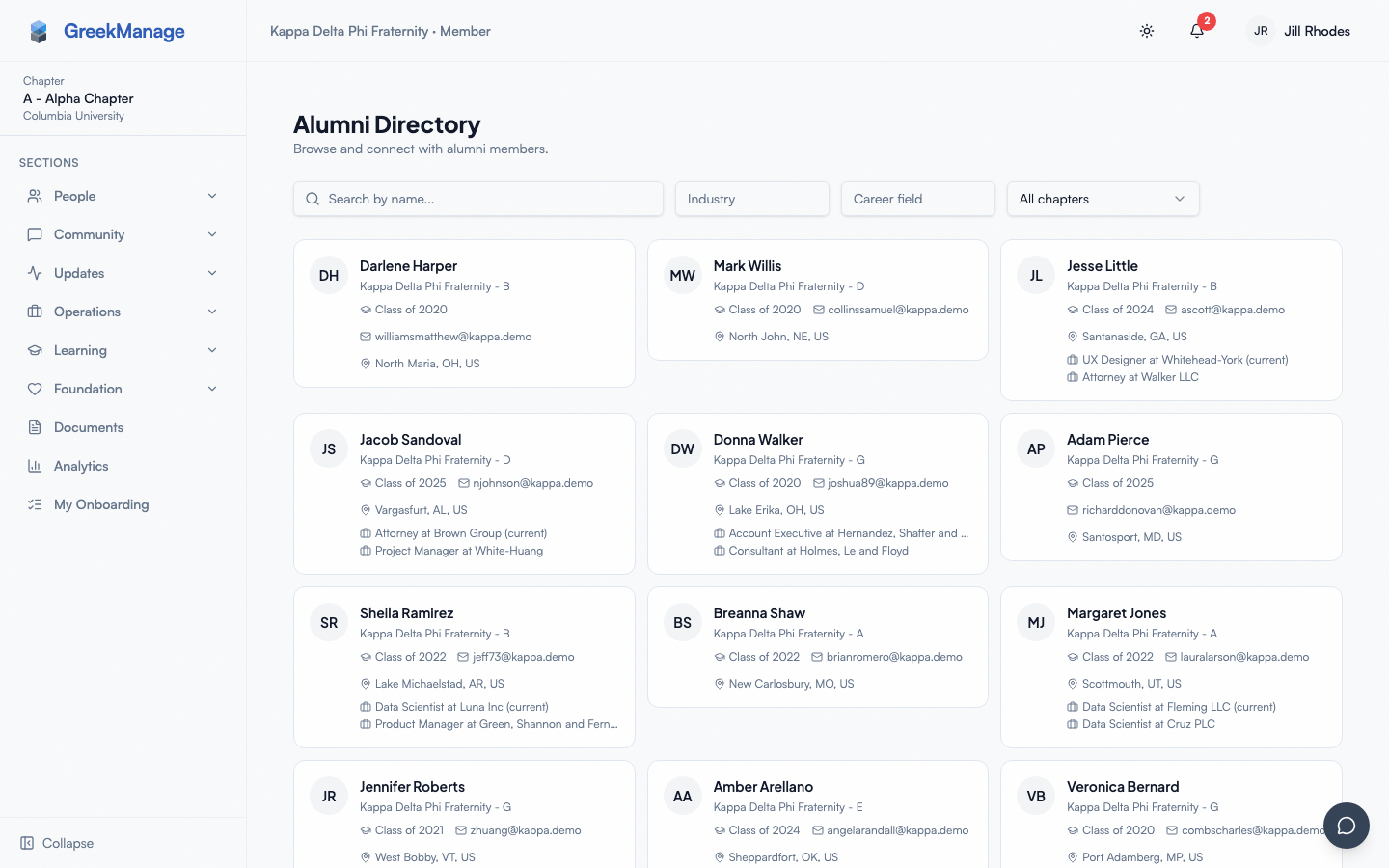
Open the Directory page (People → Directory in your sidebar) and click the Alumni button in the toolbar.
The directory lists alumni across your chapter, region, or org depending on your role. You can:
- Search by name in the top search input.
- Filter by chapter and graduation year range.
- Open a profile to see the fields the alumna/alumnus has chosen to expose.
Each card in the directory shows the alumnus' name, chapter, graduation year, and a small set of public fields. Sensitive fields (email, phone, work history, location) honor each alumnus' privacy preferences — see Alumni privacy below.
 Alumni mentorship browser with mentor cards and topic filters.
Career board
The career board is a posting space for alumni and officers / admins.
- For undergrads: browse postings created by alumni, officers, and admins and express interest in opportunities that interest you.
- For alumni / officers / admins: post jobs, internships, referrals, or networking opportunities for active members.
Each posting includes a type, role, company, optional external URL, location, description, and an expiration date. The card view shows title, company, location, type badge, post date, and total interest count.
Postings expire automatically: a Celery task (expire_career_postings) runs daily at 00:30 and flips expired postings to inactive so they stop appearing on the board.
Posting types
The platform supports exactly four posting types:
| Type | What it is |
|---|---|
| Job | A full-time job opening at the poster's company |
| Internship | A summer or part-time internship role |
| Referral | The poster will refer qualified members for openings at their company |
| Networking | An informational coffee chat, alumni mixer, or open networking invitation |
There is no separate "Mentorship opportunities" posting type — mentorship lives in the Mentors flow. The previous docs claim listing a fifth type was incorrect.
Express interest
To express interest in a posting:
- Open the posting (click the card from the career board).
- Read the description, location, type, and external URL (if provided).
- Scroll to Express Interest at the bottom of the posting card.
- Write an optional short message in the textarea.
- Click I'm Interested.
You'll get a confirmation badge ("You have expressed interest in this posting") in place of the form. The poster sees the count of interested members on their dashboard and can view the list of interested members with each member's optional message.
You can express interest once per posting — duplicate submissions are blocked by a unique constraint on (posting, user).
Post a job (alumni / officers / admins only)
- Open Career Board.
- Click Post Opportunity in the top-right.
- Fill in: title, company, location, type (Job / Internship / Referral / Networking), description, optional external URL, optional expiration date.
- Click Publish.
Org admins can additionally feature a posting — featured postings sort above the rest and get a star badge.
Mentors
Alumni can opt in as mentors by creating a mentor profile. The platform then runs an AI-driven matching service to surface mentors for active members based on overlap in skills, work-history industries, and certifications.
Create a mentor profile (alumni only)
- Open your Mentor profile page.
- Fill in:
- Bio — a short paragraph about your career and what you can help with.
- Industries — a list of industries you've worked in (free-text tags).
- Career fields — career-field tags (e.g. "Software Engineering", "Investment Banking").
- Availability — one of Open, Limited, or Closed.
- Max mentees — the cap on simultaneous active mentees (default 3).
- Save.
The profile shows up in the chapter's Mentors list (People → Mentors) with your bio, industry / career-field chips, availability badge, and mentee cap.
How matches are scored
The matching service computes a 0–1 similarity score between you (mentee) and every active alumni mentor in your org, weighted as:
| Signal | Weight |
|---|---|
| Skill overlap (Jaccard similarity on skill tags) | 0.40 |
| Industry overlap (Jaccard similarity on work-history industries) | 0.30 |
| Certification overlap (Jaccard similarity on cert names) | 0.20 |
| Base score for mentor having any enrichment data at all | 0.10 |
If both you and the mentor have AI embeddings indexed (via the org's AI Services config), a small cosine-similarity bonus from your member embeddings is added as a final smoothing pass.
The service surfaces a human-readable list of match reasons (e.g. "Shared skills: Python, SQL" / "Shared industries: Healthcare") so the suggestion is explainable, not just a number.
The matching service is gated by ai_scope_mentorship on your org's AI configuration. If your org has that scope disabled, the platform falls back to a directory-only experience and you'll need to reach out to mentors manually.
Match states
Each potential match progresses through the workflow:
- Suggested — the system has proposed the match. Visible to the mentee in the Mentors area.
- Requested — the mentee has reached out asking to connect.
- Accepted — the mentor has agreed.
- Declined — the mentor has declined.
A mentee can only have one pending request per mentor at a time (the (mentor, mentee) pair is unique). Declined matches don't auto-resurface; mentees can reach out to a different mentor or wait until status changes.
Alumni privacy
Alumni control what active members can see about them through their Privacy Settings page.
Each sensitive field has four visibility levels:
| Setting | Who can see this field |
|---|---|
| Everyone | Every active member of the org (default for non-sensitive fields like work history / location) |
| Alumni only | Active alumni only (default for email and phone) |
| Officers only | Chapter officers and admins only |
| Hidden | No one (only the alumna/alumnus themselves) |
Per-field controls cover email, phone, work history, and location in v0.62.1. Defaults are sensible (email and phone default to Alumni only; work history and location default to Everyone).
Settings save when you submit the form. The directory respects these settings server-side — fields you've hidden are stripped from API responses, not just hidden in the UI.
Forums for alumni
Forums marked with the is_alumni_forum flag are visible only to members with alumni status. They appear in your normal Engage list once your membership status becomes alumni / active alumni / lifetime alumni. Officers can use these forums for alumni-only conversations without spinning up a separate platform.
Mobile differences
- The directory, career board, and mentor list all collapse to a single column on small screens.
- Express Interest uses a native keyboard for the optional message field — autocorrect can be turned off via standard iOS / Android settings.
- External URLs on postings open in the device's default browser (not in-app webview) so login state is preserved on third-party sites.
- Push notifications for new postings, mentor match suggestions, and interest activity arrive through the OS notification system if push is enabled.
What officers and admins see that you don't
- Org admins can mark / unmark a posting as Featured from the posting detail page — featured postings sort to the top of the career board.
- Officers and admins can see the full list of interested members for postings in their scope (members can only see the count).
- Officers and admins see admin-only fields in the alumni directory if a privacy setting is Officers only.
- National admins can see all postings and mentor matches across the org; regional admins see their region.
Errors and edge cases
- "You have expressed interest in this posting." Duplicate prevention; you can only express interest once per posting. There's no UI for revoking interest in v0.62.1.
- Expired posting. If a posting is past its expiration, you can still open it (the URL works) but the Express Interest form is hidden and the posting is greyed out.
- No mentors visible. If the org has no alumni with active mentor profiles, the Mentors page shows an empty state. Encourage alumni to opt in via their Mentor profile page.
- Match score of 0.1. A mentor with no shared skills / industries / certifications still scores 0.1 because they have some enrichment data. Use this as a signal to expand your skill / work-history fields on your profile so matches surface meaningful overlap.
- Privacy update didn't take. Make sure you submitted the form — there's no "auto-save" on the privacy form; you must click Save / Submit.
Troubleshooting
- A mentor's bio is blank. Mentors set their bio themselves. If you'd like more context, message the mentor through the platform's messaging feature.
- My Express Interest message wasn't sent in time. The platform stores the message on submission. If the posting expired after you typed but before you clicked, the submission is rejected — copy your message and reach out via direct messaging.
- I can't see an alumni record I expected. The alumna/alumnus has set their record to Hidden for the field(s) you're looking for, or has set the entire profile to alumni-only and you're not yet alumni-status.
- My match list is empty. Either your org has
ai_scope_mentorshipdisabled, you have no enrichment data on your profile (no skills / work history / certifications), or no active alumni mentor profiles exist yet.
Related
- Updating your profile — better profile data drives better mentor matches
- Privacy & data
- Module: Alumni
Last verified against v0.65.25 (2026-07-05). Corrected stale "Alumni" top-level sidebar-group references (v0.65.23 redesign): Career Board and Mentors now live under People; Alumni Directory moved from a sidebar item to an Alumni button on the Directory page. Mentor profile and Privacy Settings have no dedicated sidebar entry point in either the old or new nav — reached directly, not via a sidebar breadcrumb.