Notifications & preferences
GreekManage delivers notifications via two channels: in-app (the bell menu and the notification center page) and email. Each event type you can configure has an independent toggle for each channel.
What you see
The bell
The bell icon in the top navigation shows a count badge whenever you have unread notifications. Clicking it opens a panel summarizing the most recent items and gives you a link to the full notification center.
Notification center
Open the notification center from the bell or from the Notifications entry in your sidebar. You’ll see a chronological list grouped by category, with a filter to limit the view to items that require action.
Each row shows the notification’s title, a short message, the time it arrived, and a category badge. Clicking a row marks it read and jumps to its source (a forum thread, an election ballot, an invoice, an alert, and so on).
You can mark a single notification read or use Mark all read to clear the badge.
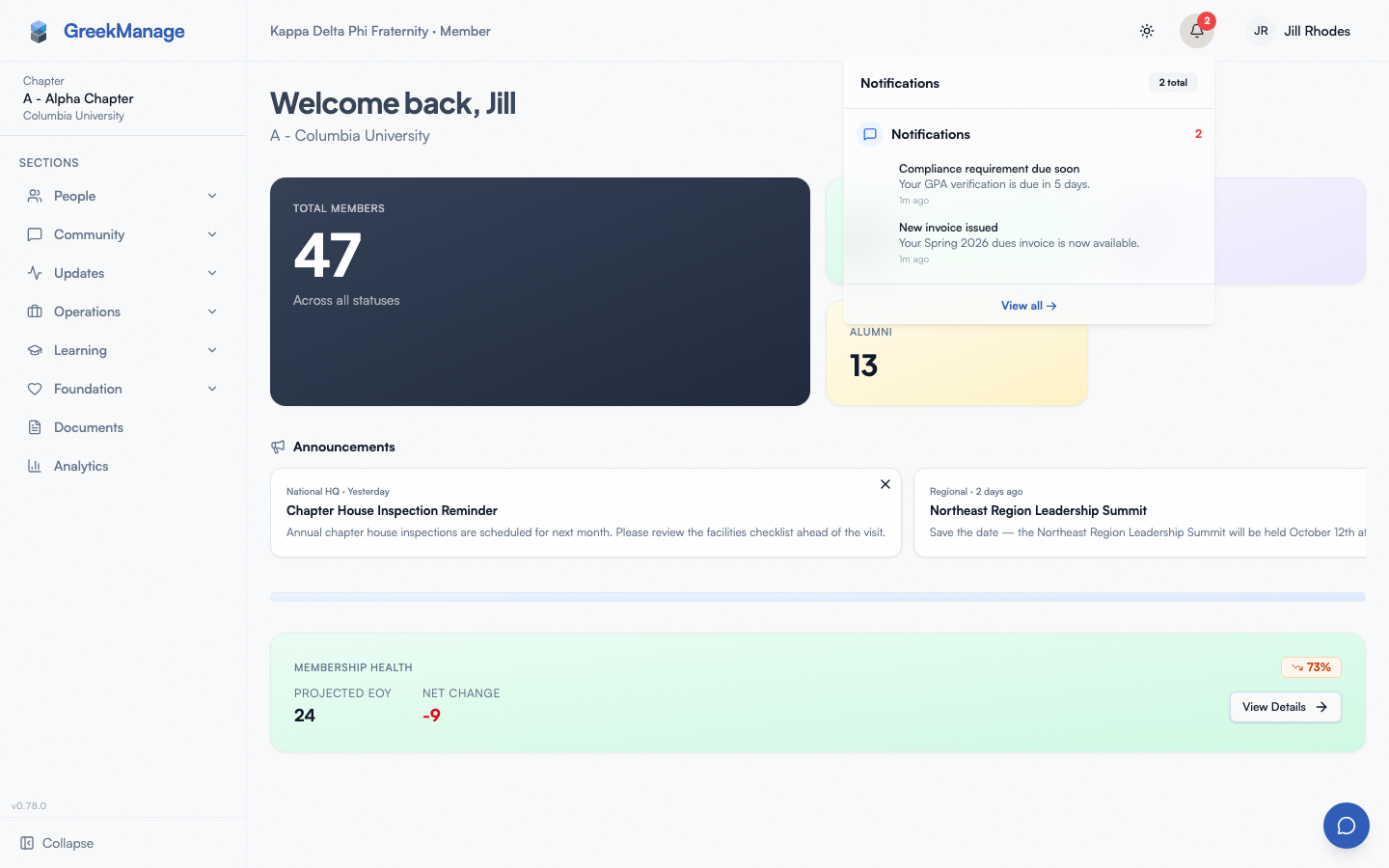 Notification center with the dropdown open from the bell icon.
Notification categories
The system tags each notification with one of these categories, which drive the on-page grouping:
- Forum — replies, new posts in forums you subscribe to, mentions
- Election — election published, voting reminders, results available
- Compliance — requirement deadlines and alerts (typically for officers and admins)
- Billing — invoice issued, invoice overdue, payment received, payment failed. Who hears about a payment depends on who is billed: a member-billed invoice notifies only that member, while a chapter-billed one notifies the chapter’s officers and the organization’s admins (admins see the chapter name and the org-side invoice link; nobody is notified twice).
- Learning — course assigned, deadline approaching, overdue, completed, certificate issued. “Overdue” reaches the member, their chapter’s officers and president, and their org’s admins (admins get one per-course digest rather than one per member); all three share the single
course_overduepreference row. - Recognition — recognition received
- System — platform-generated messages (account requests, PNM name approvals, admin actions on your content)
Step-by-step: change your preferences
- Open Notification Preferences — either from the action menu on the notification center page or from your sidebar’s preferences link.
- You’ll see a three-column matrix: event type, In-App, Email.
- Flip toggles independently per row.
- Click Save Preferences at the bottom.
Event types you can configure
The matrix exposes these seven event types in v0.62.1:
| Event | What it covers |
|---|---|
| Reply to my post | Someone replied to a forum thread you authored |
| Reply to my comment | Someone replied to a comment you authored |
| New post in subscribed forum | A new thread in a forum you’ve subscribed to. Email is off by default — you get it in-app (and as a push on your phone); turn on Email here if you also want one email per post |
| Admin action on my content | A moderation or admin action affecting your post or comment |
| Election published | A new election ballot is open for voting |
| Election voting reminder | Reminder to vote before an election closes |
| Compliance alert | A compliance issue requiring action (typically routed to officers and admins) |
If an event type isn’t in the matrix, GreekManage uses sensible defaults. For example, dues invoices, course assignments, and recognition you receive arrive as in-app notifications by default; you can’t turn those off from the preferences page in this release.
Daily / weekly digest
Open Account Settings → Notification Digest to enable a periodic email digest summarizing recent notifications. You can pick Daily, Weekly, or Off. Until you choose a frequency, no digest is sent and the setting shows Off; opening the page does not turn it on. Each item in the email shows its category and a View details link. Weekly digests are sent on Mondays. The digest is in addition to per-event emails, with one exception: while a digest is on, new forum posts arrive in the digest instead of as separate emails, even if you turned on Email for “New post in subscribed forum”. (If you’ve turned off In-App for new posts, they aren’t in your digest, so you keep getting the individual emails.)
Quiet hours
Open Account Settings → Notifications → Quiet Hours to silence push notifications during a window of your day (e.g., 22:00–07:00). Configure:
- Enabled toggle — flip on to apply the window.
- Start time and End time — 24-hour times. Overnight wrap is supported (start later than end means the window spans midnight).
- Timezone — IANA name (e.g.,
America/Chicago,Europe/London). The window is interpreted in your timezone, not the server’s.
What happens during the window:
- Non-critical push notifications defer to the end of the window. A row is recorded with
scheduled_forset to your wake-up time; a background job re-fires the push at the right moment. - In-app notifications and email are unaffected — they still arrive in real time. Only push (phone OS banner / lock screen) is gated.
Critical-bypass allowlist. A short list of notification types always fires through, even during quiet hours, because they’re security- or money-relevant:
payment_failed— your dues payment didn’t process.invoice_overdue— your invoice is past due.admin_action— a national admin took action on your account (force-disable, reactivate, deletion confirmations).
Everything else respects the window. Admins who want to bypass for “important announcements” can’t — the allowlist is intentionally tight. Send those tomorrow.
Mobile differences
GreekManage’s mobile apps register device push tokens with the backend on sign-in (APNs for iOS, FCM for Android).
To make sure your device is ready for push when the dispatch pipeline ships:
- Allow notifications for the GreekManage app at the OS level.
- Sign in on the device after installing or updating the app — this registers the push token.
- If you uninstall and reinstall, sign out and back in to re-register.
What officers see that you don’t
- Compliance alert lands on officers and admins by default; rank-and-file members usually don’t receive these unless an alert is directly tied to a record they own.
- PNM name approval events, account request submitted / approved / rejected events, and admin action notifications are routed to admins based on the role that owns the workflow.
- Officers can configure forum subscription notifications for any forum they have access to; non-members of a forum simply won’t be subscribed.
Errors and edge cases
- “No notifications yet.” — Either you’re new to the platform or your preferences are all off. Toggle a few on and wait for activity.
- A notification jumps to a 404 page. The underlying resource (a forum thread, an event, an invoice) was deleted after the notification was created. The notification itself still exists; just the target is gone.
- Email isn’t arriving. Check spam, then confirm the email channel is enabled for that event type. If email is on but nothing arrives, your org’s outbound email may not be configured — contact a national admin.
- Bell count is stale. Refresh the page; the count syncs on page load and on each notification interaction.
Related
- Mobile app
- Engage forums — most of the configurable events come from forum activity
- Account security
Last verified against v0.63.39 (2026-06-26). Push notifications shipped; quiet hours v0.63.38.