Recognition
Recognition is GreekManage's built-in shout-out feature. Officers and admins give recognitions to members for milestones, contributions, or appreciation; the rest of the chapter sees them on the feed.
Where to find Recognition
In your sidebar: Community → Recognition.
The Recognition page shows a vertical feed of the most recent recognitions in your scope:
- A chapter member sees their chapter's recognitions.
- A regional admin sees recognitions across chapters in their region.
- A national admin sees recognitions across the whole org.
Each card shows:
- The category icon (emoji) and category name as a small pill.
- The recipient's name in bold.
- The message the giver wrote.
- A footer with the giver's name and the date the recognition was given.
A trash icon appears in the top-right of the card if you have permission to delete it.
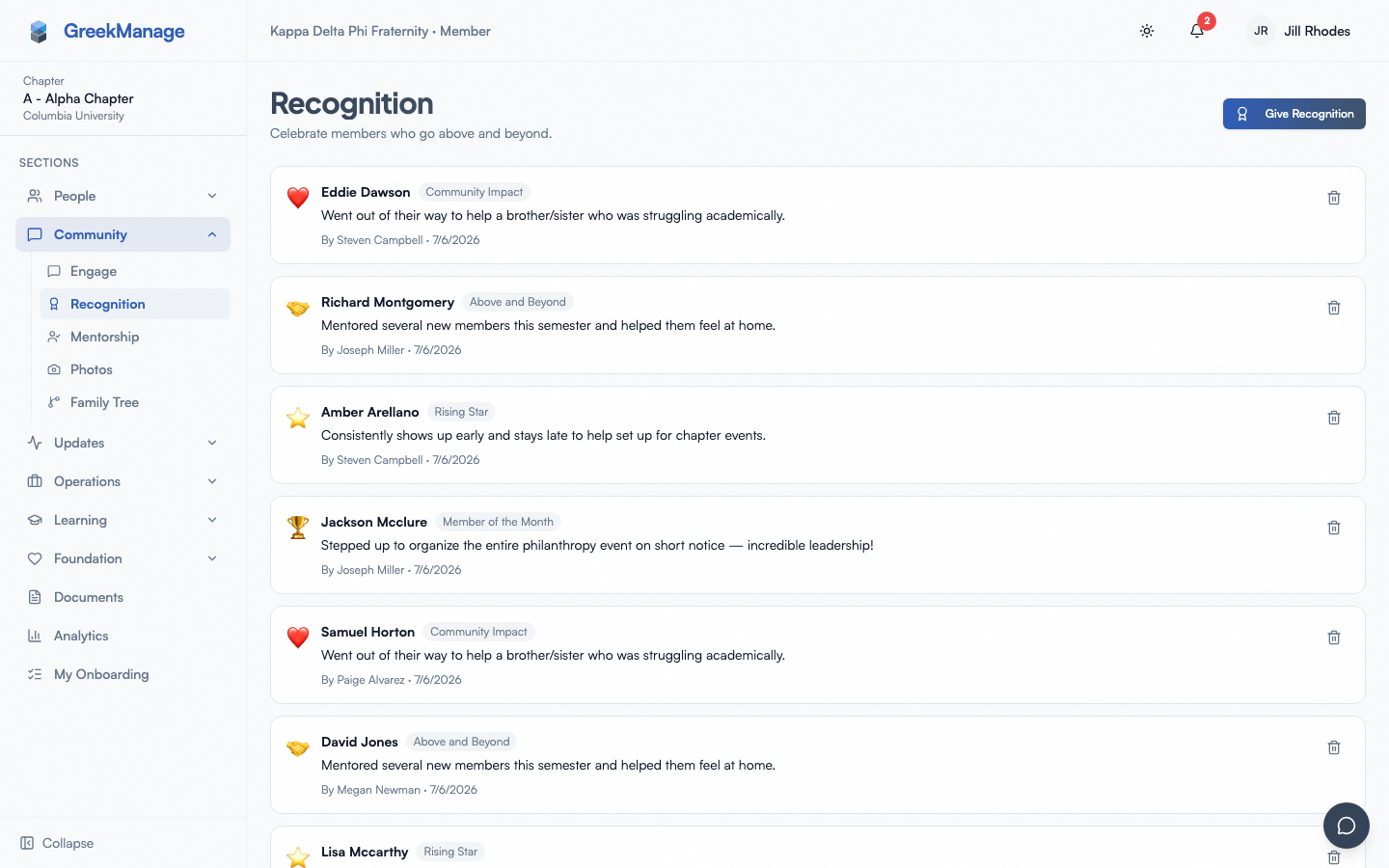 Recognition wall with recent shoutouts and categories.
Recognition wall vs feed
There are two surfaces for recognitions:
- Recognition feed — the dedicated Recognition page. Full cards, full messages, most recent first.
- Recognition wall — a compact card that appears in other places (member profile, dashboard widgets). Shows the icon, category name, a two-line message preview, and the date. Limited to a small number of items by default. Always renders the public, non-deleted recognitions for the relevant scope.
A member's profile shows a recognition wall scoped to recognitions that member has received.
Who can give a recognition
In v0.62.1, chapter officers, presidents, regional admins, and national admins can give recognition. Regular chapter members cannot give recognitions from the UI.
If you're a member and you'd like to see someone recognized, message a chapter officer and ask them to post one.
Give a recognition (officers / admins)
- Open Community → Recognition.
- Click Give Recognition in the top-right (visible only if you have write access).
- Recipient — type at least two characters to search org members by name or email. The dropdown shows matches with name and email. Click a result to select.
- Category — pick from the org's active categories (optional). The dropdown shows the emoji icon next to each name.
- Message — write a few sentences describing what the recipient did. Be specific.
- Click Give Recognition to submit.
The recipient gets a notification immediately, and the recognition appears in the feed.
In v0.62.1 every recognition is:
- Single-recipient — one member per submission. There is no multi-recipient picker.
- Public — recognitions appear on the feed. There is no public-vs-direct toggle in the UI; the backend always stores
is_public = true. - Text-only — no photo attachment, no embedded media, no rich-text formatting.
- Without reactions — there's no like, heart, or comment thread on a recognition card.
Categories
Categories are configured by your org admin in the Recognition settings. Each category has:
- An emoji icon (defaults to a trophy if blank).
- A name (unique per org).
- An optional description.
- An active / inactive state (inactive categories are hidden from the create dialog but stay attached to historical recognitions).
- A display order number that controls the order in the dropdown.
Common examples your org might configure:
- Above & Beyond — exceptional contribution
- Sisterhood / Brotherhood — community spirit
- Service — philanthropy or volunteering
- Academic — grades, research, presentations
- Leadership — running an event, chairing a committee
Picking a category is optional — if you skip it, the card displays a generic trophy icon and the label "Recognition".
Managing categories (org admins only)
Org admins manage categories from Settings → Recognition categories. They can add, edit, deactivate, and reorder categories. Officers and members cannot create their own categories.
View someone's recognitions
Open any member's profile. The Recognition wall section shows the public recognitions they've received, newest first. The list is capped to the most recent few in the wall component.
If the member has more recognitions than the wall shows, a "See all →" link appears below the wall. Click it to open a full-list page scoped to that member's recognitions, ordered newest-first. The link text adapts based on the surface — on dashboards it reads "View recognition wall →" instead. Dedicated full-list pages live at /chapter/recognition, /org/recognition, and /region/recognition for the broader feeds.
Delete a recognition
The trash icon in the top-right of a recognition card is visible to:
- The user who gave the recognition (giver).
- An org admin for the org that owns the recognition.
Deleting soft-deletes the record (sets deleted_at). Soft-deleted recognitions disappear from feeds, member walls, and recipient notifications. They're not erased from storage immediately, but they aren't recoverable from the UI.
Note: chapter officers can give recognitions but cannot delete recognitions they didn't give themselves. Only the giver or an org admin can.
Mobile differences
The Recognition feed renders identically on web and mobile — same cards, same staggered animation on load. The Give Recognition dialog is a full-screen sheet on small screens, with the same fields. The member search dropdown adapts to use a native scroll list rather than a popover anchor.
What officers and admins see that members don't
- Give Recognition button in the top-right (officers, regional admins, org admins).
- Trash icons on recognitions they gave (any giver) — and on all recognitions in the scope, for org admins.
- Org admins also see a Manage categories link inside the org Settings page.
There's no "pin to top" or "feature recognition" capability in v0.62.1. The feed is strictly chronological.
Errors and edge cases
- "Please select a recipient." You typed in the search box but didn't click a result. Click a row to commit the selection.
- "Please write a message." Empty messages are blocked client-side.
- "Only the giver or an admin can delete this recognition." A chapter officer who didn't give the recognition can't remove it.
- Recipient has left the org. If you give a recognition to someone whose membership becomes inactive later, the card stays on the feed — the recipient name is stored at write time. Removing the membership doesn't remove past recognitions.
Troubleshooting
- The Give Recognition button isn't visible. You're signed in as a regular member, not an officer. Ask an officer to post on your behalf.
- Search shows "No members found." The search requires at least two characters, runs on a 300 ms debounce, and is scoped to active members of your org. If you expect a name and don't see it, check that the member's status is active.
- The category dropdown is empty. Either your org has no active categories yet, or all categories are marked inactive. Org admins can fix this in Settings.
- My recognition didn't trigger a notification. Check Notifications → Preferences — recognition notifications can be muted per-recipient.
Related
- Updating your profile
- Engage forums
- Notifications — control recognition notifications
Last verified against v0.63.39 (2026-06-26). See-all link + dedicated full-list pages v0.63.21; admin-side drag-reorder of categories v0.63.28.