Proposing Big-Little relationships
Members can propose their own Big-Little pairings, but officers do it more often — adding pledges who aren’t using the app yet, recording crossings retroactively, and stitching the family tree back together after a long-dormant chapter comes back online. This page covers the officer-side proposal flow, who can be a Big, and how the approval chain reviews what you submit.
Big/little assignments run on the shared approval-chain engine: a national admin configures, per organization, which tiers must approve — chapter, regional, national — and every proposal walks that chain one tier at a time. See Approval chains for the configuration side.
This is distinct from the member-add request — that flow brings a new person onto the platform. Big-Little proposing operates on people who are already members; you are recording a lineage relationship between two existing memberships.
What you see
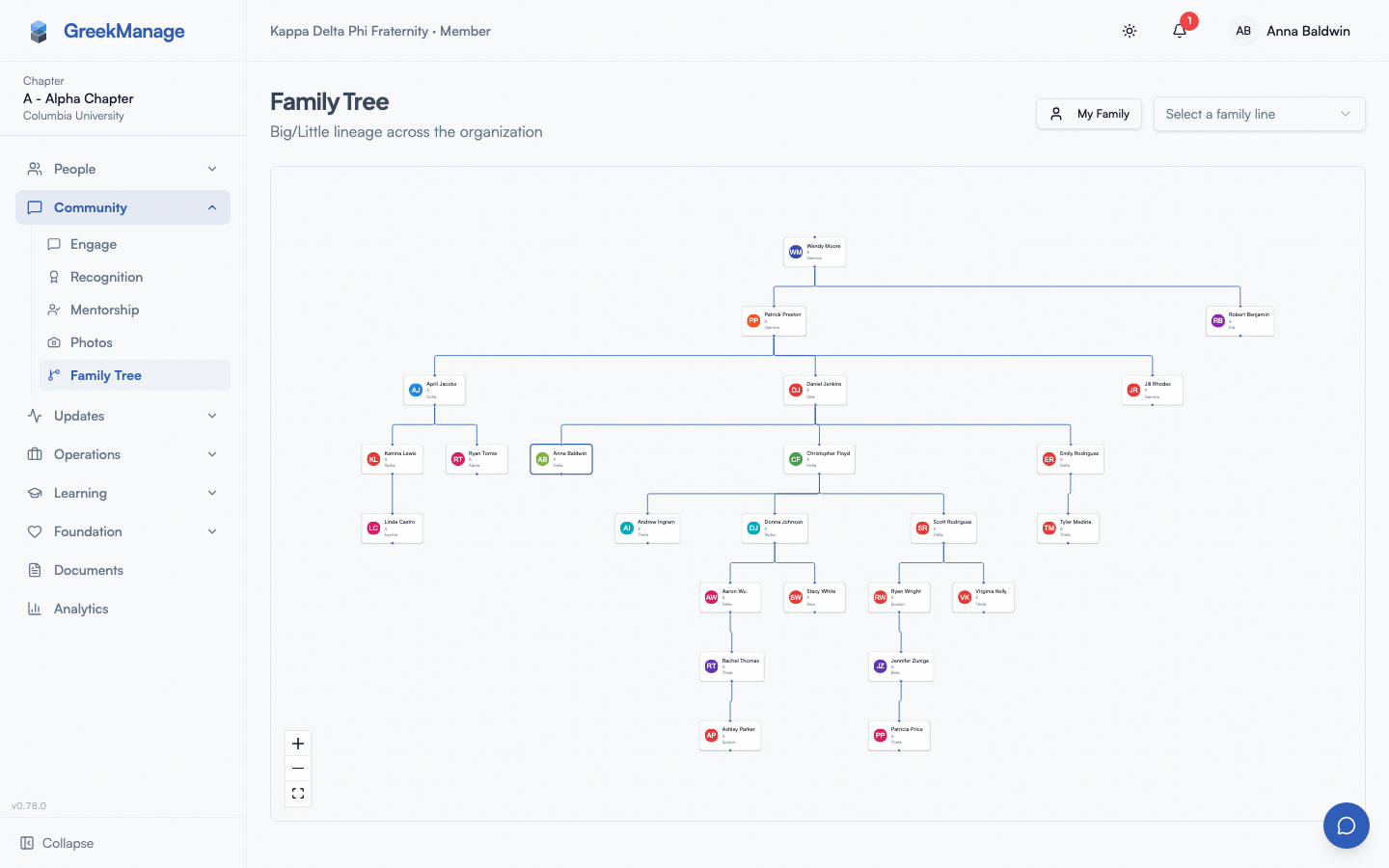
The proposal entry point lives on the Family tree page. From your sidebar: Family Tree (or under the Members group, depending on your sidebar layout). The page renders an interactive tree visualization of every recorded Big-Little relationship in your organization, with member cards as nodes.
To propose a new pairing, you typically:
- Open the proposed Little’s member detail page (or open Family Tree and click on their node).
- Click Propose Big (or a similarly labeled action — exact wording depends on your build).
- A form opens asking for the proposed Big (a typeahead member search across your org), an optional justification text, and a confirmation step.
The form behaves slightly differently depending on who you are and who you are proposing for:
- Proposing for yourself. The form pre-fills you as the Little; you only pick a proposed Big.
- Proposing on behalf of another member. The form lets you pick both the Little and the Big. Only officers and admins see this two-field version — regular members can only propose for themselves.
 Family tree page with the Propose Big dialog open and a member typeahead.
Who can be a Big
The system enforces a few rules at submission time. A proposed Big must:
- Be a member of the same organization as the Little. Cross-org pairings are blocked by the API.
- Be different from the Little. The system rejects “make me my own big” with a clear error.
- Not already be a descendant of the Little in the family tree. If your proposed Big is somewhere in the Little’s subtree (their little, their little’s little, and so on), accepting the pairing would create a cycle, and the system refuses with “This would create a cycle in the family tree.”
A proposed Big does not have to be in your specific chapter — cross-chapter pairings are allowed as long as both members belong to the same org. They also do not have to have an Active membership status; an Inactive or Alumni Big is permitted (which is common when you are recording historical lineage).
There is no minimum length of membership, no requirement that the Big has crossed before the Little crossed, and no class-year check — those are policy concerns your chapter handles outside the platform.
Step-by-step: proposing on behalf of a member
- Open the proposed Little’s member detail page.
- Click Propose Big in their profile sidebar.
- In the form, use the typeahead to find the proposed Big. Start typing the name; the dropdown shows matching members in your org.
- (Optional) Enter a justification — useful context for the reviewer at the next tier (“Replacing a crossed-out relationship; original Big graduated 2024” works well).
- Submit.
What happens next is decided by your organization’s chain.
Your submission pre-satisfies the tiers you hold
When you submit — for yourself or on behalf of another member — the tiers you hold count as already reviewed. An officer submitting means chapter review has effectively happened, so the request enters at the next tier the chain requires: regional, or national if your chapter has no region or your organization does not use the regional tier.
This is the recorded version of the old “escalate one tier above the requester” rule. The tier is now marked satisfied rather than jumped over, so the request’s status and its chain always agree about who has to act, and the queue that names a tier is a queue somebody can actually action.
Pairs that cross chapters and regions
A Big and a Little can be in different chapters, and different regions. Either side can review: the chapter tier is held by an officer of either chapter, and the regional tier by an admin of either region. Which tiers apply comes from the Little’s chapter — they are the person the relationship is recorded on — so a Little in a chapter with no region has no regional tier even if the Big does.
For more detail on what each tier does, see The approvals queue.
What the proposed parties see
When you submit a request, notifications fire to the affected members and to the tier that has to act:
- The Little (the member the request is for) receives an in-app notification — “Big/Little Request Submitted: Your request to set [Big] as your big has been submitted for review.” The target URL points to their My Approvals page where they can see the request and its current status.
- The proposed Big does not receive a notification at submission — only when the request is approved. At approval time, both the Little and the Big are notified.
- Everyone holding the tier the request is now waiting on is notified that it is their turn — across both parties’ chapters for a cross-chapter pair. This half did not exist before the approval-chain rework: a request notified only the member it was about, so no reviewer was ever told anything was waiting.
A pending request also surfaces on the Little’s member detail page so subsequent reviewers see context. You will also see your own pending requests on your member surfaces (if you propose for yourself, the request shows up in your My Approvals).
What admins see that you don’t
National admins see every pending Big-Little request across every chapter in the org, regardless of tier — but they act at the national tier only. Approving at the chapter or regional tier is refused; a national admin who wants a lower tier skipped has to record that decision, with a reason, rather than absorb it into a click.
Regional admins see Big-Little requests for chapters in their region, and act at the regional tier.
Officers see their own chapter’s queue and act at the chapter tier — including on a cross-chapter pair where only the other party sits in your chapter.
Errors and edge cases
- “A pending big/little request already exists for this member.” A member can have only one open request at a time. The previous one has to be approved or rejected before a new one can be submitted. If you are stuck, find the existing request in the approvals queue and resolve it first.
- “This would create a cycle in the family tree.” The proposed Big is already a descendant of the Little. The cycle check runs both at submission and again at approval, so a stale page won’t slip through. Pick a different Big who isn’t in the Little’s subtree.
- “Only officers or admins can assign big on behalf of a member.” A regular member tried to propose a pairing for somebody else. Only officers, regional admins, and org admins can do this — and you can do it for any member in your org.
- “Member is not in this organization.” / “Proposed big is not in this organization.” Cross-org pairings are blocked. Both parties must belong to the same org.
- “A member cannot be their own big.” Self-explanatory — and yes, the system enforces it.
- “You do not have permission to review this request at its current tier.” This appears on the review side, not the proposal side. The request is waiting on a tier you do not hold. Each tier is actioned by somebody who holds it — including national admins, who get this too.
- “You cannot approve your own request.” Even if you have role permission at the request’s current tier, the requester is never allowed to approve their own request. This is why officer self-requests escalate.
Mobile differences
The Family Tree visualization is interactive on tablet and degrades gracefully on phones (the tree can be panned and zoomed; for very large trees, a list view may be more practical on a small screen). The propose-Big dialog opens as a full-screen modal on phones. The member typeahead works the same way as on desktop, with on-the-fly results as you type. Notifications about new requests come through the in-app bell and (if push is enabled) via native push.
Troubleshooting
- The typeahead is empty for a member I know exists. Confirm they have an active or alumni-status membership in your org. Members with the PNM status are not eligible Bigs (they have not crossed yet) and won’t appear. Members in the Inactive status may also be filtered depending on your org’s directory configuration.
- I proposed a pairing on behalf of a pledge and the family tree didn’t update. Expected: on-behalf-of proposals are no longer auto-approved. The relationship is written only when the whole chain completes. Find the request on the approvals queue and see which tier it is waiting on.
- My self-request never reached the chapter tier. Correct — the tiers you hold as an officer are pre-satisfied at submission. Your request is at
pending_regional(orpending_orgif your chapter has no region). Ask your regional admin to review it. - A request shows as Approved on the queue but the family tree still shows the old Big. Hard-refresh the tree page. The relationship is set on save; the visualization caches for a few seconds.
- You want to undo an approved pairing. Officers cannot reverse an approval through the proposal flow. Ask your org admin — they can edit the
bigfield directly on the member’s profile.
Related
- The approvals queue — review Big-Little requests for your chapter
- Family tree (member view) — where members propose their own pairings
- Managing members — the separate flow for adding new people to the platform
- Permissions matrix — every Big-Little action listed by role
Last verified against v0.62.1 (2026-05-11). Approval-chain behaviour re-verified 2026-09-12.