Compliance submissions
Compliance is how chapters report against national-organization requirements — bylaws filings, safety attestations, financial reports, intake paperwork, attendance counts, and anything else the national org tracks at the chapter level. The compliance flow is the single most important officer-only review surface in v0.62.1. Officers (and members) submit; officers review at the chapter tier; regional and national admins handle higher tiers.
This is the page where the chapter officer role earns its keep. Most other officer surfaces are convenience (events, attendance, profile edits). Compliance review is the one place where a regular-member submission cannot move forward without officer action, and where officer-submitted compliance bypasses the chapter tier entirely.
Opening Compliance
In your sidebar: Operations → Compliance. You see a chapter-scoped dashboard with the requirements assigned to your chapter and their current status. The header shows the active compliance period (typically a semester) and the close date; the body lists each requirement with its category, due date, tier, and current status.
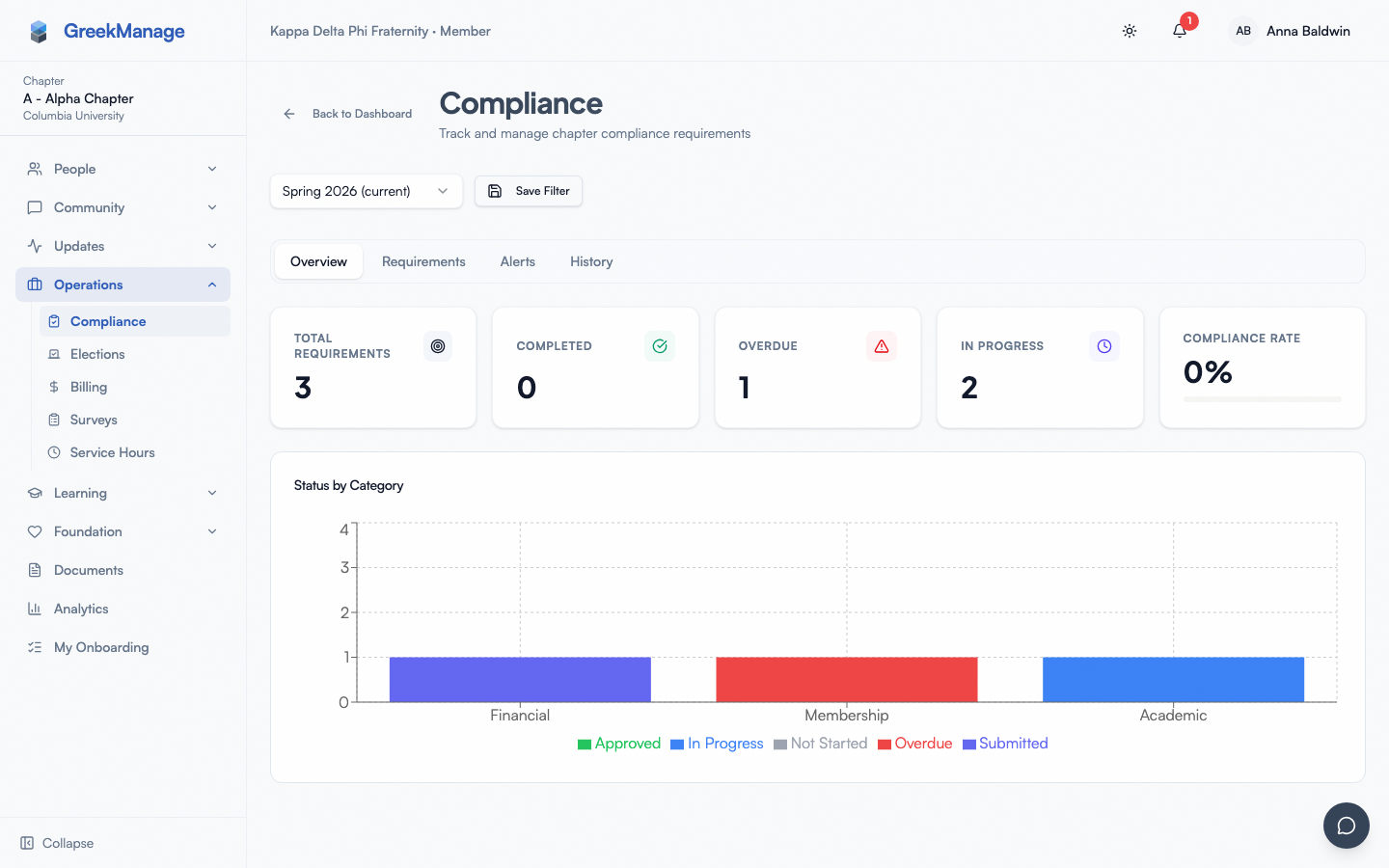 chapter compliance dashboard with requirement list and status badges
Each requirement card shows:
- Title and category (Administrative, Financial, Membership, Safety, Academic, PNM Intake, PNM Name Assignment, Other).
- Frequency (One Time, Monthly, Quarterly, Semesterly, Annually) — drives when the requirement recurs.
- Tracking type (Submission, Count, Numeric) — drives what you submit.
- Priority (Low, Medium, High, Critical) — set at the requirement level by the national admin.
- Status — one of
not_started,in_progress,submitted,pending_chapter,pending_regional,pending_org,approved,rejected,overdue,exempt. - Due date — the date this requirement must be in
approvedfor the chapter to be in good standing.
Multi-tier visibility — see all tiers, act only at chapter
Officers can see what's happening at every tier — chapter, regional, and org — for any requirement in their chapter's queue. The submission history shows:
- The chapter-tier reviewer, review timestamp, and review notes (often you).
- The regional-tier reviewer, review timestamp, and review notes (a regional admin).
- The org-tier reviewer, review timestamp, and review notes (a national admin).
You can act only at the chapter tier. Once a submission advances past pending_chapter, the Approve and Reject controls disappear from your view — the request now belongs to the regional admin (or national admin if there's no region).
This visibility is intentional. When you submit a requirement on behalf of the chapter and a regional admin rejects it, you want to read their notes immediately — they're embedded in the submission timeline on your dashboard, not buried in an email.
Submitting a compliance requirement
Officers (and members) submit by clicking into the requirement and filling in the form. Officer-submitted compliance bypasses the chapter-tier review entirely.
- Click into a requirement to read what it asks for (the description and any attached form schema).
- Click Submit.
- Depending on the requirement's tracking type and submission type, you fill in:
- Form fields — if the requirement has a structured
form_schema, you fill in the named fields. Otherwise it's a free-text notes field. - Attachments — upload supporting documents (see the file handling section below).
- Numeric value — if the requirement is numeric (e.g., "Hours of community service"), enter the current chapter total. The system advances the status automatically once the total reaches the target.
- Event details — if the submission type is event-based, enter the event title, date, and attendee list.
- Form fields — if the requirement has a structured
- Click Submit.
Officer-submitted vs member-submitted — different starting tiers
The submission's destination tier depends on who you are:
| Submitter | Initial status of the submission |
|---|---|
| Chapter officer or president | pending_regional (if the chapter has a region) or pending_org |
| Regular member (non-officer) | pending_chapter — waits for officer review |
| National admin | pending_org (approving as org admin auto-finalizes) |
So an officer-submitted requirement skips chapter review entirely. The reasoning is straightforward: an officer is already at the tier doing the review, so reviewing your own submission would be circular. By having your submission go straight to the regional or org tier, the chapter gets an external check without a redundant self-approval step.
A member-submitted requirement, by contrast, lands in pending_chapter and waits for you (or another officer in the chapter, or a national admin) to approve or reject at the chapter tier.
Tracking types — what changes per type
Three tracking types exist, and each one changes the submission form slightly:
- Submission — the most common. The requirement asks for a one-time submission (a document, a form, an attestation). Submit once; on approval the requirement is satisfied for the period.
- Count — the requirement asks for a count of recurring events. Each submission represents one "event" (a meeting, a safety drill, a philanthropy event). The chapter's count increments per submission; the national admin configures the target.
- Numeric — the requirement tracks a running total (community-service hours, GPA, fundraising dollars). You enter the current chapter total on the requirement record. When the total reaches the target_value, the status auto-advances to
submittedand waits for review. If the total drops below the target later in the period, the status falls back toin_progress.
You can tell which tracking type a requirement uses from the requirement card — it's shown alongside the category.
Reviewing a member submission at the chapter tier
When a non-officer member submits a requirement, it lands in pending_chapter. You review it:
- Open the requirement (the row will be badged
pending_chapter). - Click into the submission to expand the details.
- Read:
- The member's submission body (notes, form data, event details).
- Every attachment — click each to download or open inline.
- Any prior submission history if this is a resubmit.
- Decide:
- Approve to advance the submission. It moves to
pending_regionalif your chapter has a region, orpending_orgif not. - Reject with notes. The submission moves to
rejectedand the member receives a notification with your notes.
- Approve to advance the submission. It moves to
The Approve and Reject buttons only render when the submission is currently at pending_chapter and you have officer (or higher) authority on the chapter. After you act, the controls disappear from your view because the submission has advanced past your tier.
Notes are visible to the chapter and the next reviewer
When you approve at the chapter tier, your notes are stored as chapter_review_notes and shown to the regional reviewer who picks the submission up next. The regional reviewer sees "Approved by [you] at chapter tier with notes: [your notes]." This means future reviewers know what you confirmed, which speeds up their decision.
When you reject at the chapter tier, your notes are shown to the original submitter so they know what to fix. The submission status flips to rejected and the requirement returns to the chapter's open queue for resubmission.
National admins can override at chapter tier
A national admin can also act at the chapter tier — when they do, the submission auto-escalates through every remaining tier in one step. This is by design: a national admin approving at chapter is functionally the same as approving at every tier above it, so the system collapses the steps. Officers cannot do this; chapter-tier approval by an officer advances exactly one tier.
What chapter members see while their submission is pending chapter review
When a non-officer chapter member submits a requirement, here's what they see on their side:
- Their submission appears under the requirement with the status badge
pending_chapter. - The submission body, attachments, and timestamp are visible to them.
- A "Waiting for chapter officer review" note tells them what tier they're stuck at.
- They get a notification when you approve (advancing to regional/org) or reject (with your notes).
- They cannot withdraw or edit the submission once submitted — to change it, they have to wait for rejection and then submit a corrected version.
If your chapter has multiple officers, any of you can review. Whichever officer clicks first records the action; the others see the result. There is no claim or assign workflow.
File handling — what you can upload and what gets rejected
Submission attachments live on the SubmissionAttachment model. The constraints are:
- Maximum file size: 25 MB per file. Files over the cap are rejected with "File size exceeds 25 MB limit." If you have a large PDF, compress it or split into multiple files.
- Allowed MIME types: JPEG, PNG, GIF, WebP, PDF, Word (.docx, .doc), Excel (.xlsx, .xls), PowerPoint (.pptx), plain text, CSV, and ZIP. Anything else (e.g., video, audio, executable) is rejected.
- Magic-byte validation runs on every upload — the system reads the file's actual bytes, not just the file extension, and rejects mismatches. Renaming a
.exeto.pdfwill not get it past validation. - No file count limit. You can attach multiple files to a single submission. Each one is uploaded separately and validated separately.
The file is stored in the chapter's configured object storage (per-org S3 / MinIO bucket or platform-default storage). Downloads route through an authenticated proxy so the storage URLs themselves are not public — only signed-in members of the chapter (and higher tiers) can fetch the file.
Downloading attachments
When reviewing, click any attachment to download or open inline. PDFs and images open in a new tab; Word and Excel files download. The download is authenticated — if your session expires mid-review, you'll get a 401 and need to refresh.
Resubmit after a rejection workflow
When a submission is rejected at any tier, the chapter can resubmit. The flow is:
- The rejecting reviewer's notes appear on the requirement and the original submitter receives a notification.
- The requirement's status returns to a re-submittable state (typically
in_progressorrejected, depending on tracking type). - Click Submit again to enter the corrected version. The form is the same as the original.
- The submission re-enters the workflow from the chapter tier (if the resubmitter is a regular member) or from regional/org (if the resubmitter is an officer).
Resubmissions are independent records — the prior rejection stays in the submission history so reviewers can see what was changed and why. Don't delete the rejected attempt; the audit trail benefits from having both.
Resubmission counts per cycle
There is no hard cap on resubmissions in v0.62.1. Practically, most chapters get to approval in one or two cycles; if a requirement is rejected three or more times, that's a signal to talk to the reviewer offline rather than spinning through more cycles.
Tracking status across the lifecycle
Each compliance status row carries a rich history:
- The current tier (
pending_chapter/pending_regional/pending_org/approved/rejected/overdue/exempt). - Who reviewed at each tier (chapter, regional, org reviewer fields).
- The review notes at each tier (chapter, regional, org).
- Timestamps for submission and every review action.
- The current numeric value (for numeric tracking) and the effective target (which may differ from the requirement default if your chapter has an override).
Use the timeline to follow up if something is sitting at a tier too long — a polite "hey, just checking in on the safety attestation we submitted last week" to your regional admin moves things along.
Deadlines and compliance periods
Compliance periods bound the submission window. Each period has:
- Compliance open date — submissions cannot be filed before this date.
- Compliance close date — submissions cannot be filed after this date.
- A status (
open,closed).
When a period is closed, the API rejects new submissions with a 403 and the message "This compliance period is closed. No further submissions are accepted." The dashboard shows the upcoming close date prominently. Once a period closes, the requirements in it freeze at whatever status they had on close.
Officers cannot open or close periods. If you need a period reopened (e.g., for an extraordinary circumstance), ask your national admin.
Chapter overrides
National admins can configure per-chapter overrides on count and numeric tracking — for example, lowering the community-service hours target for a smaller chapter, or raising the meeting-count target for a chapter on probation. The override is invisible to officers (you just see a different effective target on the requirement card). If a target doesn't match what you expected, ask your national admin whether an override is in place.
What officers cannot do
To be explicit about the boundaries:
- Create or edit requirements or templates — national admin only.
- Approve at the regional or org tier — gated to regional and national admins respectively.
- Create an override for your chapter — national admin only.
- Open or close compliance periods — national admin only.
- Export compliance data for the org — national admin only. (You can see your chapter's data in the dashboard.)
- Configure auto-moderation, alerts, or notification settings for the compliance program — national admin only.
Mobile differences
Compliance review works on mobile but is materially better on tablet or desktop.
- The dashboard renders well on phone — requirement cards stack vertically with status badges visible.
- Submitting a numeric or count value works fine on phone.
- Submitting attachments uses the native file picker — pictures from your camera roll, PDFs from Files, and Office documents from Drive/iCloud all work. The 25 MB cap applies the same.
- Reviewing a submission with multiple attachments is awkward on phone — each download is a separate native action. Tablet/desktop with multiple browser tabs is the better setup for review-heavy days.
- Notifications about approvals and rejections come through the notification bell and (if push is enabled) native push.
What admins see that you don't
The admin tiers above you have more on this page:
- Regional admins see the regional submission queue across every chapter in their region. They review at the regional tier, which means approving advances to
pending_organd rejecting flips torejected. They have read-only access to chapter-tier history but cannot act there. - National admins see the org-wide submission queue across every chapter. They can review at any tier — chapter, regional, or org — and approval at a lower tier auto-escalates. They also see the org-wide compliance dashboard with chapter-by-chapter completion rates, the requirements and templates pages (create / edit / delete), the compliance periods page (open / close), the requirement overrides page, the alerts list, and the export page.
- Platform admins see the same as a national admin but across every org; they only intervene for support.
The view differences matter when you're trying to triage a problem. If a submission is sitting at pending_org and you want to know who's looking at it, the national admin's queue knows; your queue just shows the status.
Tips
- Submit ahead of close, not on the deadline. Late approvals can sit at higher tiers for days. If close is Friday at midnight, aim to have everything
pending_regionalorpending_orgby the prior Monday. - When approving as officer, leave a note explaining what you confirmed. Future officers and the regional reviewer benefit, and your note is part of the audit trail forever.
- Don't reject lightly. Resubmission cycles are slow and a rejection note that says "more detail" is far less useful than a rejection note that says "you attached the prior semester's safety attestation; we need the current one."
- Watch the dashboard before period close. The
overduestatus fires automatically once a due date passes and the requirement isn't approved. Overdue requirements are a red flag during chapter standing reviews. - Use the numeric tracking type for running totals. Don't submit a numeric requirement as if it were a single document — the auto-advance logic only fires for numeric submissions.
Related
- Documents library — where governing documents that compliance often references live
- Compliance program (national admin) — the requirement and template authoring side
- Module: Operations — compliance plus the other operations tools
- Permissions matrix — every compliance action listed by role
Last verified against v0.62.1 (2026-05-11).