Multi-tier compliance approval
Every compliance submission moves through a chain of reviewers before it counts as approved. The chain has up to three tiers — chapter, regional, org — and each tier is gated to a specific role.
Which tiers are in the chain is your organization’s choice. Set it in Settings → Approval Chains (see Approval chains), or give one requirement its own chain from its edit form. National review is required on compliance and cannot be turned off. It is required on every approval surface except Service hours, the one surface where it is optional. A tier you have not ticked is not part of the chain and nobody is asked to review at it. Organizations that were already running the full chapter → regional → national ladder were seeded with exactly that chain, so nothing about their routing changed; organizations created since then start with national review only.
This page walks through the whole cascade, who can act where, what happens on a reject, and the rules for skipping tiers.
The cascade
When a submission is created, the platform picks an initial tier from the chain and who submitted it:
| Submitter | Starts at |
|---|---|
| Regular chapter member | The first tier in the chain — Pending chapter when the chain includes the chapter tier |
| Chapter officer or president | The first tier after chapter — Pending regional (if the chain includes the regional tier and the chapter has a region) or Pending org |
From there, an approval at each tier moves the submission to the next tier in the chain. A rejection at any tier ends the cycle — the requirement flips to Rejected and the chapter has to resubmit. The diagram shows the full chapter → regional → national chain:
Member submits           Officer submits
      │                         │
      ▼                         │
Pending chapter ─approve────┐   │
      │                     │   │
   reject                   ▼   ▼
      │              Pending regional  ←─── (if chapter has a region)
      ▼                     │
  Rejected               approve ─────┐
      │                     │         │
 (resubmit)              reject       ▼
                            │   Pending org
                            ▼         │
                        Rejected   approve ────► Approved
                                      │
                                   reject
                                      │
                                      ▼
                                  Rejected
If the chapter has no region assigned, the regional tier is skipped entirely — chapter approval (or officer self-submission) routes straight to Pending org.
Tier 1: Chapter review
Submissions in Pending chapter are reviewed by chapter officers or presidents of that specific chapter.
Who can act
- Chapter officers and the chapter president, drawn from active membership in the chapter.
- Platform admins (super-admin override; rare).
Regional admins cannot approve at this tier. Officers from a different chapter cannot approve at this tier. Org admins cannot approve at this tier either — holding the national role no longer implies holding the chapter one. To move a record past a tier nobody can action, record an override (below).
What happens on approve
The platform stamps the reviewer’s name, timestamp, and notes onto the chapter-review fields, then advances the submission to the next tier in the chain:
- Pending regional if the chain includes the regional tier and the chapter has a region.
- Pending org otherwise.
What happens on reject
The requirement flips to Rejected. The chapter-review reviewer, timestamp, and notes are recorded so the chapter can see who rejected and why. The chapter can submit again — a fresh submission re-enters the workflow at the tier appropriate for the new submitter (chapter for members, regional/org for officers).
Why this tier exists
Chapter officers catch obvious problems before regional or national staff have to look at the submission — missing attendees, the wrong file, a typo on a count. It also makes officers accountable for what leaves their chapter.
Tier 2: Regional review
Submissions in Pending regional are reviewed by the regional admin assigned to the chapter’s region. This tier only exists when the chain includes it and the chapter has a region.
Who can act
- Regional admins of the chapter’s region.
- Platform admins.
Org admins cannot approve at this tier on the strength of their national role. Chapter officers cannot review at this tier — once a submission has cleared their chapter review, it’s out of their hands.
What happens on approve
The reviewer, timestamp, and notes are stamped onto the regional-review fields and the submission advances to Pending org.
What happens on reject
Same behavior as chapter rejection — the requirement flips to Rejected, the regional-review fields capture who rejected and why, and the chapter can resubmit. The submission does not drop back to chapter review; the chapter has to send a brand new submission.
Why this tier exists
Regional admins see patterns across their chapters (e.g., “this colony’s GPA report doesn’t look right compared to its sisters”). They’re also a sanity check between local officers and national HQ.
Tier 3: Org review
Submissions in Pending org are reviewed by national admins of the organization. This is the final tier — an approval here flips the requirement to Approved and it’s done.
Who can act
- Org / national admins of the chapter’s organization.
- Platform admins.
Nobody else. Regional admins and chapter officers cannot act at this tier.
What happens on approve
The reviewer, timestamp, and notes are stamped onto the org-review fields and the requirement flips to Approved. For count-tracked requirements, the approved count contributes to the chapter’s progress on that template.
What happens on reject
The requirement flips to Rejected with the org-review fields populated. The chapter can resubmit — and once they do, the new submission has to climb the cascade again from the bottom.
Skipping a tier: the recorded override
Auto-escalation is gone. A national admin used to be able to approve a submission sitting at the chapter or regional tier and have the platform escalate through every remaining tier at once — which made a configured tier advisory, since it could be bypassed and nothing recorded that it had been.
Each tier is now approved by someone who actually holds it, one decision at a time. When a tier genuinely cannot act — an officer graduated, the regional admin has gone dark, the deadline is real — a national admin records an override for that tier on that record. An override:
- requires a reason, stored with it;
- is attributed to the admin who recorded it, and audit-logged;
- advances the record to the next tier that still has to act, or to Approved if none remain.
The record then shows that tier as satisfied, with the override as the explanation for why nobody reviewed it. An override lasts until the chain restarts: a rejection clears every tier’s sign-off and supersedes the override too, so the new evidence is examined at every tier. If the same tier still has nobody to review the resubmission, record a fresh override with a current reason. A superseded override stays in the record’s history.
The submitter shortcut
A submission by a chapter officer skips chapter review entirely. The thinking: an officer wouldn’t approve their own submission anyway, so requiring chapter review just creates a self-referential loop. Officer-submitted requirements start at the first tier after chapter — Pending regional, or Pending org if the chain does not include the regional tier or the chapter has no region — and climb from there.
Members submitting through officers is the path for everyone else.
What chapters see at each tier
Each tier of the cascade is visible on the requirement detail page in the chapter compliance dashboard, as a timeline:
- Submitted — when, by whom.
- Chapter review — reviewer name + date, or “Skipped” (if officer submitted), or “Pending” (if waiting).
- Regional review — reviewer name + date, “N/A” (no region), or pending.
- Org review — reviewer name + date, or pending.
- Final — Approved or Rejected, with the final reviewer and any rejection notes.
This makes it obvious where a submission is stuck and who needs to act.
The timeline shows only the tiers that actually govern that record. It used to list all three review steps for every requirement, including tiers nobody would ever review at — so an organization on an org-only chain saw a Chapter review and a Regional review row that meant nothing, and a requirement given its own shorter chain still looked like it had to climb the full ladder. The steps now mirror the chain in force for that requirement, so a tier you did not configure simply is not listed.
One tier does still appear even though it is not in the chain: one the platform skipped because nobody could review it. That reads “Skipped — no eligible reviewer”, which is the chapter-side view of an unstaffed tier being bypassed (above). It is deliberately not silent — a tier that cleared with nobody looking at it is something the next reviewer needs to see.
Backlog management
- Submissions tab on the org compliance page shows everything currently in any pending state across the org.
- Submissions on the regional view shows just the regional tier for that region.
- Reviews can be done from the submission card directly or by drilling into a chapter and expanding the requirement.
- Each card names who submitted and which chapter they submitted for —
Submitted by Jane Doe · Alpha (A). Both the org and regional queues span many chapters, so the chapter is what tells two otherwise identical submissions apart. The chapter-scoped view shows it too, where it is simply redundant.
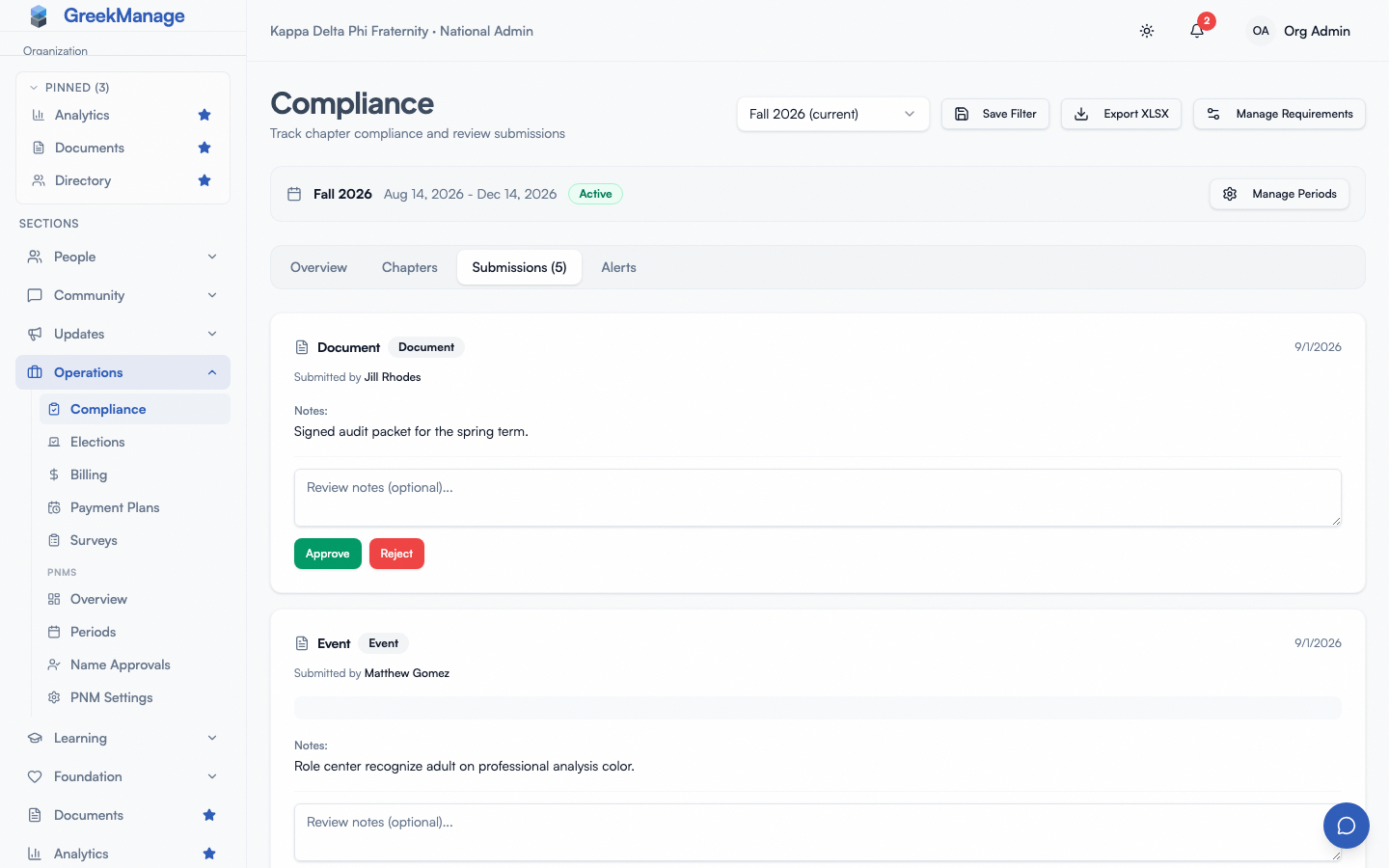 The org Compliance page, Submissions tab: each pending submission with a review-notes box and Approve / Reject.
There is no bulk-approve UI today. Each submission is reviewed individually so the reviewer has to actually look at the evidence.
Edge cases
- Chapter without a region. Tier 2 is skipped. Member submissions go chapter → org; officer submissions go straight to org.
- Regional admin role removed mid-review. The submission stays at Pending regional but no one can act on it. A national admin clears it by recording an override for the regional tier, with a reason.
- Officer who submitted leaves the chapter. No effect on submissions already in flight — they’re attached to the submission record, not the user’s current role.
- Closed compliance period. Submissions in a closed period cannot move tiers — the cascade is paused. See Semester management.
Related
- Approval chains — choosing which tiers must approve
- Compliance program overview
- Templates and requirements
- Compliance submissions (officers) — the officer perspective on submitting and approving at the chapter tier
- Permissions matrix
Last verified against v0.84.4.