Org dashboard tour
The org dashboard is your home as a national admin. It surfaces a few headline numbers, quick links into the most-used surfaces, profile completeness, the bulletin banner, and the social feed.
Open the dashboard
Sign in. If you’re an org admin, you’ll land here automatically. Otherwise navigate to Org → Dashboard.
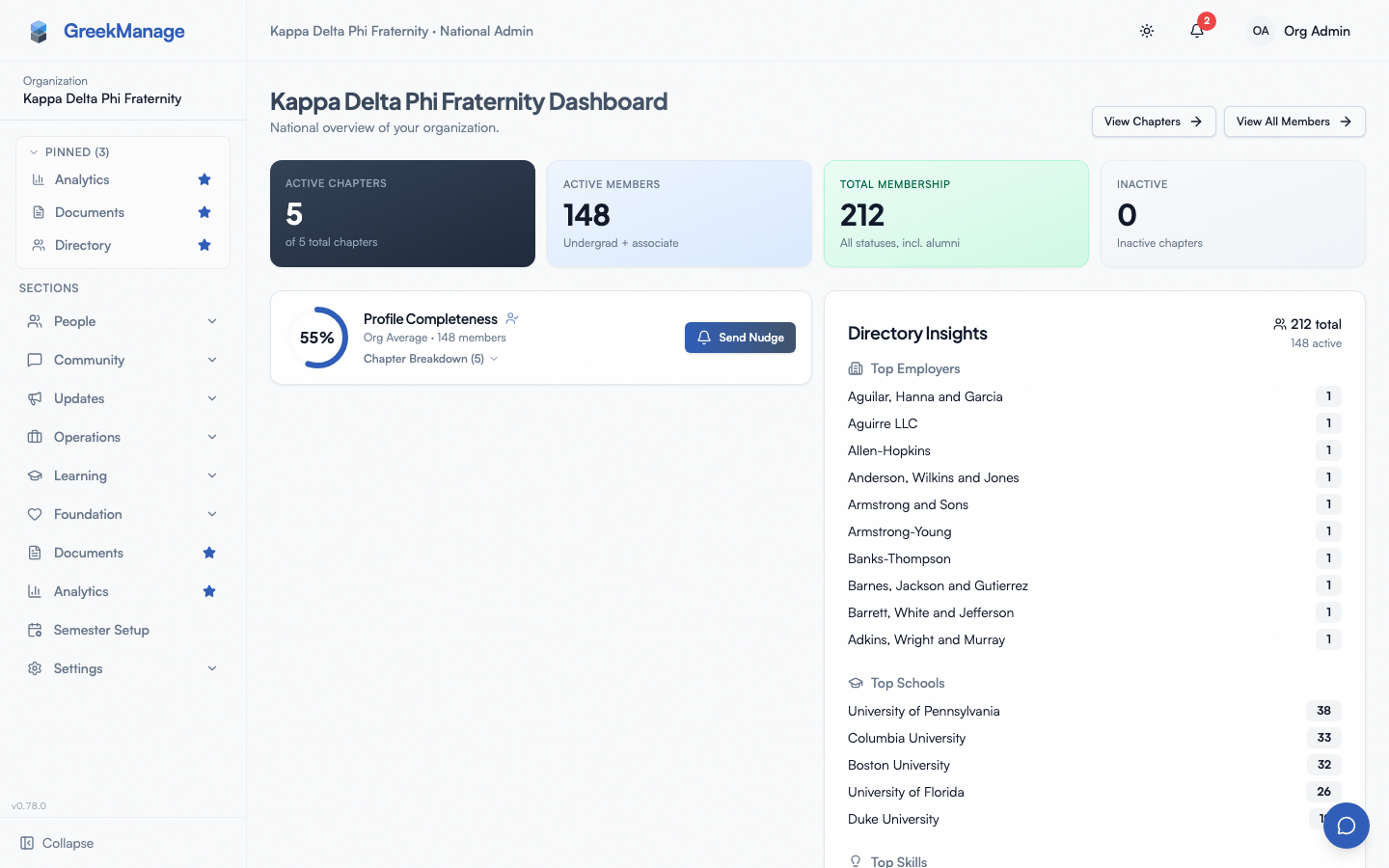 The org admin dashboard.
What’s on the dashboard
Top-line stats
The bento grid at the top includes:
- Active chapters
- Active members — undergrad + associate memberships only
- Total membership — everyone counted as a member, alumni and inactive included. PNMs, disaffiliated members and the record a chapter transfer leaves behind are not counted, which is the same number Analytics reports as Total Members
- Inactive chapters
There’s no dedicated “Suspended chapters” tile — a chapter’s status is still visible and editable from the chapters list and chapter detail page, but the dashboard doesn’t surface a standalone count for it (it was almost always zero).
Quick Actions
A card with shortcuts to View Chapters and View All Members. (No “Add chapter / Invite admin / Bulk import / New bulletin / Configure dues” buttons today — quick actions are intentionally minimal.)
If you are also a member of one of your organization’s chapters, a My Chapter button appears first in that row and opens your own chapter’s page directly, instead of making you find yourself in the org-wide chapter list. It is the same button members get on their own dashboard. If you hold no chapter membership, the button is simply not there — the row looks exactly as it did before.
Profile Completeness
A card summarizing the org’s member profile completeness — useful for spotting how much enrichment data you have on file.
Directory Insights — moved
This card used to sit beside Profile Completeness. It now lives on the member directory (/org/members), where each of its rows applies a roster filter instead of merely reporting a number — click Deloitte 87 and the table shows those 87 people.
Two things changed in the move:
- It counts the whole directory, alumni included. It previously reported only active statuses, which at a mature organization describes a small fraction of the roster and empties the panel of the alumni network it exists to surface. An Active only toggle, visible to national admins, brings the old view back.
- Members can see it too, governed per-org by Member Analytics Visibility settings. Their copy carries the top employer/school/skill rows and the population counts only — the profile-completeness figures and the per-chapter completeness breakdown stay admin-only, and rows with fewer than three members behind them are hidden from them.
Bulletin banner
If your org has active bulletins, they appear inline above the social feed.
Social feed
A timeline of recent forum / engagement activity across the org’s chapters.
Navigation pattern
Since the v0.65.23 menu redesign, the org admin sidebar groups nav items into 9 top-level entries: People (member directory, chapters, regions, alumni overview, alumni career board, advisors), Community (engage, recognition, mentorship, photos, family tree), Bulletins (a flat link, national admins only — the Feed that shared an Updates group with it was removed, and events moved to the top-level Calendar row), Operations (compliance, elections, billing, surveys, and the PNM overview / periods / name approvals), Learning, Foundation, Documents (a flat link), Analytics (a flat link, national admins only), and Settings (general, PNM settings, learning settings, foundation settings). Items are gated by module enablement — disabled modules don’t appear.
The sidebar’s brand/logo row now links directly to the dashboard, replacing the old flat “Dashboard” nav item. There’s no standalone “Messages” nav item either — messaging and the GreekManageAI assistant live in a unified messaging + AI panel outside the sidebar.
Switching scope
Admins operate at the org level by default. To drill into a specific chapter, click it from People → Chapters. Different surfaces use different scope mechanisms — some pages filter by chapter via a query param or path segment rather than a global “chapter picker”.
Dark mode
Toggle dark/light from the user menu. The choice is per-user.
Tips
- Use the chapters page for health drill-down. The dashboard’s top-line numbers tell you whether to dig in; the chapters list is where you actually triage.
- Don’t expect the dashboard to surface every alert. Compliance overdue, payment failures, and flagged forum content all live on their own pages — check those module surfaces as part of your regular review.
Related
Last verified against v0.78.2 (2026-09-02). Directory Insights moved to the member directory. Earlier note retained — the v0.70.2 stat-grid fix: “Total members” — which actually counted active members only — split into “Active members” and a genuine “Total membership”; the “Suspended chapters” tile was dropped. Earlier note retained: corrected pre-v0.65.23 sidebar structure description (9 top-level groups: People, Community, Updates, Operations, Learning, Foundation, Documents, Analytics, Settings; brand row replaces flat “Dashboard” link; messaging moved to unified panel).