Dues configuration & billing
Org admins control the dues structure and connect a payment processor for the entire organization. The dues settings page has two tabs: Dues Structure and Payment Processor.
Billing mode — who receives the invoice
As of v0.73.43 you choose who GreekManage bills:
| Mode | What happens |
|---|---|
| Bill the chapter (default) | One invoice per chapter per period, priced as head count by member type × the per-type rate. A chapter officer pays it. This is how GreekManage has always worked, and every existing org stays on it until you change it. |
| Bill each member | One invoice per member, at that member’s own member-type rate. Each member pays HQ directly through your existing payment processor. The chapter becomes a grouping and collection dimension rather than the payer. |
The same member-type rates drive both modes — chapter mode multiplies a rate by a head count, member mode charges it to each member. There is no second rate table to maintain.
Officer financial visibility
A second setting governs whether chapter officers see member balance amounts, or only status buckets (paid / unpaid / overdue) and counts.
It defaults to amounts visible, because a treasurer chasing payment generally needs to know whether someone owes $25 or $425. Turn it off and every money figure on the officer’s roster and member-ledger views is withheld — not zeroed — while statuses and counts survive, since an officer with neither cannot collect.
Independently of this setting, officers never see the reason behind a discount. A hardship or scholarship discount reaches them as a bare “Balance Adjustment”. Without that rule, a balance of $325 where peers owe $425 would disclose the reason by arithmetic. Members always see their own discounts itemized — it is their money and their reason.
The same rule now covers ad-hoc charge descriptions. When you withhold amounts, the free-text description you type on a one-off charge is replaced, for officers, by the charge’s category (“Special Assessment”, “Damages”). An admin typing Hardship makeup — $325 would otherwise have put that figure straight onto the screen of an officer whose org had explicitly chosen to withhold it. Members and admins still see the description you wrote.
Chapters manage their members’ dues
A third setting, off by default, decides whether chapter treasurers get bulk tools for collecting their members’ dues.
It changes nothing about who is invoiced. Under Bill each member, HQ still invoices each member individually and each member’s payment history stays their own. What it adds is ergonomics on the officer’s Record remittance dialog: the treasurer can select everyone on a page who owes, and fill each amount from what that member owes, before reviewing and submitting. Every figure stays editable, the total is shown before anything is charged, and neither button sends anything on its own.
Two limits are worth knowing when you decide:
- It does nothing where officers cannot see amounts. If you have withheld member amounts (above), the server never sends the balances, so there is nothing for the fill to draw on and the controls do not appear. The two settings interact in one direction only: withholding wins.
- It only fills where nothing is being decided. A member who owes exactly one invoice is filled in; a member who owes two is left blank, because which invoice the money settles and how it splits between them are the treasurer’s call. The dialog says how many it left for them.
You can turn it on while your org is still on Bill the chapter — it is accepted and simply stays inert until a chapter bills its members, so you can set it before a single-chapter pilot begins rather than after.
Payment-plan policy is not configurable yet; the panel is visible but disabled until that feature ships.
Deep dives for each surface: Billing periods · Member-type rates · Payment processor · Invoices & chapter billing
Open dues settings
Org → Settings → Dues & Billing.
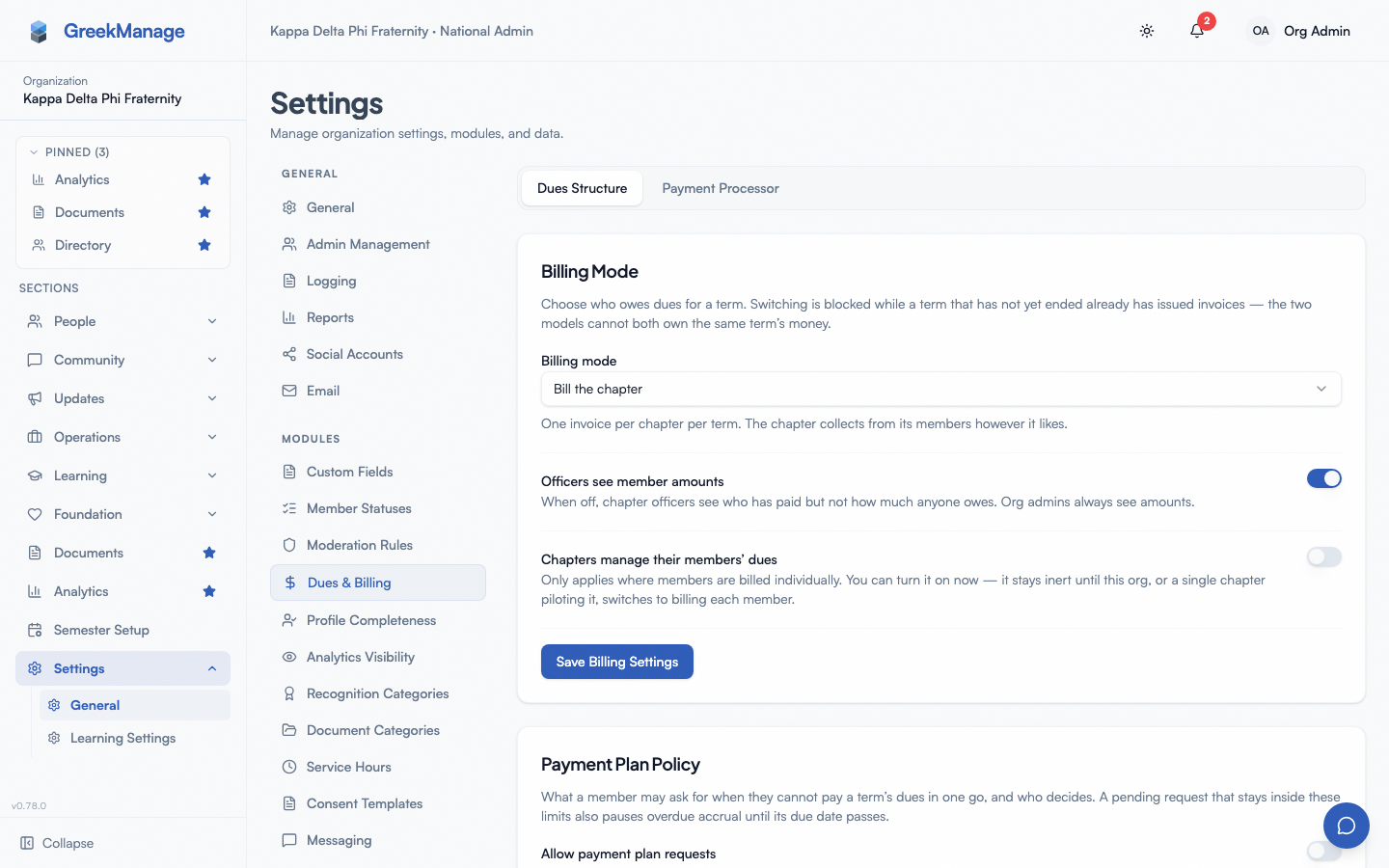 The org dues configuration screen.
Tab 1: Dues Structure
Billing cadence
Pick how often chapters are billed:
- Per Semester (Fall + Spring)
- Annual (Aug–Jul)
When you change the cadence, GreekManage generates new billing periods on the chosen schedule. Existing unpaid invoices keep their original cadence. The change cannot be undone (you’d have to change the cadence again to reverse).
Dues rates
Set per-member-type rates for a specific billing period:
- Pick the Billing Period from the dropdown (e.g., “Fall 2026” or “Aug 2026 – Jul 2027”).
- Enter a USD amount for each member type:
- Undergraduate
- Associate
- Officer
- Click Save Rates.
Each rate is saved with the billing period and member type. Rates can be revised at any time before the period closes.
Rate history
The Rate History card shows every saved rate with the period, cadence, who set it, and the timestamp — useful for audit and reconciliation.
Tab 2: Payment Processor
Connect a payment processor so chapters can pay invoices online.
- Choose a processor type: Stripe, Braintree, Square, or PayPal.
- Enter the credentials the processor requires (API key, secret, merchant ID, etc.). Credentials are stored Fernet-encrypted on the backend.
- Save. GreekManage runs a validation check; once it succeeds,
validated_atis set on the processor record and chapters can submit payments.
There is no OAuth Connect flow — credentials are entered directly. Funds settle to whichever account the credentials correspond to on the processor’s own schedule.
Invoices and payments
Once dues structure and a payment processor are configured, chapter officers see their chapter’s invoices in Chapter → Billing. → Chapter billing (officers). Members see their personal dues balance on their dashboard. → Paying dues (members).
A member who transfers chapters keeps any open invoice from the chapter they left. It stays on that chapter’s books, payment plans on it stop, no new charges can be added to it, and the member pays it by hand under My Dues. Credit also stays with the old chapter. → Chapter transfers
Payment records are written by webhook handlers when a processor confirms a successful charge. Each payment includes a processor payment ID used as the idempotency key.
What’s not built today
- No per-chapter rate overrides — rates are org-wide per member type.
- No late-fee policy engine, no auto-block voting / RSVP gates, no good-standing rule builder. (Members are tracked as paid or unpaid per invoice; orgs enforce consequences outside the platform.)
- No invoice waivers, scholarship credits, or partial-refund UI in the dues admin surface.
Tips
- Save rates per period. When you roll into a new semester, set rates explicitly for that period — they don’t carry over automatically.
- Validate the processor before period open. A failed validation blocks chapters from collecting online; catch it before invoices go out.
- Communicate cadence changes ahead of time. Changing per-semester to annual mid-year complicates reconciliation for chapters.
Related
- Chapter billing (officers)
- Paying dues (members)
- Foundation — fundraising; uses a separate processor
- Module: Operations
Last verified against v0.62.1 (2026-05-10).