Elections — authoring an election
Org-wide elections in GreekManage are authored exclusively by org / national admins. This page covers the create-and-schedule flow, what eligibility means in practice, what draft elections look like to the rest of the org, and the rules that apply once an election goes Open.
For the lighter introduction to what an election is, see Election authoring. For what chapter officers and members see, see Elections (for officers).
When to use an org-wide election
Use an org-wide election for any vote that crosses chapter boundaries:
- National executive board (President, VP, Secretary, Treasurer, etc.)
- National committee chairs
- Convention motions framed as a candidate ballot
- Anything else that needs to be tallied across the whole organization
For an election that only matters inside one chapter, use the chapter’s own internal process. GreekManage’s elections module is org-scoped — every election lives under one organization and every position belongs to that election.
Open the elections page
Org → Elections → New election.
You will see your org’s election history (draft, open, finalized) in a single All Elections table, sorted with the most recent year first, 25 rows to a page with a pager reporting the total. Past finalized elections stay on this list as a record — they are on later pages rather than a separate card.
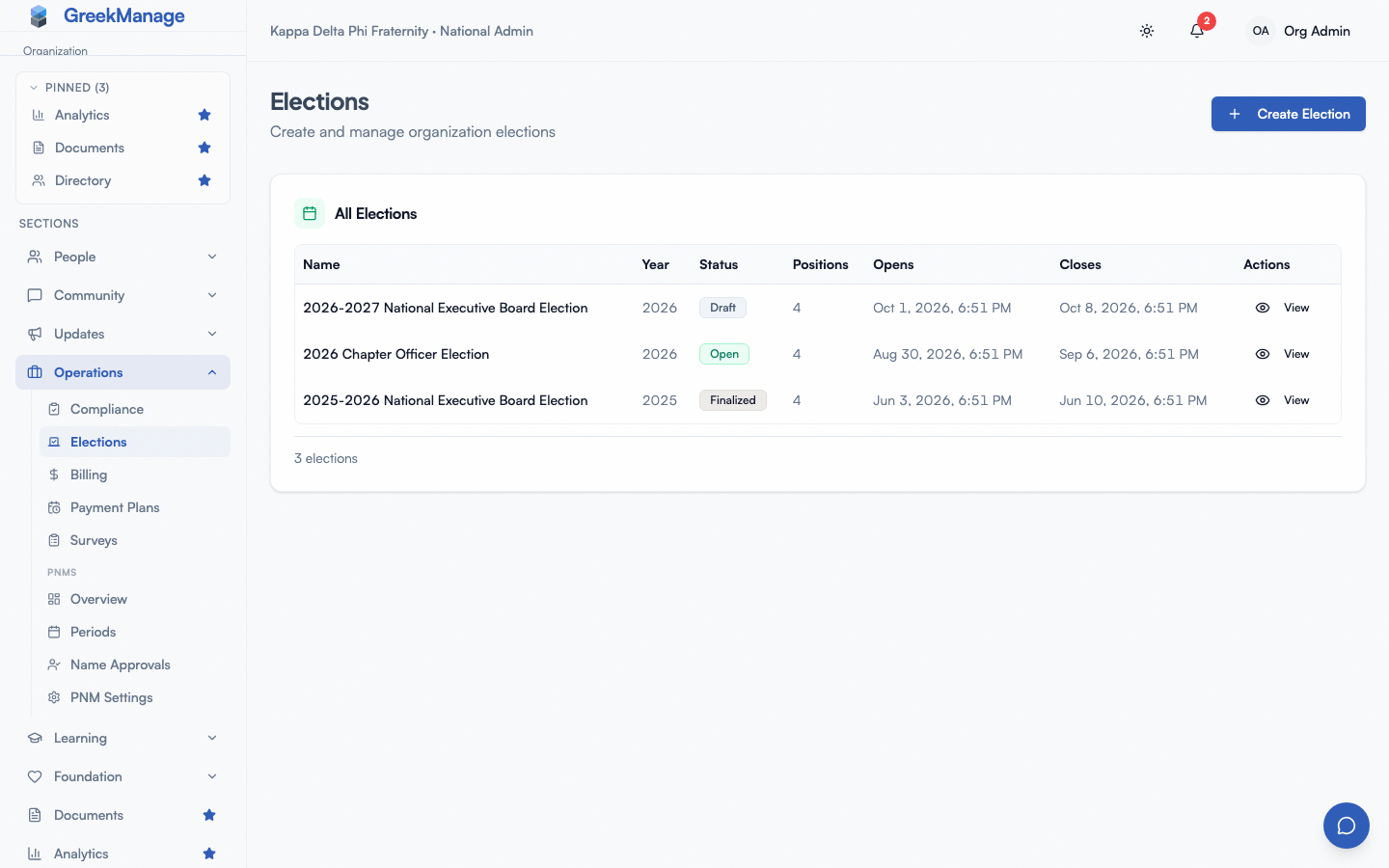 Elections index with status pills (draft, open, finalized) sorted by most recent year.
Required fields
The new-election form asks for:
- Name — e.g. “2026 National Executive Board.” This is what voters see at the top of their ballot and what appears in the elections list, notifications, and the XLSX export.
- Year — a four-digit year used for sorting and display.
- Opens at — the timestamp the election should transition from Draft to Open. Set this in your local timezone; GreekManage stores it in UTC. Eligible voters cannot see a ballot until this moment passes.
- Closes at — the timestamp the election should transition from Open to Finalized. Voting stops the moment this passes, and results are computed automatically. Closes must be strictly after Opens.
- Eligible voter statuses — see the next section.
- Confirmation email subject and body (both optional) — sent to every eligible voter in the snapshot when the election opens (whether that’s the scheduled opens-at time or an immediate publish), not per-ballot. You can use simple placeholders like
{'{{member_name}}'},{'{{election_name}}'},{'{{ballot_link}}'},{'{{opens_at}}'},{'{{closes_at}}'}, and{'{{positions}}'}and GreekManage will substitute them at send time.
You can save the election with no positions and no candidates. Both are added on later screens — see Elections — positions and candidates.
Eligibility is by membership status
GreekManage filters the voter pool by membership status. The form accepts any combination of the following statuses:
pnm— Potential New Memberundergrad— Undergradassociate— Associatealumni— Alumniactive_alumni— Active Alumnilifetime_alumni— Lifetime Alumnidisaffiliated— Disaffiliatedinactive— Inactive
If you leave this field blank, GreekManage applies the platform default of undergrad and associate — the same definition used for “currently active members” elsewhere in the platform. To open a vote to alumni, add alumni, active_alumni, and lifetime_alumni explicitly. To include only a single status (for example, a board-only ratification vote), list just that status.
There is no region-scoped, chapter-scoped, GPA-scoped, custom-field-scoped, or delegate-list-based eligibility. The only filter is status. If you need a narrower vote, consider running it outside the platform or splitting it into multiple elections.
The eligibility list is snapshotted at the moment the election opens — see “Snapshot timing” below.
the new election form with eligibility list
Draft state — what everyone else sees
A draft election is invisible to non-admins. Specifically:
- Members and chapter officers will not see it in their elections sidebar, in notifications, or anywhere in the app.
- The ballot endpoint returns a “not currently open” message even if someone discovers the URL.
- No voter notification has been sent.
- The eligible-voter snapshot has not been taken yet.
Draft is the only state where you can freely edit. Use it to:
- Stage the election well in advance of the open date
- Add and reorder positions
- Add and remove candidates
- Tweak titles, dates, and the eligibility list
When you are ready, Publish the election and confirm. GreekManage refuses to publish an election nobody can vote in:
- No positions. The publish dialog says “Add at least one position before publishing this election.” and Confirm Publish stays disabled.
- No eligible voters. If no member of the organization has one of the Eligible voter statuses, publishing is refused with a message saying so. Creating an election with such statuses is refused the same way. Change the statuses, or the members’ statuses, first.
Otherwise, publishing does one of two things:
- If the open time is in the future, GreekManage schedules a background task to flip the election to Open at exactly that moment. Voters will receive an in-app notification when that happens.
- If the open time is already in the past (or right now), GreekManage flips the election to Open immediately and sends the open notification right away.
Snapshot timing
When an election transitions from Draft to Open, GreekManage builds a list of every member of the organization whose status matches your Eligible voter statuses filter. That list is frozen as the election’s eligible-voter snapshot.
The implications:
- A member whose status changes from
inactivetoundergradafter the election opens will not be added to the snapshot. They cannot vote. - A member whose status changes from
undergradtoalumniafter the election opens will still appear in the snapshot ifundergradwas in your eligibility filter at open time. They can still vote. - If you need to correct the snapshot (for example, an officer’s status was wrong and they should have been eligible), you cannot edit the snapshot directly — it’s a record of who was eligible at the moment of opening.
Run your status hygiene before you publish. If you publish and then realize the snapshot is wrong, your options are limited to closing the election early and starting a new one.
What you can edit once an election is Open
Almost nothing. Once an election leaves Draft, the entire authoring surface locks:
- Name, year, opens-at, closes-at, eligibility, and email templates can no longer be edited.
- Positions can no longer be added, edited, reordered, or deleted.
- Candidates can no longer be added, edited, or removed.
- The election itself can no longer be deleted.
This is intentional — votes that have already been cast were cast against a specific ballot, and the audit trail would be meaningless if the ballot could shift afterward. If you discover a critical mistake (wrong candidate, wrong title, wrong window), the only path is to let the election close, record the issue, and run a corrective election.
Finalized elections are even more locked — they exist only as a historical record and a results export source.
What’s not built today
GreekManage’s elections model is a single-round, plurality-style ballot. Specifically:
- No runoffs or second-round logic. A position with two candidates tied for the most votes shows both as winners; you decide how to break the tie offline.
- No multi-stage workflow (nomination phase → vetting phase → ballot phase). Nominations happen outside the platform; you enter the resulting candidate list directly.
- No constitutional-amendment workflow with custom passing thresholds. Every position is decided by highest vote count.
- No re-authentication step at ballot submission. A member already logged into GreekManage submits their ballot inside their normal session.
- No certification PDF. Use the XLSX export for any board-report or notarized-result purpose.
If your organization’s constitution requires any of the above, you’ll need to handle it as a manual process around the GreekManage ballot, not inside it.
Tips
- Pilot first. Run a low-stakes election (an awards committee, a fun superlative) before your highest-stakes annual board vote. The platform’s behavior is more obvious once you’ve seen it open and close end-to-end.
- Lock dates with leadership before you publish. The open and close timestamps are unchangeable after publish.
- Audit member statuses the day before opening. This is the single biggest source of “I couldn’t vote” complaints.
- Write the confirmation email body once and reuse it. A short “Thanks for voting in {’{{election_name}}’}” message is enough to give voters confidence their ballot was recorded.
Related
- Elections — positions and candidates
- Elections — results and live tracking
- Election authoring (overview)
- Elections (for officers)
- Permissions matrix
Last verified against v0.63.51 (2026-07-01). Confirmation email actually sends on election open (scheduled or immediate) shipped v0.63.51.