Elections — results and live tracking
Once an election is Open, GreekManage gives org admins a real-time view of who is voting and how. Once it Finalizes — either automatically at the close-at time or by an admin action — results are computed, winners marked, and a complete record is preserved for export and audit.
This page covers the live tracking view, the audit log behind every ballot, how finalization actually runs, and how to export the results.
The live results view
On an Open election’s detail page, you have a Live results view. It shows:
- Total eligible voters — the number of members in the eligible-voter snapshot taken at open time.
- Total voted — the count of distinct members who have submitted at least one ballot entry. (A voter who has voted on three of five positions counts once here, not three times.)
- Per-position breakdown — every candidate’s current vote count, plus a count of abstentions for that position.
The view updates in real time. It is powered by a WebSocket: as soon as a voter’s ballot is recorded on the server, every admin currently viewing the live results sees the candidate’s tally tick up. There is no refresh button to press.
Two important things about the live view:
- It is admin-only. The WebSocket connection itself checks whether you are an org / national admin (or a platform admin) for the election’s organization. Members, chapter officers, and regional admins cannot watch the live counts even if they discover the URL — the connection closes immediately.
- It shows running totals, not predictions. GreekManage does not project a winner or call a race early. The numbers you see are the actual votes recorded so far.
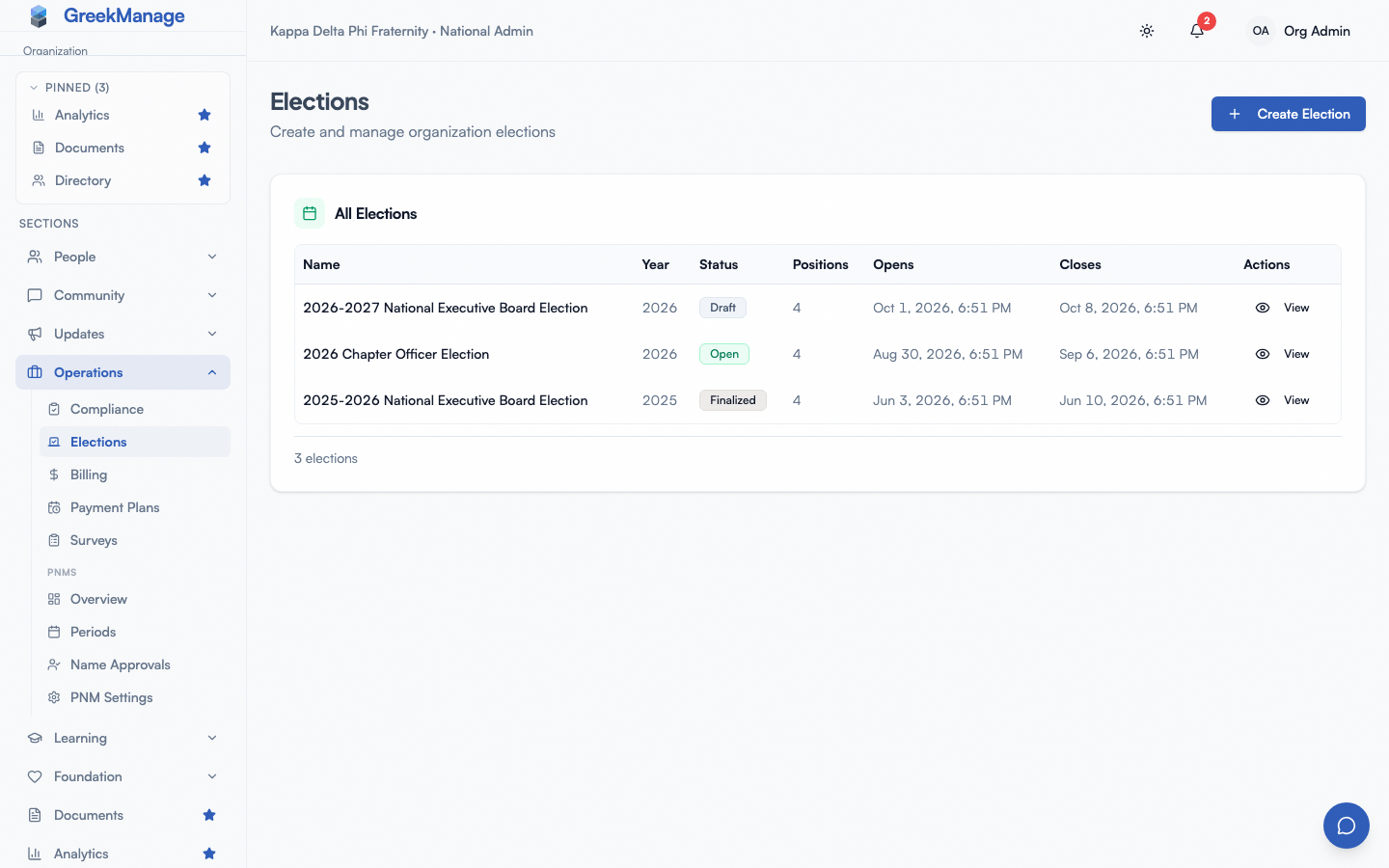 The org Elections list, with each election’s status. View opens an election.
A reasonable use during voting is to keep this view open in a tab during a chapter meeting where a vote is happening, or during the closing hours of a national vote. You’ll see turnout climb in real time.
The vote audit log
Every vote that gets cast writes two records:
- A vote record — which voter, which election, which position, which candidate (or Abstain).
- A vote audit log entry — a one-to-one record tied to that vote, with the timestamp and a SHA-256 hash of the voter’s IP address at the time of submission.
The IP is hashed, not stored in plaintext. This means:
- You can detect whether two ballots came from the same IP (the hash will match).
- You cannot read back the actual IP from the hash. There is no decryption key — it’s a one-way hash.
This is a deliberate trade-off between privacy and integrity. The audit log is enough to detect anomalies (one IP submitting twenty ballots) without storing identifying network information that GDPR and similar regimes would prefer not to keep around indefinitely.
The audit log is read through internal tools — there is no end-user “browse audit log” page in v0.62.1. If you need to investigate a specific election, contact the platform admin for a SQL pull.
Finalization
A GreekManage election leaves the Open state in exactly one of two ways:
- Automatic. When you publish an election with a future opens-at time, GreekManage schedules a background task to flip it to Open at that moment, and a second background task to finalize it at the closes-at moment. You don’t need to be online for either transition.
- Manual. On an Open election’s detail page, org / national admins see a Finalize now button. Clicking it opens a confirmation dialog (“Finalize Election”) warning that “Finalizing closes voting immediately, computes the winners, and publishes the results. Voters will be notified that results are available. This action cannot be undone.” Clicking Confirm Finalize calls
POST /api/elections/<id>/finalize/, which queues the exact same background finalization task used by the automatic path — it does not run a separate code path. The button only appears while the election is Open; it disappears once the election is Finalized. If the election isn’t Open when the request lands (e.g. a race with the scheduled task), the endpoint rejects it with “Only open elections can be finalized.”
The finalization task does several things atomically:
- Counts the votes for every candidate in every position.
- Computes each candidate’s percentage of the position’s total votes (excluding abstentions).
- Creates one election result record per candidate, with their vote count, percentage, and a winner flag.
- Marks the candidate with the most votes per position as the winner. If two candidates tie, both are marked winner — the platform does not break ties for you.
- Flips the election’s status to Finalized.
- Sends an “Election Results” notification to every member in the original eligible-voter snapshot.
Result records are immutable. Once finalized, the per-candidate tallies and winner flags will not change.
Reading the results page
The finalized results view shows:
- Election name, year, status — the basics.
- Total eligible voters — from the snapshot.
- Total voted — distinct voter count.
- Participation rate — voted divided by eligible, as a percentage.
- Per-position breakdown — every candidate, their vote count, their percentage of the position’s non-abstain votes, and a winner badge.
Members can see the same results page (filtered to results, not the audit log) by following the notification they received at finalization.
XLSX export
From a Finalized election, click Export results to generate a downloadable spreadsheet. The export runs as a background task and produces a four-sheet workbook:
- Election Summary — name, year, status, opens-at, closes-at, total eligible, total voted, participation rate.
- Positions & Candidates — every position, its order, every candidate’s name, and their bio text.
- Vote Results — every position with every candidate, their vote count, percentage, and a yes/no winner column.
- Participation — turnout metrics again, in a shape that’s easy to pivot for board reporting.
Use the XLSX for any external reporting — board minutes, convention records, archival. There is no certified results PDF generated by GreekManage; if your bylaws require a notarized or sealed certification, generate that document outside the platform from the XLSX numbers.
The XLSX endpoint is restricted to org / national admins; chapter officers and members cannot trigger or download it.
A pragmatic finalization checklist
Once an election reaches its close time and the platform finalizes it automatically:
- Spot-check turnout. Compare total voted to total eligible. A surprisingly low number can indicate a notification failure or a status issue.
- Look at every position. Confirm the winner badge makes sense given your knowledge of the race.
- Watch for ties. If two candidates are both marked winner for the same position, you have a tie to break offline.
- Export. Pull the XLSX and file it with your board records.
- Send the human follow-up. Even though the platform sends an in-app results notification, a separate email from the President or election committee chair lands better for high-stakes outcomes.
What’s not built today
- No automatic tie-break logic. The platform records both tied candidates as winners and leaves the resolution to you.
- No runoff election generation. If you want a runoff, you author a new election from scratch with the relevant candidates as its slate.
- No “results published / results private” toggle in v0.62.1. Once an election is Finalized, the results are visible to eligible voters via their notification target. If you need a delayed announcement window, do not let the election auto-finalize until you’re ready for the news to land.
- No certification PDF. XLSX is the only export.
Related
- Elections — authoring an election
- Elections — positions and candidates
- Elections (for officers)
- Voting in elections (members)
- Permissions matrix
Last verified against v0.65.23 (2026-07-05). Manual “Finalize now” button shipped v0.63.50; election XLSX export made downloadable (job + status endpoint) shipped v0.63.52.