Foundation settings
The Foundation Settings page is the control panel for everything that powers your public donation pages, donor receipts, and payment processing. It lives at Foundation → Settings (/org/foundation/settings) and is organized as four stacked cards, in this order: General Configuration, Funds, Receipt Template, and Payment Processor.
If you are setting up Foundation for the first time, start with the Foundation Admin onboarding walkthrough — it covers the full bootstrap flow end-to-end. This page is the deep reference for what each field does and what changes downstream when you touch it.
General configuration
This card holds the identity of your foundation: the names, IDs, and contact details that appear on every receipt and every public donation page.
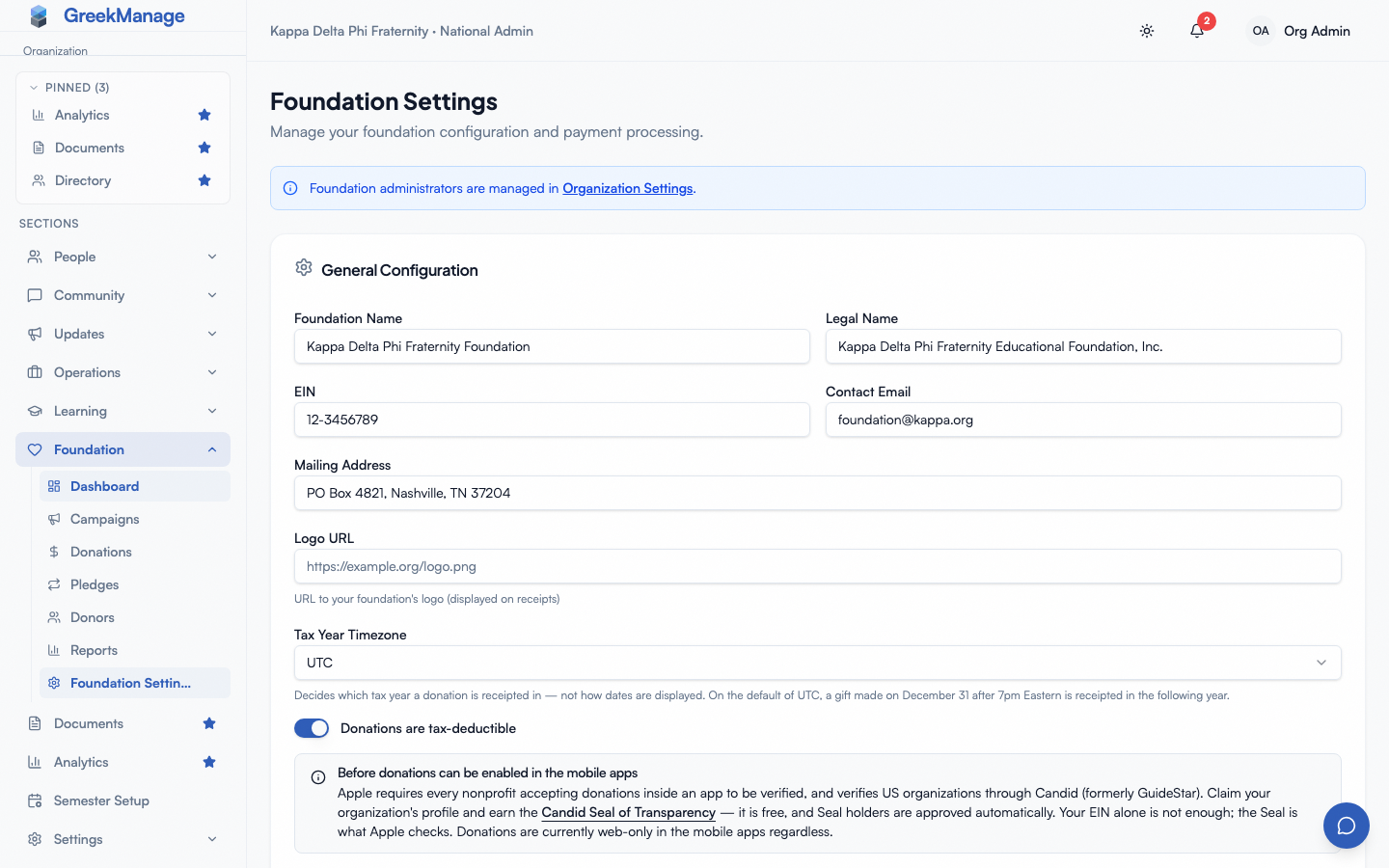 Foundation Settings — General Configuration card filled in.
Foundation Name
The display name shown to donors on the public donation page and at the top of the receipt PDF. Often distinct from the parent organization — for example, “Alpha Educational Foundation” rather than “Alpha Fraternity, Inc.”
Legal Name
The legal entity that issues tax receipts. If a legal name is set, it is used in place of the display name on the receipt header, with the display name reserved for donor-facing communications. If you leave this blank, the display name is used everywhere.
EIN
Your 501(c)(3) tax identification number, formatted XX-XXXXXXX. Printed on every receipt PDF. Required for IRS-compliant receipts — leave it blank only if your foundation is not a registered nonprofit and you have disabled tax deductibility (below).
Mailing Address
Free-form multi-line address. Printed under the legal name on every receipt. Multi-line values render with line breaks preserved.
Contact Email
The reply-to address used when GreekManage sends receipts or bulletins on behalf of the foundation. If left blank, mail falls back to your platform default sender. Donors who reply to a receipt or bulletin will reach this address, so use a real inbox that someone monitors.
Logo URL
A public URL to your foundation’s logo image. The receipt PDF generator downloads this image when building each receipt and places it in the header next to the title. If the URL is unreachable or returns an error, the receipt still generates but without the logo — there is no error toast for a broken logo URL. Test it by issuing yourself a small donation after a save.
Tax Deductible toggle
Controls which legal statement appears on receipts:
- On — receipts include the IRS Publication 1771 statement, the tax-deductibility statement you set in the Receipt Template card, and language about consulting a tax advisor. This is the right setting for a registered 501(c)(3).
- Off — receipts include a “this donation may not be tax-deductible” disclaimer instead. Use this if you are running a non-deductible scholarship pool, an event registration, or any foundation that is not a registered nonprofit.
The toggle does not affect whether donations are accepted — only what text the receipt PDF carries.
Tax Year Timezone
The IANA timezone that decides which tax year a donation is receipted in. Common US zones are pinned at the top of the picker; the full list follows below them.
This is not a date-display preference. It is the boundary the annual tax-receipt run buckets donations on, and it is also what the donor portal’s annual totals are grouped by. Every foundation starts on UTC, which is five hours ahead of Eastern time — so on the default a gift made on December 31 at 8pm Eastern is already January 1 in UTC and gets receipted in the following tax year.
Set this to your foundation’s own zone (for example America/New_York) before your first year-end. The server rejects any value it cannot resolve as a real IANA zone.
Changing it affects how future receipt runs bucket donations. Receipts already generated for a prior year are not regenerated.
Hit Save Configuration at the bottom of the card to commit changes. The save button is only visible to Foundation Admins.
Receipt template
This card lets you override the boilerplate text on every donation receipt PDF and email without touching the layout. Six fields are configurable, each with a sensible default.
Foundation Settings → Receipt Template card with all six fields and the Reset to Defaults button
Header Title
The big bold text at the very top of the receipt PDF. Default: “Donation Receipt”. Common overrides: “Charitable Contribution Receipt” or “Annual Giving Acknowledgment”.
Organization Tagline
A small italic line that prints under the organization name on the receipt body. Default: empty. Use this for a foundation motto or chapter affiliation, e.g., “Supporting brothers since 1968.”
Tax Deductibility Statement
The IRS-required statement that confirms no goods or services were exchanged for the contribution. Default: “No goods or services were provided in exchange for this contribution.” You must customize this if you ran a benefit event where donors received something of value — IRS Pub 1771 requires you to describe and value those goods or services. The platform does not enforce this; the responsibility is on your foundation.
Footer Text
A small grey line at the very bottom of the PDF. Default: “Please retain this receipt for your tax records.”
Thank You Message
An italic message that appears in both the receipt PDF and the receipt email body. Default: “Thank you for your generous support!” This is the easiest field to give your foundation a distinct voice in.
Custom Note
A free-form block of text that prints near the bottom of the receipt PDF, just above the thank-you message. Default: empty. Use this for anything that does not fit the other fields — a fund-specific message, a board chair signature, an upcoming event teaser.
Reset to defaults
Use the Reset to Defaults button next to Save if you want to start over. It clears the form back to the canonical defaults but does not persist that change until you hit Save — review the cleared form first, then save.
When you hit Save, only fields that differ from the defaults are persisted as overrides. Fields you have not customized are left as defaults, so future default-text updates from a platform release will flow through. This means the in-form values you see may not exactly match the saved JSON — that is correct behavior.
Payment processor
This card is how your foundation accepts donations — Stripe, Braintree, Square, or PayPal. Until this card is filled in and saved, your campaigns cannot accept donations — the public donation page will load, but the donate button will be disabled.
Choosing a provider
Four cards — Stripe, Braintree, Square, PayPal — sit at the top of the section. Click one to open its credential form below. If a different provider is already connected, clicking another one shows a confirmation dialog first: switching clears the currently-stored credentials, so cancel if you only meant to look.
Recurring pledges work on Stripe and Braintree — Square and PayPal still accept one-time gifts only.
When a processor exists
A badge across the top names the connected provider and whether it’s Active; Verified appears once a successful test charge has confirmed the credentials work. No credential values are ever shown back to you — not even masked. To change credentials, re-enter the full set for that provider and save; there is currently no per-field “leave blank to keep just this one” — saving replaces the whole credential set for whichever provider is selected.
Credential fields per provider
- Stripe — Publishable Key, Secret Key (
sk_test_…/sk_live_…), Webhook Signing Secret (whsec_…). All three are required to save. - Braintree — Merchant ID, Public Key, Private Key, Environment (
sandboxorproduction). Merchant ID, Public Key, and Private Key are required; Environment is optional. If you want to offer recurring gifts, a Recurring plan IDs section appears below the credential fields — paste the Plan ID you created in your Braintree Control Panel for each interval (Monthly/Quarterly/Annual) you want to support; leave an interval blank to leave recurring gifts on that schedule unavailable. Braintree Plans can only be created in the Braintree dashboard, not from this page. - Square — Application ID, Access Token, Location ID, Webhook Signature Key. Application ID, Access Token, and Location ID are required; the webhook field is optional (Square has no webhook wired up yet — see below).
- PayPal — Client ID, Client Secret, Webhook ID, Mode (
sandboxorlive). Client ID and Client Secret are required; Webhook ID and Mode are optional (same reason as Square).
All secret-type fields are encrypted at rest using Fernet symmetric encryption tied to your deployment’s secret key, and can be shown/hidden in the form via the eye icon while typing.
Webhook registration — Stripe and Braintree
Selecting Stripe or Braintree shows the exact webhook URL to register with that provider, with a copy button — each provider gets its own URL (the webhook itself is per-foundation, not per-provider, but the URL includes the provider name so it’s unambiguous which one you’re pasting where). For Stripe, this must match what’s configured in your Stripe dashboard or webhook deliveries fail with a 400 and donations hang in pending state. Braintree needs no separate webhook secret — its signature is verified using the same Merchant ID/Public Key/Private Key you already entered above — but registering the URL is still required for recurring pledges: a Braintree donor’s first and every later charge succeeds at Braintree either way, but without the webhook registered a pledge never advances past pending in GreekManage. A one-time Braintree gift needs no webhook at all; it completes synchronously when the donor pays.
Square and PayPal show a note instead: “No webhook to register — donations complete immediately when the donor pays.” That’s accurate for the golden path today — a Square or PayPal donation completes synchronously when the donor pays, no webhook needed. It also means a dispute or refund initiated from either processor’s own dashboard (rather than from GreekManage) won’t be reflected here yet — the same is true of a Braintree-initiated refund or dispute, since Braintree has no webhook event for a merchant-initiated refund succeeding.
Fee pass-through toggle
This controls the donor-covered fees option on the public donation page, for whichever processor is connected:
- Off (default) — your foundation absorbs the processor’s fee. The donor sees the amount they entered. Their Donation row in the dashboard will show
amount_cents, the fee deducted, and the net amount that lands in your account. - On — donors can opt to cover the fee. The public donation page renders a “cover processing fees” checkbox. If checked, the charge is grossed up so your foundation receives the full intended amount and the fee shows as donor-covered on the donation record. If unchecked, the behavior is identical to the off state.
The gross-up solves for the charge — charge = (gift + fixed_fee) / (1 - rate), rounded up — rather than simply adding the fee on the gift, because the processor takes its cut from the total it charges. At Stripe’s card rate (2.9% + $0.30) a $100 gift means a $103.30 charge, of which Stripe takes $3.30 and your foundation banks $100.00. The rounding is always up, so any residual cent lands with you rather than the processor.
Toggling this setting takes effect on the next page load of the public donation page — there is no deployment or republish step.
Saving
The save button reads Validate & Save if no processor is connected yet, and Update Configuration otherwise. Credentials are validated against the provider before being saved — an invalid key surfaces the provider’s own error message under the form rather than saving.
Test your save by issuing a small donation from the public campaign page (a $1 donation in test mode is enough). For Stripe, a successful test also fires the payment_intent.succeeded webhook back to your foundation, flipping the donation from pending to completed and showing the Verified badge. For the other three providers, a successful charge completes immediately without a webhook round-trip.
What changes downstream
Each setting has a downstream effect worth knowing about before you flip it:
- Changing Foundation Name or Legal Name affects every future receipt. Already-issued receipt PDFs are not regenerated.
- Changing EIN or Mailing Address affects every future receipt PDF the same way.
- Changing Tax Deductible flips the language on every future receipt PDF immediately.
- Changing the Logo URL affects every future receipt PDF. Existing PDFs are not refreshed.
- Changing the Header Title, Footer Text, Thank You Message, Custom Note, Organization Tagline, or Tax Deductibility Statement receipt-template fields affects every future receipt PDF. All six fields are correctly applied by the PDF generator as of v0.63.4 (an earlier bug that dropped the tagline and tax statement was fixed). Already-emailed annual statements and per-donation receipts are never retroactively regenerated.
- Changing a processor’s credentials affects every future charge attempt. For Stripe, in-flight payment intents created against the old key may fail to settle — issue a small test donation to confirm. Switching to a different provider entirely clears the previous processor’s stored credentials.
- Toggling Fee pass-through on or off changes the public donation page on next load but does not retroactively reclassify existing donations.
Related
- Foundation overview — high-level reference to the module.
- Foundation Admin onboarding — first-hour walkthrough from blank to test charge.
- Foundation tax receipts — how receipt template overrides flow into PDFs.
- Permissions matrix — Foundation Admin vs Editor vs Org Admin verbs.
Last verified 2026-08-25. Receipt PDF canonical key handling shipped v0.63.4; payment-processor webhook secret validation v0.63.12; Braintree/Square/PayPal support and live credential validation on save shipped v0.73.71; Braintree recurring pledges and webhook receiver added since (version numbers are now assigned at merge time — see the CHANGELOG for the release that shipped this).
Last verified against v0.78.0 (2026-09-01). Corrected: the page has four stacked cards (Funds, General Configuration, Receipt Template, Payment Processor), not three — Funds was undocumented.