Foundation tax receipts
Tax receipts are the document that turns a donation into a tax-deductible record for your donors and a recordkeeping artifact for your foundation. GreekManage generates two kinds automatically — per-donation receipts after each successful charge, and annual summary receipts for everyone who gave during the prior calendar year. Both are PDFs, both are emailed, and both follow an IRS-Publication-1771-style layout.
Two receipt types, same template
The same receipt template drives both formats. The only difference is which donations the PDF summarizes:
- Per-donation receipt — one PDF per successful donation. Issued automatically within seconds of the charge clearing.
- Annual summary receipt — one PDF per donor per year, listing every completed donation that donor made during that tax year. Issued either via the annual automated task or via on-demand generation.
Both receipt types are listed together on the Tax Receipts section of the Reports page, distinguished by a “Per Donation” or “Annual” badge.
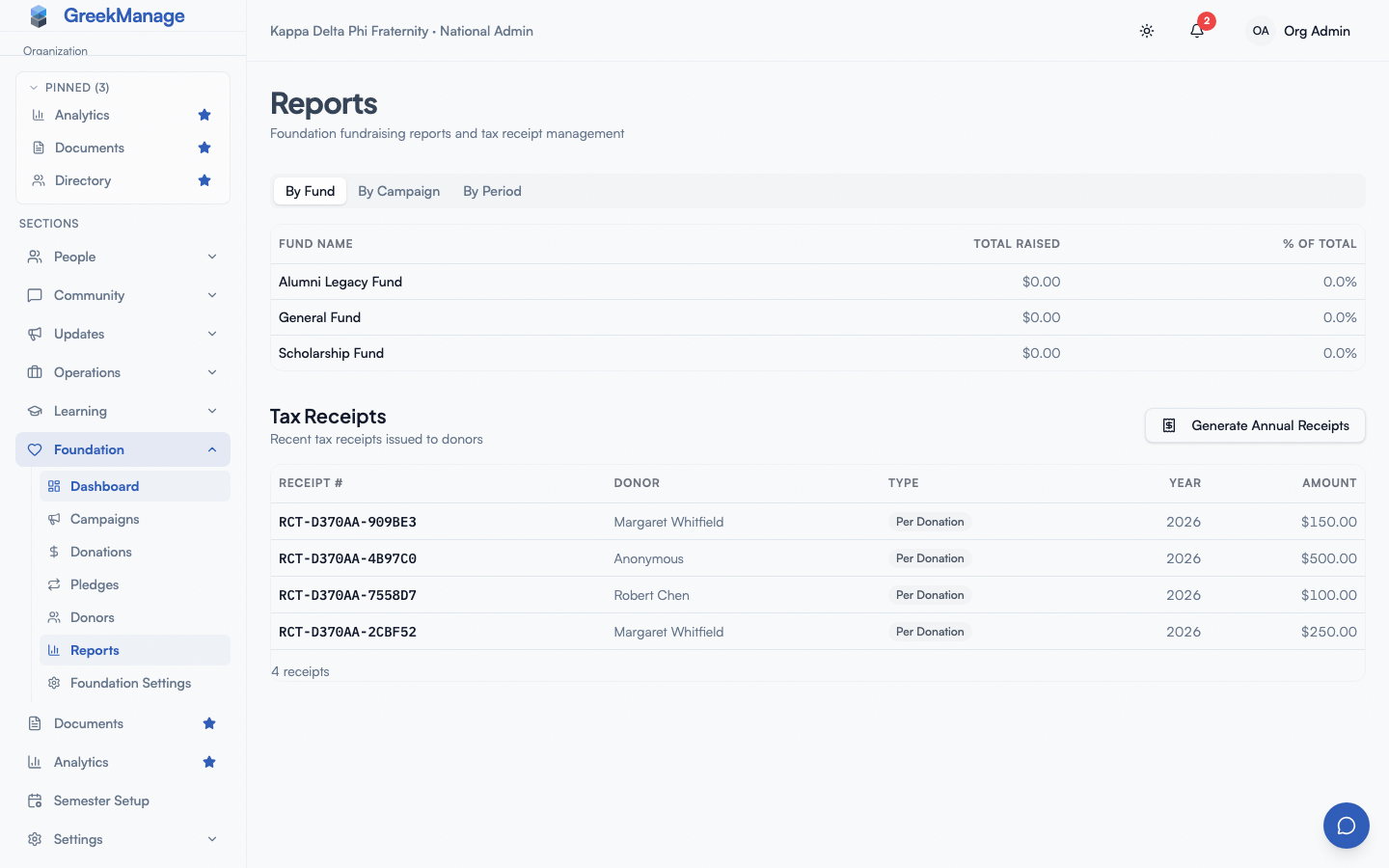 Tax Receipts section of the Foundation Reports page with Per Donation and Annual badges.
Per-donation receipts
When they fire
A per-donation receipt is generated and emailed in the moments after a donation completes. The trigger is the payment_intent.succeeded Stripe webhook landing back at the platform. The chain of events:
- Donor submits the donation form on the public campaign page.
- Stripe processes the charge.
- Stripe fires
payment_intent.succeededback to your foundation’s webhook endpoint. - The platform marks the Donation as Completed and triggers the receipt-generation background task.
- The task builds the PDF, stores it, creates a TaxReceipt record, attaches the PDF URL to the Donation, and emails the receipt to the donor.
- The Donation’s
receipt_sent_attimestamp is stamped on success.
The same chain runs for each successful charge against a recurring pledge — every pledge billing generates its own per-donation receipt with a unique receipt number.
Receipt number format
Each per-donation receipt gets a unique number like:
FND-{foundation_id_short}-{year}-{8_hex_chars}For example: FND-a1b2c3d4-2026-7F3A4B82. The platform uses a UUID-based suffix to guarantee uniqueness even when receipts are generated in parallel for high-volume campaigns.
What the PDF contains
In order, top to bottom:
- Foundation logo (if Logo URL is set and reachable)
- Header title (default “Donation Receipt”; customizable)
- Receipt number and receipt date
- Organization block: legal name (falls back to display name), tagline (if set), EIN, mailing address
- Donor block: name, email, address (if on file)
- A small table with the donation date, amount, and fund
- Tax year
- Tax deductibility statement (or non-deductible disclaimer, based on the Tax Deductible toggle in Settings)
- Custom note (if set)
- Thank-you message
- Footer text in small grey type
The PDF is stored under your organization’s storage configuration (S3 if you have one configured, otherwise the platform default file storage). The URL is attached to both the Donation record (receipt_pdf_url) and the TaxReceipt record (pdf_url).
Receipt email
Alongside the PDF, the platform sends an HTML+plaintext email from the foundation’s Contact Email address (or the platform default if Contact Email is blank). The email body includes:
- A greeting using the donor’s first name (or “Donor” if no first name)
- A thank-you summary with the amount, receipt number, and date
- A link to download the receipt PDF
- The PDF attached directly to the message
Donors who reply to the email reach the foundation’s Contact Email address.
Resending a per-donation receipt
If a donor reports they did not receive their receipt — junked, deleted, wrong inbox — open Foundation → Donations, click the donation row, and click Resend Receipt in the detail dialog. This queues the same receipt-generation task as the original, which produces a fresh PDF with a fresh receipt number and re-emails the donor. The donation’s receipt_sent_at is updated to the new send time.
Note that resending generates a new receipt number; it does not re-send the exact PDF the donor missed. For IRS purposes the donor is fine — both receipts cover the same donation — but if you need to send the exact original, locate the PDF in your storage and forward it manually.
Annual summary receipts
What they cover
An annual receipt summarizes every Completed donation a single donor made to your foundation during a single calendar year. It is the donor’s one-stop tax document for the year and is preferred by many donors over collecting twelve monthly per-donation receipts.
Annual receipts are generated per donor per year. A donor who gave once in March and twice in November will get one annual receipt listing all three donations.
The automatic January 15 run
Every year on January 15 at 3:00 AM server time, a scheduled task fans out across every foundation with the module enabled. For each foundation:
- The platform identifies every donor who had at least one Completed donation in the prior calendar year.
- For each such donor, a sub-task is queued to build the annual receipt PDF and email it.
The result is one annual receipt PDF per donor per foundation, emailed to the donor with the PDF attached, listing every Completed donation for that donor that fell within the prior tax year.
You do not need to do anything to make this happen. The task runs unattended; you will see the receipts show up in Foundation → Reports → Tax Receipts.
On-demand annual generation
If you need annual receipts for a year other than the prior one — say you onboarded mid-year and want to issue receipts for the partial first year, or a donor asks for a re-issue — use Generate Annual Receipts on the Reports page:
- Click Generate Annual Receipts in the Tax Receipts section header.
- Enter the tax year.
- Click Generate.
The same fan-out task runs for the year you specify, producing one PDF per donor and emailing each one. If a donor already has an annual receipt for that year (matched by receipt number), the platform reuses the existing record rather than regenerating — annual receipts are idempotent by year and donor.
Generate Annual Receipts dialog with tax year input
Annual receipt number format
Annual receipts use a different number format from per-donation receipts:
FND-{foundation_id_short}-ANN-{year}-{donor_id_short}For example: FND-a1b2c3d4-ANN-2025-9e8d7c6b. The ANN marker and the inclusion of the donor ID make annual receipts idempotent — running the task twice for the same year and donor produces the same receipt number and reuses the existing record.
Receipt date
Per-donation receipts use the donation date as the receipt date. Annual receipts always use December 31 of the tax year — this is the standard date for IRS annual giving summaries regardless of when the PDF was actually generated.
Customizing receipts
Six receipt template fields are configurable on Foundation → Settings → Receipt Template:
- Header Title
- Organization Tagline
- Tax Deductibility Statement
- Footer Text
- Thank You Message
- Custom Note
See Foundation settings for what each field does, plus the Reset to Defaults button that returns the form to the canonical defaults.
When you save the Receipt Template card, only fields that differ from the defaults are persisted as overrides. Fields you leave at default value are not stored — so a future platform release that adjusts the default text will flow through.
Receipt template changes affect every future receipt PDF. Already-issued PDFs are not regenerated.
Audit trail
Every receipt — per-donation or annual — produces a TaxReceipt record. Looking at the Tax Receipts section on the Reports page, each row carries:
- Receipt number (mono-spaced, copyable)
- Donor name or email
- Type (Annual vs Per Donation)
- Tax year
- Total amount
The TaxReceipt record also carries:
- The PDF URL
- A foreign key to the donation (for per-donation receipts only; null for annual)
- An
emailed_attimestamp set when the receipt email successfully sent - Creation timestamp
You can use the list to confirm a donor was sent their year’s receipt, to grab the PDF URL for a re-send, or to reconcile against your accounting system.
There is no “who issued this” attribution on a TaxReceipt — receipts are generated by the system, not by a specific admin user. The closest audit artifact is the timing: per-donation receipts within seconds of the webhook, annual receipts within minutes of either the January 15 auto-run or the Generate Annual Receipts admin action.
Tax deductibility
The Tax Deductible toggle on Foundation → Settings swaps the legal statement on every future receipt PDF:
- On — the receipt includes language about IRS deductibility plus your customizable tax-deductibility statement.
- Off — the receipt includes a “this donation may not be tax-deductible” disclaimer.
The default deductibility statement reads “No goods or services were provided in exchange for this contribution.” If you ran a benefit event where donors received something of value (a dinner, a t-shirt, an event entry), IRS Pub 1771 requires you to describe the goods or services and their fair market value. Use the Tax Deductibility Statement field in the Receipt Template to add that language — the platform does not enforce this; the responsibility is on your foundation.
Storage and retention
PDFs are stored under your organization’s configured storage backend — S3-compatible storage if you have it set up, otherwise the platform default file storage. They are not deleted automatically. URLs are signed if your storage backend requires signing; donors clicking the link in their email should always reach a working PDF.
If you migrate storage backends, existing receipt URLs may become unreachable. Coordinate with your platform admin on a backfill if this is in your future.
Tips
- Use the prior-year auto-run. It exists so you do not have to remember January 15. Foundation Admins should see the annual receipts trickle in to the Tax Receipts list over a few minutes after 3:00 AM that day.
- Test the per-donation flow. After configuring Stripe, run a $1 test donation through your live campaign and check the resulting PDF — header, EIN, mailing address, tax statement, thank-you message. Adjust the Receipt Template fields if anything reads wrong.
- Re-issue from the donation row. When a donor asks for a copy, the fastest path is Donations → click row → Resend Receipt, not regenerating from scratch.
- Annual receipts are idempotent. Don’t worry about running the Generate Annual Receipts action twice for the same year; the platform reuses existing records rather than duplicating.
Related
- Foundation overview — module reference.
- Foundation settings — Receipt Template card and Tax Deductible toggle.
- Foundation donations and donors — Resend Receipt action.
- Foundation Stripe webhooks — the event that triggers per-donation receipts.
- Permissions matrix — who can trigger annual generation.
Last verified against v0.62.1 (2026-05-10).