Learning org defaults
Org learning defaults are a per-organization setting that says: “When a national-scope course is published for the first time, automatically assign it to every member at one of these statuses, with this deadline, marked as required.” It’s the lazy admin’s best friend — set it once and every new national training reaches the right cohort without a manual assign step.
This page covers what the defaults control, when they fire (and don’t), and the relationship between defaults and one-off assignment rules.
Open the settings
Navigate to Org → Learning → Settings.
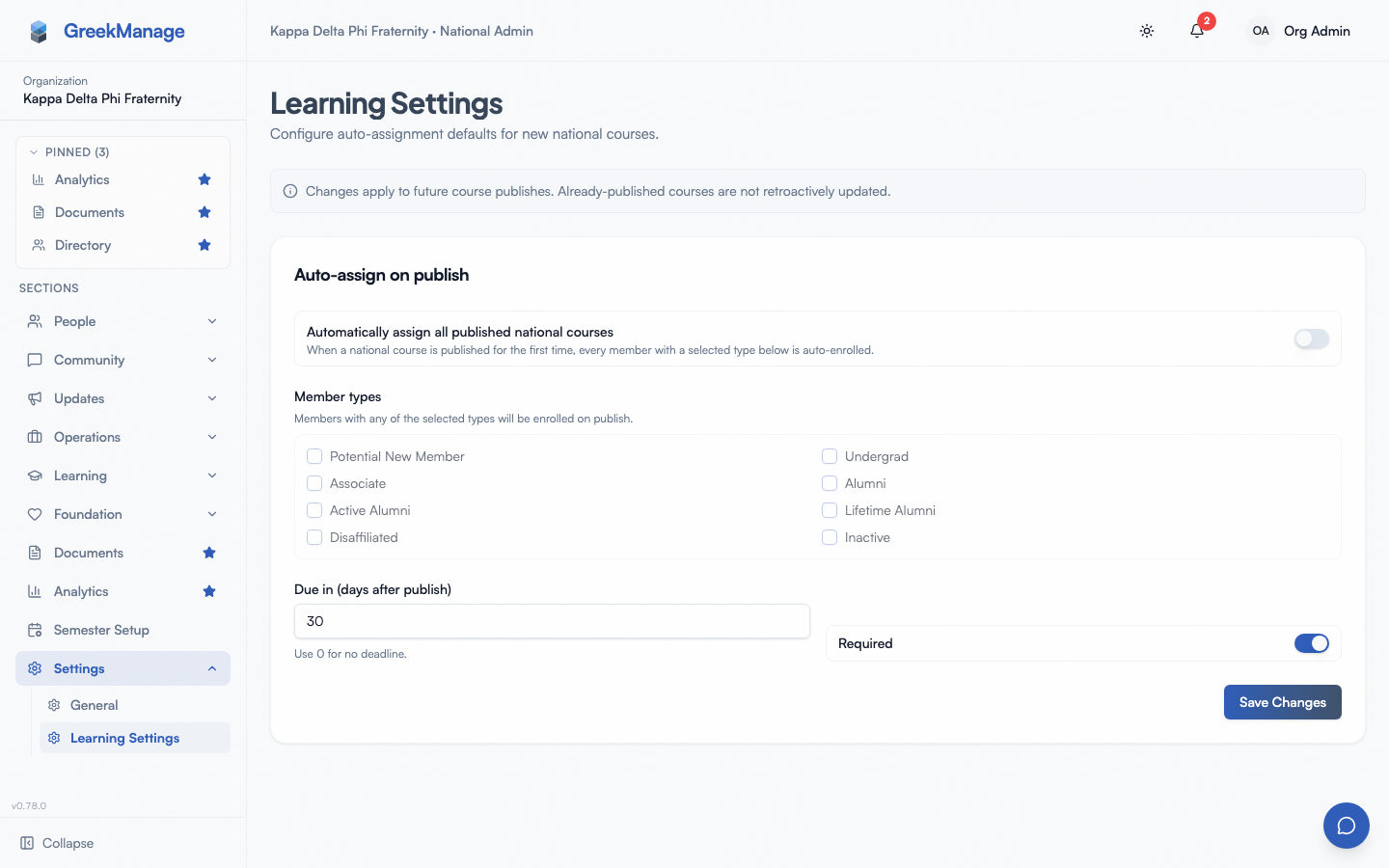 the settings page with the auto-assign toggle, member-type picker, and due-days input
The page has one card: Auto-assign on publish. Configure four things:
- Automatically assign all published national courses. The master toggle. Off by default.
- Member types. Which membership statuses get auto-enrolled. Tick any number — pledges, new members, active, alumni, lifetime, etc.
- Due in (days after publish). How many days the new auto-assignments give members to complete. Default 30. Zero means “no deadline.”
- Required. Whether the resulting enrollments are required (default true) or recommended.
Click Save Changes. Settings apply going forward; they do not retroactively re-assign anything that’s already published.
What “fires” means
The defaults fire exactly once per course, the first time you publish it. Specifically:
- You publish a course with National scope.
- The platform checks whether this is the course’s first-ever publish. (If the course has ever been published before — even if you unpublished it and re-published it later — the defaults are skipped.)
- If first-time, the platform reads your org’s defaults. If auto-assign is on and there’s at least one selected member type, it creates a bulk assignment targeting those statuses, sets the deadline to
now + due-days, applies the required flag, and notes “auto-assigned via org learning defaults” on the assignment. - The bulk assignment expands in the background into individual enrollments for every active member matching the selected statuses.
- Members get a “new course assigned” notification.
The course is stamped with “auto-assigned on” so subsequent unpublish-and-re-publish cycles don’t re-trigger. This prevents an admin who’s tinkering with a course (publish, fix a typo, unpublish, re-publish) from accidentally re-enrolling members who already have the enrollment.
When defaults don’t fire
The defaults are deliberately narrow. They do not fire when:
- The course is not national-scope. Region-scoped and chapter-scoped courses ignore org defaults. The reasoning is that regional/chapter content is targeted by definition — you picked a region or chapter when you authored the course, so the audience is already specified. Defaults are for “every member” cases.
- The course has been published before. As described above, this is the dedupe guard. The defaults only trigger on the maiden voyage.
- No member types are selected. If you turn auto-assign on but don’t tick any statuses, the platform skips the assignment rather than enrolling everyone or no one. This is a fail-safe — you have to explicitly say who to target.
- Auto-assign is off. The master toggle gates everything else.
Defaults vs. assignment rules
Defaults and assignment rules overlap, but they’re complementary tools for different timeframes:
| Defaults | Assignment rules | |
|---|---|---|
| Fires on | Course publish (one-shot) | Member status change (ongoing) |
| Targets | Existing members at selected statuses | Members transitioning into the selected statuses |
| Use case | Roll out new training to the whole org | Onboard new pledges/officers as they appear |
| Per course | One trigger, never repeats | Can have multiple rules per course |
| Edits | Updates apply to future course publishes | Edits don’t retroactively enroll |
A typical setup uses both:
- Defaults: target =
active,pledge,officer,president. Now every national training you publish lands on the whole org automatically. - Rules: trigger on
pledge→ enrolls new pledges in foundational training even months after publish.
The combination handles “everyone at publish time” plus “everyone joining later.”
What the auto-assign actually does
When defaults fire, the platform writes a single bulk assignment row targeting the selected statuses, then dispatches a background job to expand it into per-member enrollments. The job is the same one a manual bulk assign uses, so:
- It’s idempotent. Members who already have an enrollment for this course (which would be no one in the auto-assign case, since the course was just published, but the safety is there) are skipped.
- It’s scoped to active memberships. Only members in
active,alumni, etc. (whichever you ticked) get enrolled. Disaffiliated and other “no platform access” rows are excluded automatically. - It scopes to the org. Cross-org leakage is impossible — even if a stale FK existed, the expansion query filters to the course’s organization.
For a 30-chapter org with 5,000 active members, the expansion finishes within seconds. For a single-chapter test org, it’s near-instant.
Editing defaults
Settings changes apply to future publishes only. If you turn auto-assign on today, the next national course you publish gets the auto-assign treatment. Courses you’ve already published do not retroactively get enrolled — they’re already through their publish event.
Likewise, changing the selected member types only affects the next first-time publish. The members who were auto-enrolled under a previous configuration keep their enrollments unchanged.
There’s deliberately no “re-fire defaults” button. If you want to bulk-assign an already-published course to a new cohort, use the course’s Assign action and pick the target audience manually — that gives you full control and avoids the surprise of a default fire that’s no longer aligned with your intent.
Member type targeting
The member-type picker exposes every membership status your platform recognizes (pledge, new member, active, alumni, active alumni, lifetime alumni, etc.). Tick the ones that should get the training.
Common combinations:
- Compliance/safety training (annual). Tick every active status —
pledge,new_member,active,officer,president. Alumni statuses usually don’t need annual safety training. - Lifecycle training (one-time). Often handled better as a rule (triggered on the lifecycle transition) than as a default — the default would only fire on publish, not on each new pledge.
- Officer onboarding. Defaults can target
officeras a status, but if officer is a role rather than a status in your data model, use a manual assign by role on the course instead.
When in doubt: defaults target “the entire steady-state population.” Rules target “the people entering a state.” Manual assigns target “this specific cohort, this once.”
Disabling defaults entirely
Toggle Automatically assign all published national courses off. The platform skips the entire auto-assign flow on future publishes, regardless of what’s ticked under member types. Your tick-list and due days are preserved — you can re-enable later without re-configuring.
This is the right move if your org runs a “publish, then announce, then manually assign on a schedule” workflow rather than a “publish, immediately enroll” workflow. Different orgs prefer different cadences; the toggle accommodates both.
Related
Last verified against v0.62.1.