PNM application questions
The Application Questions card under Org → PNM → Settings is where you add org-specific custom questions that go beyond the standard fields. Every question you author here shows up on the public apply page in the order it appears in the editor, and answers are persisted on each PNM record under a structured map keyed by question identifier.
The same schema editor powers compliance event forms, so if you’ve authored a compliance form before, the experience here is identical.
When to use a custom question instead of a standard field
Reach for a custom question when:
- The question is genuinely org-specific (e.g., “Which chapter event introduced you to us?”)
- You need a widget the standard fields don’t offer — multi-select, conditional follow-up, or rich-text answer
- You want to phrase the prompt in your org’s voice rather than the generic standard-field label
- You need a question to appear only when another answer triggers it (conditional logic)
Stick with a standard field when the same data point exists in the standard list. The advantage of a standard field is that the captured value is stored on a typed column you can filter, sort, and report on directly; custom answers live in a JSON map and are best surfaced on the detail page rather than as table columns.
What question types are supported
The schema editor exposes short text, long text (textarea), number (with optional min/max), checkbox, single select (dropdown), multi select (checkboxes), date, and two member-picker types shared with the compliance module (not applicable to the public PNM form, which has no roster to pick from). Every type except Checkbox supports a Required toggle that is independent of the Required fields toggles for standard fields.
There is no email, phone, or file-upload question type. If you need applicants to upload a file, use the Attachments card’s Custom documents section instead — it’s built specifically for that (its own label, required/optional toggle, and file validation), where a question here would have none of it.
Conditional follow-up questions
Single-select and checkbox questions support a conditional follow-up — a second question that only renders when the parent answer matches a specific value. For example: “Are you a transfer student?” Yes → “What was your previous institution?” The follow-up has its own required toggle, and its requirement only fires when its parent answer triggers it. If the parent answer doesn’t trigger the follow-up, the follow-up’s required toggle has no effect on submission.
This is enough conditional logic for most recruitment forms. Deeper branching (a question that triggers based on the value of another conditional, multi-condition triggers, etc.) is not supported — model those with separate questions and a clear free-form instruction at the top.
Validation
Each question type carries basic validation: number fields enforce min/max, select fields reject an answer outside the configured choices, and required questions reject empty answers — in the browser and on the server, so a payload posted directly cannot bypass it. A blank required answer comes back as 400 REQUIRED_ANSWER_MISSING, naming the questions, and nothing is written.
A whitespace-only answer counts as blank. 0 does not — it is a real answer to a number question, as is an explicit no on a Single Choice.
Authoring a question
- Open Org → PNM → Settings → Application Questions.
- Click Add field.
- Pick the question type.
- Set the prompt (the visible label), an optional help text shown beneath the input, and the required toggle.
- For select types, add the choices.
- For conditional follow-ups, click Add conditional field on the parent question, pick the trigger value, and configure the follow-up like any other question.
- Repeat for each question.
- Use the up/down handles to reorder.
- Click Preview form at the bottom of the card to see exactly what an applicant will see. Use this aggressively — it’s much faster than smoke-testing the live apply URL.
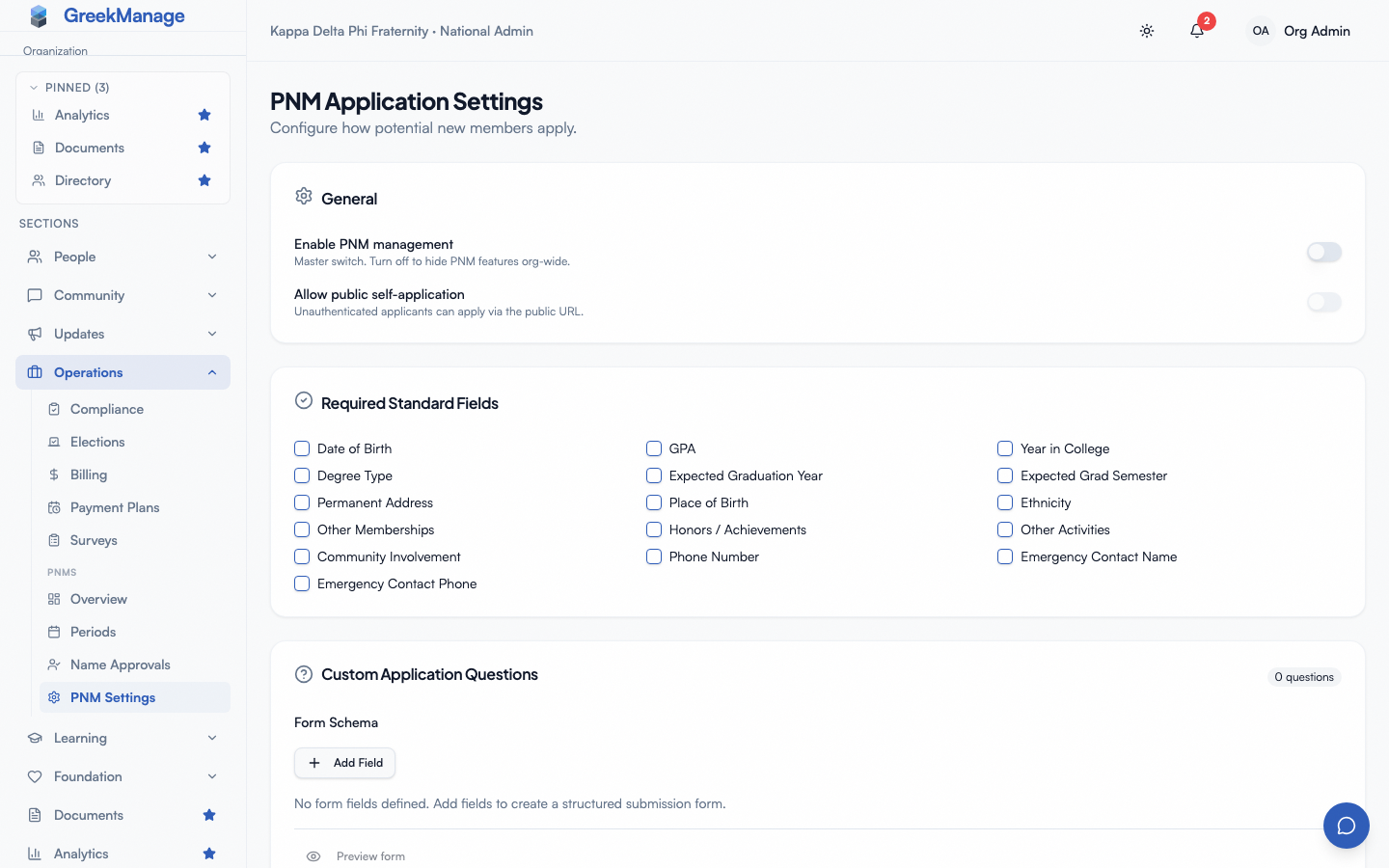 PNM settings - Application Questions editor with preview
When you save the settings page, every change to the questions list takes effect immediately. There is no draft state — applicants who arrive on the public page after your save see the new questions, applicants mid-form see the version they originally loaded.
How answers are stored and surfaced
Each PNM record carries an application_answers field — a structured map keyed by question identifier. Identifiers are assigned by the editor when you create the question and never change; renaming the prompt updates the visible label but preserves answer continuity, so historical answers don’t lose their meaning.
On the PNM detail page (chapter or org view), answers render in a Custom answers section beneath the standard fields. Each answer is shown next to its current prompt, so a renamed prompt is reflected on every record retroactively.
If you delete a question, existing answers for that question stay on the record but no longer render on the detail page. This is intentional — it preserves audit history without cluttering the UI. If you change your mind and re-add the question with the same identifier, the old answers reappear. (Adding it back as a new question with a fresh identifier does not recover them.)
How required custom questions affect completion percentage
Required custom questions feed into the same completion-percentage calculation as required standard fields. A required question that has not been answered counts against the denominator; a required question with a non-empty answer counts toward the numerator. Optional questions don’t affect completion at all.
For conditional follow-ups: a follow-up only contributes to completion when its parent answer has triggered it. A hidden conditional doesn’t count for or against — it’s effectively not part of the form for that applicant.
Best-practice picks
- Be brief. Every question increases drop-off. Aim for the minimum that informs your bid decision.
- Prefer single-select over short-text when the practical answer space is small. Selects are faster to fill, easier to skim, and easier to filter on the queue.
- Put long-form prose last. Applicants tire on textareas; if you put “Why do you want to join?” first, you’ll lose people. Save it for the bottom.
- Use the preview obsessively. A question that reads clearly in the editor sometimes lands awkwardly in the real form — preview shows you the truth.
- Don’t duplicate standard fields. Asking “What’s your GPA?” as a custom question when GPA is also a required standard field gets two answers stored on the record. Pick one.
Changing questions mid-cycle
The editor is live — every save is immediate. If you must change a question while applications are flowing, prefer adding new questions over editing existing ones. Edits to a prompt are safe (the identifier doesn’t change). Deletes are reversible (re-adding restores answers). Type changes are not safe: changing a yes/no into a multi-select silently invalidates the stored answer shape for every record submitted before the change, which can blank out the value on the detail page.
If you absolutely must change a type mid-cycle, do it after the period closes.
Related
- PNM required fields — standard fields that ship with every org
- PNM attachments — file uploads, standard and custom
- PNM admin onboarding — first-hour walkthrough
- Applying as a PNM — what your applicants experience
Last verified against v0.82.0 (2026-09-07).