PNM notification routing
The Notification Routing card under Org → PNM → Settings decides who finds out about new PNM activity, how quickly, and through what channel. The default routing fires a per-application email to the chapter officers of the chapter an applicant selected, plus a once-a-day digest email to national admins summarizing every new PNM across all chapters. Each piece is configurable independently.
This is a v0.58 feature; orgs on older deployments may see a simpler always-on routing model. After upgrading, review the card to make sure your routing matches your operational rhythm.
The four reviewer toggles
The first four toggles route inward, to people inside the organization. The two applicant toggles further down the card are the only ones that send mail to someone outside it.
The card surfaces four boolean toggles plus a digest-time picker:
- Notify chapter officers — when a new PNM is created, email every active officer and the president of the chapter the applicant selected. This is the most common useful notification: officers see new applicants in their queue in real time. Default: on.
- Notify regional admins — when a new PNM is created, email every regional admin of the region the PNM’s chapter belongs to. Useful in orgs where regional admins actively coordinate recruitment across their region. Default: off.
- Notify national admins on every application — when a new PNM is created, email every org admin. Useful only for small orgs or low-volume periods; for a 30-chapter recruitment, this will fire dozens of emails a day and create notification fatigue. The card hint explicitly recommends keeping this off and preferring the digest. Default: off.
- Send national admins a daily digest — once a day, email every org admin a single summary of every PNM that arrived in the prior 24 hours, grouped by chapter. The right knob for org-level visibility without per-application noise. Default: on.
The Digest send hour (UTC) dropdown next to the digest toggle picks the hour of day (0–23 in UTC) when the digest fires. The hint suggests 13 UTC as roughly 9 AM Eastern. Adjust to taste — the card spells out the UTC mapping so you can avoid timezone surprises.
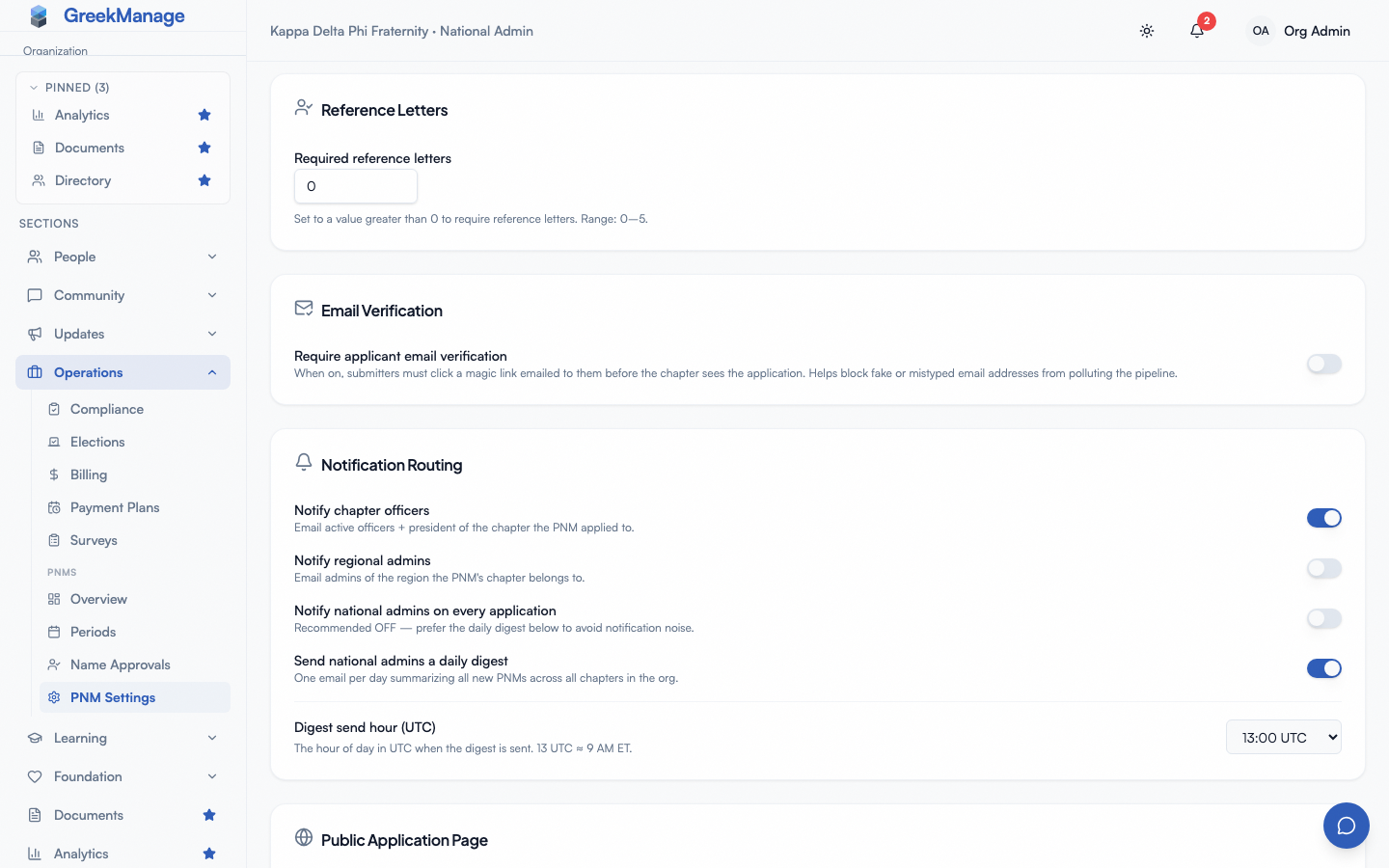 PNM settings - Notification Routing card with toggles and digest hour
Telling the applicant the outcome
Two further toggles decide whether the person who applied ever hears back:
- Email the applicant when approved — sent once the application clears every tier in its approval chain, not when a single tier signs off. A chapter officer approving the first tier of a
chapter → nationalchain has not approved the applicant; telling them so would announce a decision that can still become a rejection. Default: off. - Email the applicant when rejected — sent when any tier rejects the application. Any tier may reject outright, so a chapter officer alone can end an application. Default: off.
Both are off by default, and the card says so in words rather than leaving you to infer it from two unchecked boxes: with both off it states plainly that applicants are not told the outcome of their application. Turn either on and the sentence changes to match, naming whichever half is still silent. This is deliberate — an organization that has never considered the question has not decided to write to applicants, and a rejection email is not a message to send by accident.
Applicants have no GreekManage account, so these are email only. There is no in-app notification that could reach them.
What these emails do and do not say
- They name no reviewer and no tier. The message comes from the organization. A rejection naming the chapter officer who made the call sends a declined applicant to that person directly, and naming the tier hands your review structure to someone outside the organization.
- A rejection never carries the reason. When a reviewer records a reason it goes onto the application’s admin notes — for the record and for the tiers above — and stays there. The applicant is told the outcome, not the reasoning.
- They are sent from your organization’s email identity if you have one configured, and from the platform default otherwise.
If you leave these off, plan another channel: applicants who applied through the public form have no other way to find out.
Per-application emails
When Notify chapter officers is on, every new PNM submission queues an email to every active officer of the selected chapter and the chapter president. The subject reads [{Org Name} {Chapter Name}] New PNM application from {Applicant Name} and the body summarizes the applicant and links to the PNM detail page. Delivery is essentially real-time, usually within a minute. Recipients are resolved at send time, so officers who join or step down between submission and dispatch reflect their current state.
When Notify regional admins is on, the same fan-out goes to every regional admin of the region the chapter belongs to. Independent of the chapter officer toggle.
When Notify national admins on every application is on, every new PNM queues an email to every org admin. The card recommends against this for moderate-volume orgs — prefer the daily digest for org-level awareness without per-application volume. Leave this off unless you’re running a small org where org admins also operate as chapter officers.
Daily digest
When Send national admins a daily digest is on, an hourly sweep checks every org’s PNM configuration; orgs whose digest hour matches the current UTC hour and whose new-PNM count is non-zero for the prior 24 hours get a digest email.
The sweep skips orgs that are not licensed for Operations, which is the module recruitment belongs to. That check matters more here than on most surfaces: the digest is scheduled work, not something reached by clicking a page, so without it an org whose license lapsed would keep receiving applicant names and email addresses by mail every day. If digests stop arriving and the toggle looks right, check the license before the toggle.
The digest is sent to every org admin and contains:
- A subject line of the form
[{Org Name}] N new PNM application(s) — {Date} - A summary count
- A breakdown by chapter, with applicant name, applicant email, and submission timestamp for each PNM
- A link to the org-level PNM queue for one-click triage
Orgs with zero new PNMs in the prior 24 hours do not receive a digest email. Quiet days produce no inbox noise.
The digest covers all chapters across the org. There is no per-chapter digest today; chapter officers rely on the per-application chapter-officer email instead.
How the digest hour is sized
The send hour is in UTC so every recipient on a given digest gets the email at the same wall-clock moment regardless of where they live. Pick an hour that maps to a reasonable local morning for your headquarters — 13 UTC is roughly 9 AM Eastern in standard time and 8 AM Eastern in daylight time, with the rest of the US time zones an hour behind for each step west. There is no automatic daylight-savings adjustment; the digest hour is whatever you set it to year-round.
Routing rules for reference-letter submissions
When a referrer submits a reference letter, the system treats the event as activity on the underlying PNM and reuses the same per-application routing flags:
- If Notify chapter officers is on, the chapter officers get an email about the new letter
- If Notify national admins on every application is on, org admins get an email about the new letter
The daily digest is not re-fired for reference letters — it covers new PNMs only. Officers and admins reviewing the per-letter email get a link to the PNM detail page where the new letter shows up in the References section.
This dual-purposing is deliberate: admins reviewing a freshly-arrived letter ultimately care about the underlying PNM, so the routing matches what they’d want for any new PNM activity.
Email verification deferral
When email verification is enabled, none of the routing fires until the applicant verifies their email. A submission that lands in pending_email_verification does not produce chapter officer emails, regional admin emails, per-application national admin emails, or a digest entry. When the applicant verifies, the deferred fan-out fires as if the submission had just landed.
This avoids notifying officers about applications that never get verified (typo’d emails, bot submissions, etc.).
Recipients, opt-out, and save behavior
If you want a fully silent system, turn off all four reviewer toggles — new PNMs still appear on the chapter and org queues, just without email. Useful in testing or a soft-launch, rarely useful in a busy cycle. The two applicant toggles are separate and already off by default.
Recipient lists are derived from active role assignments: chapter officers and presidents for the chapter the PNM selected, regional admins for that chapter’s region, org admins for the org. There is no separate per-recipient opt-out on this card — if a particular admin doesn’t want PNM emails, change their role assignment (Inviting admins).
Routing changes save with the rest of the PNM Settings page. New submissions from the moment of save use the new routing; in-flight submissions already fanning out are not retroactively re-routed. Toggling the digest off mid-day does not cancel a digest the hourly sweep has already queued.
Related
- PNM applicant review — where approvals and rejections happen
- Approval chains — which tiers review an application, and why any of them may reject
- PNM email verification — when on, defers all routing until verification
- PNM reference letters — letter submission reuses these flags
- Inviting admins — who gets PNM emails depends on org admin assignments
- PNM admin onboarding — first-hour walkthrough
- Permissions matrix — who can edit notification routing
Last verified against v0.86.5 (2026-09-14).