PNM program
PNM (Prospective New Member) is GreekManage’s recruitment / intake surface. It handles the journey from a person submitting an application through being initiated as a member. It is not a module of its own — it is part of Operations and requires that license, both for the admin and officer surfaces and for the public apply page.
New to PNM? Start with the PNM admin onboarding — it walks you through the critical-path settings (org slug, period, attachments, references, consents) in about 30 minutes.
What does the applicant see? Applying as a PNM is the public-facing flow your prospects go through.
Deep dives for each settings card and major feature: General config · Required fields · Application questions · Attachments · Reference letters · GPA gate · Email verification · Consents · Public page · Notification routing · Periods
Lifecycle overview
A PNMProfile tracks intake status through these states:
not_started → approved → in_progress → completed (crossed)
                                     → rejected
Practically:
- Applicant submits the public apply page → PNM record created (intake_status = not_started).
- Org or chapter reviews and approves the applicant (intake_status = approved).
- Intake begins — name assignment, pledging activities, etc. (intake_status = in_progress).
- Member crosses; the underlying Membership is updated to Undergraduate (intake_status = completed).
- If the applicant is rejected at any point, intake_status = rejected.
Configure PNM settings
Org → PNM → Settings.
Settings are organized into cards:
- General — period defaults, intake configuration
- Public Page — header text, intro markdown, and per-org slug (used in your apply URL:
https://[your-app-domain]/apply/[your-org-slug]) - Required Fields — toggle which standard PNMProfile fields are required (birth date, place of birth, address, ethnicity, GPA, degree type, year in college, expected graduation, organizations, achievements, etc.)
- Custom Questions — add org-specific questions (free-form
application_answerskeyed by question ID) - GPA Gate — optional minimum GPA; submissions below threshold are soft-flagged (
auto_flagged = true) for admin review - Attachments — see below
- Reference Letters — see below
- Consents — pick which org Consent Templates applicants must accept
- Email Verification — optionally require applicants to confirm their email before the application enters the regular not_started lifecycle
- Intake Rules — completion threshold, status after crossing, and Fraternal name at crossing: Name must be approved (the default — the name walks your PNM fraternal name approval chain), Name required, no approval, or No name required. The setting applies to your whole org. Switching approval back on blocks crossing for any PNM whose name was never approved; members who already crossed are unaffected
- Notification Routing — chapter-officer per-application emails plus national admin daily digest (v0.58)
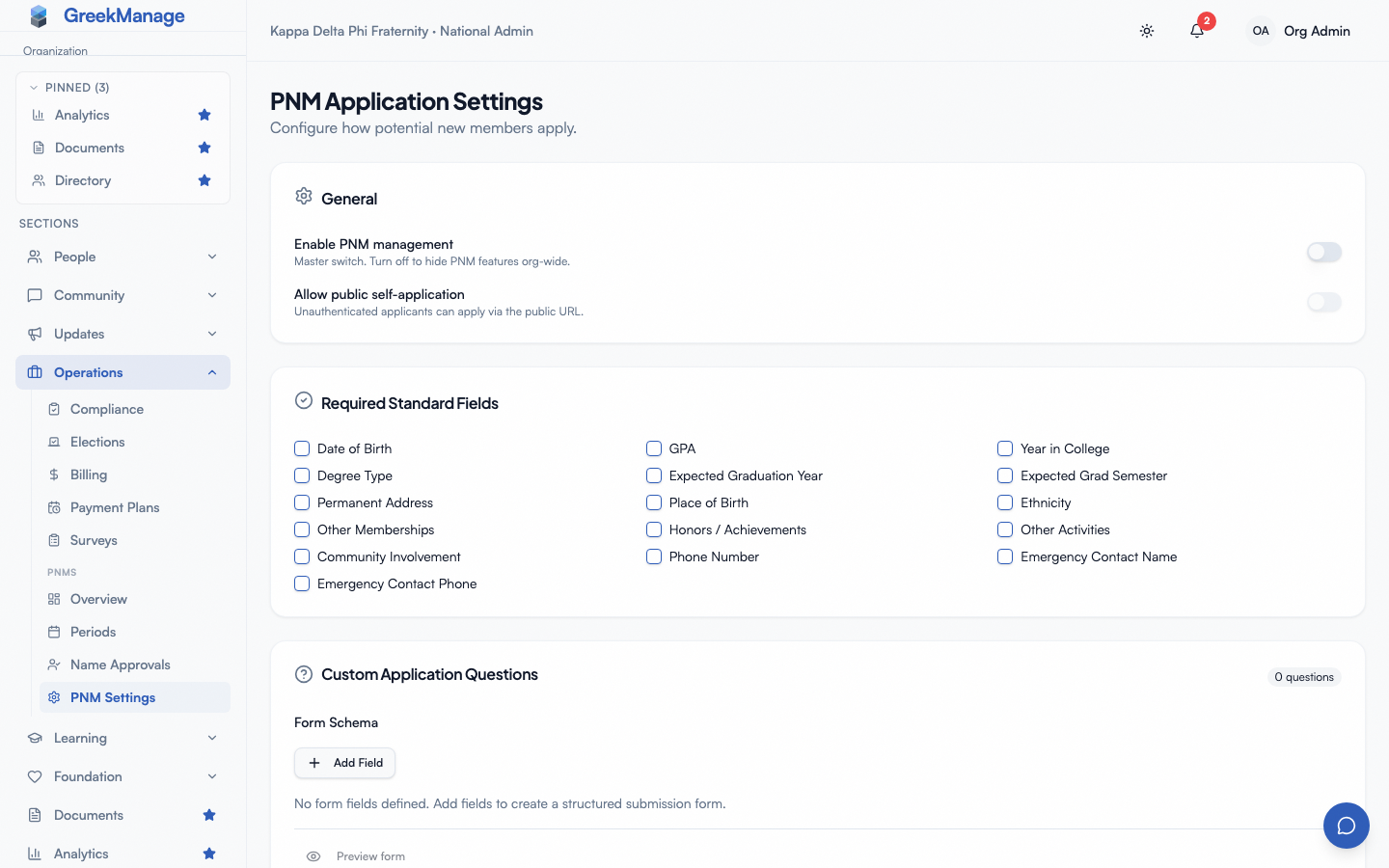 PNM settings — application form and consent.
Attachments
The Attachments settings card lets you require applicants to upload supporting files during the public apply flow.
Supported types:
- Resume — PDF, DOC, DOCX (10 MB max)
- Headshot — JPEG, PNG, WebP (10 MB max)
- Transcript — PDF, DOC, DOCX (10 MB max)
- Cover Letter — PDF, DOC, DOCX (10 MB max)
To enable:
- Open Org → PNM → Settings.
- In the Attachments card, check the types you want applicants to provide.
- Click Save.
What happens at submit time:
- Every checked type becomes required on the public apply page — applicants see a labelled drag-and-drop uploader for each.
- The server validates uploaded files via magic-byte sniffing (not just the client-declared content type), enforces the 10 MB cap, and rejects extension/type mismatches before the PNM record is created.
- If a required attachment is missing or invalid, the submission fails with a 400 — no dangling PNM rows.
Reviewing attachments:
- The PNM detail page (chapter or org view) shows an Attachments section with each upload’s type, filename, size, and uploader.
- Org admins, regional admins, and the original uploader can delete an attachment; chapter officers cannot delete uploads they didn’t make themselves.
Self-upload after the fact:
The applicant (and their chapter officers) can upload additional attachments later via POST /api/pnm-profiles/<id>/attachments/ — useful when a transcript wasn’t ready at apply time.
Reference letters
The Reference Letters settings card lets you require N reference letters per applicant (0–5). The system handles invitation, collection, and tracking automatically.
Configure:
- Open Org → PNM → Settings.
- In the Reference Letters card, set “Required reference letters” to the number you want (1–5).
- Save.
What happens at submit time:
- The public apply page renders N email/name input pairs in a “Reference letters” block. Applicants must supply N unique referrer emails (none equal to their own email).
- After the PNM is created, the system mints a one-time-token magic link per referrer and emails each one. Tokens are single-use, expire after 7 days, and are stored only as a sha256 hash (the plaintext is never persisted).
- Each referrer clicks the link in their email and lands on
/reference/<token>. They submit a brief letter (minimum 50 characters) plus an optional file. Distinct UI states cover already-submitted (409), expired (410), and unknown (404) tokens. - On successful submission, the same chapter-officer / national-admin notification flags from your routing config fire — admins are alerted that a new letter has landed.
Reviewing letters:
- The PNM detail page shows a References section with one row per letter: status badge (Pending / Submitted / Expired), referrer email + name, sent/expires/submitted timestamps, expandable letter body, and a download link for any uploaded file.
- For pending letters, admins see a Resend button that mints a fresh token and re-fires the invitation email — useful when a referrer says they didn’t get the original.
Throttle: the public referrer endpoints are rate-limited to 5 requests per hour per IP. The applicant flow itself is unaffected.
Manage PNM periods
A period is a recruitment window (e.g., “Fall 2026 Rush”). Periods scope applications and analytics. Periods are always org-wide — all chapters under an org rush together.
Create a period
- Open Org → PNM → Periods.
- Click New period.
- Set:
- Academic year (e.g., 2026)
- Semester — Fall, Spring, or Summer
- Status — Draft, Active, Closed
- Open date / close date — bound the application window
- Closed message (markdown) — shown on the public apply page outside the open/close window
- Save.
The combination of (organization, academic_year, semester) is unique. The public apply page accepts submissions only for your newest Active period (the first Active one in the Periods list), and only while now is between its open and close dates. An older Active period never opens the page, even inside its own dates. See PNM periods.
Public apply page
Each org has a public apply URL: https://[your-app-domain]/apply/[your-org-slug] (or your custom domain).
Anyone can submit an application. The form is generated from your settings.
After submitting, the applicant:
- Gets a confirmation email with their tracking ID.
- Their info goes to the chapter(s) they selected.
- Chapter officers see them in PNMs queue.
Name approvals
The approval flow varies by org policy. Most common: chapter approves first, then org admin reviews and approves names submitted by chapters.
As an org admin
- Open Org → PNM → Name approvals.
- Review pending names — each shows the applicant’s info, the recommending chapter, and any chapter notes.
- Click Approve or Decline with comments.
Approved names move to PNM status in the system. Declined names get a notification (the chapter delivers it to the applicant).
Rejection
If an applicant is found ineligible after submission, mark them as rejected from the PNM detail view (sets intake_status = rejected and stamps rejected_at). Admin notes are private to admins; the applicant gets a rejection notification.
What’s not built today
- No dedicated bid-management workflow (no “Bidded” intake status, no bid acceptance page surfaced to PNMs). Bid coordination today happens outside the platform; mark applicants approved → in_progress → completed (crossed) as their actual lifecycle progresses.
- No reusable disqualification reason picker — admins add free-form notes when rejecting.
- No custom domain for the apply page — the URL is always under your GreekManage host with your org slug.
Tips
- Test the public apply page before each period. Submit a fake application end-to-end.
- Review chapter approvals daily during peak periods. Lag in your queue creates lag in chapters’ recruiting.
- Archive old periods. Keep dashboards clean by archiving 2+ year old periods (data is preserved).
Related
- Module: Operations
- Custom fields — customize the apply form
- Consent templates — required at application
Last verified against v0.62.1 (2026-05-10). Recruitment-period rule corrected 2026-10-11.