PNM required fields
The Required Fields card under Org → PNM → Settings controls which of the built-in application fields applicants must complete before they can submit. Every field listed in the card is always available on the form; the toggles decide whether each one is required for that submission to succeed.
The standard fields
The card exposes the following standard fields, grouped here by category for readability:
Personal
- Date of birth
- Place of birth
- Permanent address
- Ethnicity — free text, with clickable suggestions including "Prefer not to say". Carried to the member's Demographics card at crossing (#1025)
:::warning Requiring ethnicity means requiring an answer A standard field only appears on the application when you mark it required, and a required field must be filled in before the applicant can submit. For most fields that is fine. For ethnicity it means an applicant cannot skip the question.
What makes that acceptable is the "Prefer not to say" suggestion, which fills the field in one click and is stored as a genuine refusal rather than as a blank. Your Demographics report counts those separately from people who were never asked, so requiring the field does not inflate your disclosure rate.
If you would rather nobody be prompted at all, leave ethnicity unrequired — the field is then absent from the application entirely, and members can still supply it themselves later from their profile. :::
- Phone number
Academic
- GPA
- Year in college
- Degree type
- Expected graduation year
- Expected graduation semester
Background
- Other memberships (organizations and societies)
- Honors and achievements
- Other activities
- Community involvement
Emergency contact
- Emergency contact name
- Emergency contact phone
Every standard field is rendered with a sensible widget for its data shape: dates use a date picker, GPA is a numeric input bounded 0.0–4.0, year in college and degree type use dropdowns, and the long-form prose fields use textareas. You do not configure widgets — the toggles only control required-ness.
What's always required, regardless of these toggles
Independent of the Required Fields card, every public submission must include:
- First name
- Last name
- Selected chapter (out of your org's active chapters)
- Every consent listed in your Required consents configuration
- Every attachment type listed in your Attachments configuration
- The configured count of reference letters, if any
These are non-negotiable; the Required Fields card does not surface them as toggles because turning them off would leave you without enough information to create the underlying applicant record. If you don't want, say, an address, leave that toggle off and the applicant can skip it — but they will still have to provide a name and an email.
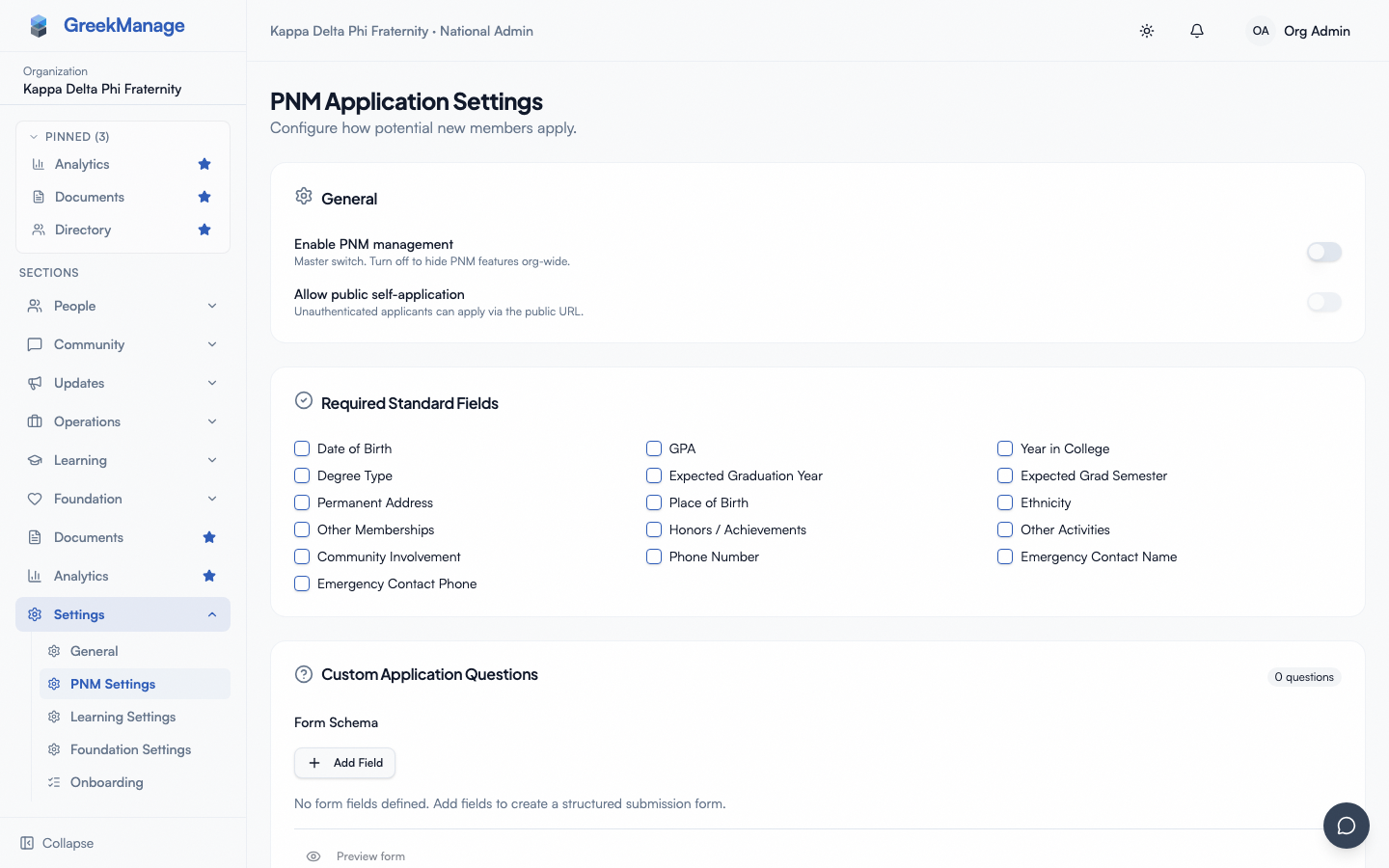 PNM settings - Required Fields card with toggles
How the toggles affect the public apply page
Every field you check shows a required-indicator (asterisk) on the public apply page and blocks the submit button until it has a non-empty value. Fields you don't check are still rendered, but optional — the applicant can leave them blank.
The required toggles are enforced both client-side (the submit button stays disabled and the field shows an inline error message) and server-side (the submit endpoint rejects payloads missing any toggled-on field with a 400 response and a clear validation error). A determined applicant cannot bypass the requirement by tampering with the browser.
If a field's value is present but unparseable — a GPA of "banana" for instance — the server returns a 400 with a field-level error. The client surfaces this near the offending input rather than as a blanket failure.
How required fields affect completion percentage
PNM records carry a derived completion_percentage that admins see on the queue and on the detail page. The denominator is the count of every toggle you've turned on in this card plus every custom question you've marked required on the Application questions card. The numerator is the count of those same fields that have non-empty values on the record.
In practice this means turning on more required toggles lowers completion percentages early in a PNM's lifecycle and raises the bar for what counts as "ready for intake." The completion threshold you set under the Intake Rules card on the PNM Settings page determines how complete a PNM must be before they're eligible to be transitioned out of not_started.
Best-practice picks
There is no single right answer — orgs vary widely in what they collect — but a few rules of thumb hold:
- Require what you actually use. Required fields that get ignored downstream just create drop-off. Every additional required field measurably reduces submission completion rates.
- Require fields you'll need before bidding. If your bid decisions rely on GPA, year in college, and a list of other memberships, require those. Leave the rest optional.
- Don't require emergency contact at apply time. Most orgs collect emergency contact after the applicant is approved — at the bid acceptance or pledge intake meeting, not the open application. Public requiredness of an emergency contact phone deters legitimate applicants.
- Permanent address tends to be optional at apply. A campus or chapter address is collected separately when the applicant signs paperwork.
- GPA is usually required if you have a GPA gate. A gate without a required GPA field means most submissions silently bypass the gate.
Effect on the apply page rendering
The public apply page reads the same configuration as the admin queue, so toggling a field changes both surfaces at once. The order of fields on the public page is fixed (the categories above describe the rendered order); you cannot reorder, group, or section the standard fields. If you need richer grouping, captioning, or conditional logic, model the extra capture as a custom question on the Application questions card — those support sections, conditional fields, and richer widgets.
Changing required fields mid-cycle
You can edit the Required Fields card at any time, including while a period is active. Records that were submitted before a field became required keep their existing value (which may be empty); records submitted after must satisfy the new requirement. The completion percentage on existing records is recalculated against the current config on each read, so a record that was 100% complete yesterday can be 85% today if you tightened the rules — that's by design, since "complete" means "complete by the org's current standard."
If you tighten requirements mid-cycle, expect a small bump in records flagged as incomplete in the queue. This is not a bug. Either grandfather those records (treat them as complete despite the score) or have the chapter follow up with the applicant for the missing field.
Related
- PNM application questions — org-specific custom questions on top of these standard fields
- PNM GPA gate — soft-flag for low GPAs
- PNM consents — required consents are always required, regardless of this card
- Applying as a PNM — public-side experience
- Permissions matrix — who can edit these toggles
Last verified against v0.62.1 (2026-05-10).