AI provider configuration
GreekManage's AI features — the chatbot, mentorship matching, resume parsing, notification digests — all run through a pluggable provider layer. (Onboarding checklists also live in this module, but they're plain admin-authored content with no AI involved — they don't touch the provider layer.) As the platform admin you set the default provider every tenant inherits, and you operate the embedding index that the chatbot and search features rely on.
The provider model in one paragraph
There is exactly one platform-default AI provider — Anthropic, OpenAI, or Google Gemini. Each tenant's AI config starts out with Use platform default = on, which inherits whatever you've set here. A tenant can flip that off and supply their own API key (BYOM). Anthropic does not support embeddings, so any tenant on platform-default Anthropic falls back to keyword/trigram search for chatbot context retrieval. OpenAI uses text-embedding-3-small (1536-dimensional vectors); Google uses text-embedding-004 (768-dimensional).
Open the AI config
Platform → Settings → AI.
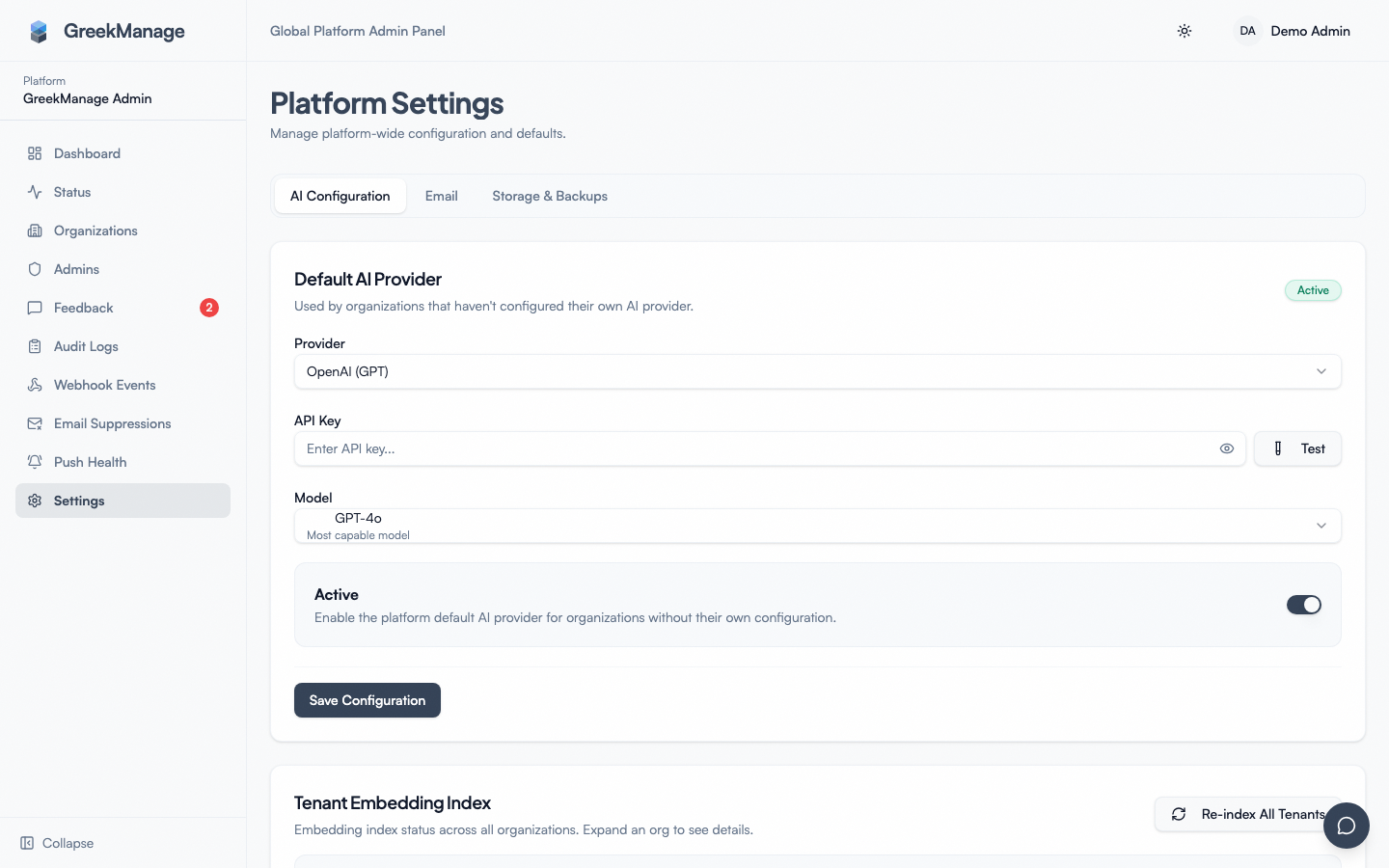 Platform Settings AI page — Default AI Provider and Tenant Embedding Index cards.
You'll see two cards:
- Default AI Provider — the platform-wide chat/completion provider every tenant inherits.
- Tenant Embedding Index — health overview of every tenant's content embeddings, plus the "Re-index" tools.
Setting the default provider
The Default AI Provider card has three fields and a test button:
- Provider — Anthropic, OpenAI, or Google. The selector pulls available providers from the backend, so the list always matches what the codebase supports.
- Model name — provider-specific. The model dropdown is populated from a live catalog synced from the provider's own model-listing API (see "Keeping the model list current" below) rather than a fixed list baked into the app. If the currently-configured model has since disappeared from that catalog, a "Use a custom model ID" link swaps the dropdown for a plain text field so you're never blocked from typing an exact model ID.
- API key — your platform-account API key for the provider. Encrypted at rest with the platform's Fernet key. The field shows the last few characters once saved; the full value is never returned to the browser again.
- Is active — leave on. Disabling here turns off all AI features for tenants on platform-default.
After saving, click Test API key. The platform calls the provider with a minimal validation request and reports back:
- Success — the key is valid and the named model is reachable. The config is marked verified.
- Invalid API key — typo, revoked, or wrong account
- Model not found — the named model doesn't exist on this provider or your account doesn't have access
- Rate limited — your key is valid, the provider is throttling; retry in a minute
- Connection error — provider API unreachable
Until the test succeeds at least once, treat the config as untrusted — tenants will hit confusing 5xx errors when they use AI features.
Switching providers safely
When you switch the default provider, two things happen:
- All tenants on platform-default immediately start using the new provider for chat completions. No re-deploy, no cache invalidation needed.
- Existing embeddings stay in the database, but they were generated against the old provider's embedding model. If the old provider was OpenAI and the new one is Google, every existing 1536-dim vector is stale relative to the new 768-dim model. Tenant chatbots will silently degrade until embeddings are regenerated.
If you switch from a provider that supports embeddings (OpenAI, Google) to one that doesn't (Anthropic), the chatbot for platform-default tenants falls back to keyword/trigram search — it doesn't break, but the answers get less semantic.
Always run Re-index all after a provider switch.
Keeping the model list current
The model dropdown used to be a short, hand-maintained list baked into the app — it would drift out of date whenever a vendor shipped a new model. It's now backed by a catalog (AvailableAIModel) that's kept fresh automatically:
- Daily sync. A scheduled task runs at 2 AM every day, calls each configured provider's own model-listing API, and refreshes the catalog — the platform's catalog using the platform key, and separately, each BYOM org's catalog using that org's own key (a vendor account's tier can see a different set of models than the platform's account).
- Refresh models button. Next to the Model field, click Refresh models to pull the latest list immediately instead of waiting for the nightly sync — useful right after a vendor announces a new model.
- Deprecated model banner. If the model you have configured falls out of the vendor's current list on a later sync, it's flagged as deprecated (not deleted or force-changed) — you'll see a banner naming the model and a nudge to switch, but nothing breaks until the vendor actually removes it.
- Custom model ID. The dropdown only shows a curated set of flagship models (dated/preview snapshots are collapsed). If you need an exact model ID that isn't in the dropdown, use "Use a custom model ID" to type it directly — the Test button still validates it against the live provider API.
Tenant embedding index
The Tenant Embedding Index card lists every org with an AI config, with one row per (org, content type) pair. Content types tracked:
- Member — member profile embeddings (for "find me a member who…" chatbot queries)
- Forum post — forum post and comment embeddings
- Compliance — compliance requirement and submission embeddings
- Document — document library embeddings
Each row shows the latest embedding job for that pair: status (pending / running / completed / failed), total items, processed items, failed items, started/completed timestamps, and any error log.
Tenant Embedding Index table with mixed status rows
Use this to spot stuck jobs (status running for hours), repeated failures on a specific org+content-type pair, or orgs that simply have no embeddings yet.
Re-index all (platform-default orgs only)
The Re-index all button on the Tenant Embedding Index card queues a full re-index for every org whose AI config is set to Use platform default = on.
When you press the button:
- Every platform-default org's organization ID is collected.
- A re-index task is queued for each one in turn.
- The card shows a confirmation count (e.g., "Re-index queued for 14 organization(s)").
- Each task runs asynchronously; watch the Tenant Embedding Index rows refresh as jobs move from
pendingtorunningtocompleted.
Re-indexing is a per-content-type operation: a single re-index call for an org schedules one job per content type (member, forum post, compliance, document) and processes them sequentially.
Nightly auto-refresh
A scheduled task runs at 4 AM every day and refreshes embeddings for every org with an active AI config. New or updated content (members added, forum posts created, compliance records modified) gets embedded; stale entries are pruned. You don't have to press anything for routine maintenance — the button exists for "I just changed the provider, regenerate everything now" situations.
If the nightly run starts failing for a specific tenant, the Tenant Embedding Index will show repeated failed rows with an error log. The most common cause is an invalid/expired BYOM key on the tenant side — ask their org admin to re-verify the key.
When a tenant has BYOM
A tenant flipping Use platform default = off signs up for owning their own provider lifecycle:
- Their chat completions hit their key, not yours
- Their embeddings are generated against their provider's model dimension (1536 / 768 / N/A)
- Per-content-type embedding jobs run independently of your platform-default re-index
- If their key is invalidated, only their tenant is affected — your other tenants stay healthy
- The Tenant Embedding Index still shows their rows so you can see the state even though you don't own the credentials
Common reasons a tenant goes BYOM: cost (their plan has free credits), compliance (they need provider-side data residency guarantees), or model preference (a specific Claude or GPT version that isn't the platform default).
Content scope toggles
Each org's AI config has four per-content-type scope toggles (ai_scope_members, ai_scope_forum_posts, ai_scope_compliance, ai_scope_documents) the org admin can flip. When a scope is off, that content type is skipped during embedding regeneration and chatbot retrieval for that org. You don't manage these from the platform side — they're org-admin controls — but they explain why a re-index might intentionally skip a content type.
What's NOT in the box
- No per-tenant cost dashboard. Provider-side usage and billing live in the provider's console (OpenAI, Anthropic, Google). The platform does not meter or attribute calls.
- No model A/B testing surface. One default per platform; no per-tenant model rollouts driven from here.
- No prompt-template editor. Prompts live in code.
- No "re-index only this content type for all tenants" button. Re-index is whole-tenant; per-content-type re-index is per-tenant.
Tips
- Test the API key every time you rotate it. A silently broken key surfaces as 5xx on AI features for every platform-default tenant.
- Re-index after every provider switch. Embeddings don't transfer between providers; the nightly task will fix it eventually, but pressing the button is the right move.
- Watch the Tenant Embedding Index after switching providers. A row stuck on
runningfor hours usually means a provider rate-limit; a row stuck onfailedusually means a bad key. - Communicate provider switches to tenants. A model rotation can change response style enough that engaged tenants will notice.
Related
Last verified against v0.62.1 (2026-05-11). Model dropdown switched from a hardcoded list to a daily-synced live catalog, with a manual "Refresh models" button, deprecated-model banner, and custom model ID input, v0.65.47 (2026-07-18).