Feedback inbox
Anywhere in the app, a user can open Send Feedback from their avatar menu and send you something. The submission lands in one place — your platform feedback inbox — and the queue is yours to triage.
The flow, end to end
- User submits. They open the avatar dropdown in the top-right of any page and click Send Feedback, which opens a dialog. There they pick a category (Bug, Feature Request, or General), write a description, and optionally attach a single file. The submission captures their page URL, user agent, current module, and resolved organization automatically — they don't have to type any of it.
- System throttles. The submit endpoint allows up to 500 submissions per user per hour, well above any plausible non-abusive rate. Past that, the user sees a 429 with a clear "you've sent too many" message. The cap is a defense against runaway bots and broken client loops, not a UX limit.
- You see it. The entry appears in your inbox immediately with status
New. - You triage. Read it, optionally promote to
In Progress, add an admin note, and resolve itCompletedorDismissedonce you're done.
Submitters never see the admin notes or status changes — there is no in-product reply or status-back-to-user mechanism in v0.62.1. If they need a response, email them at the address shown on the submission.
Open the inbox
Platform → Feedback.
You'll see all submissions, newest first.
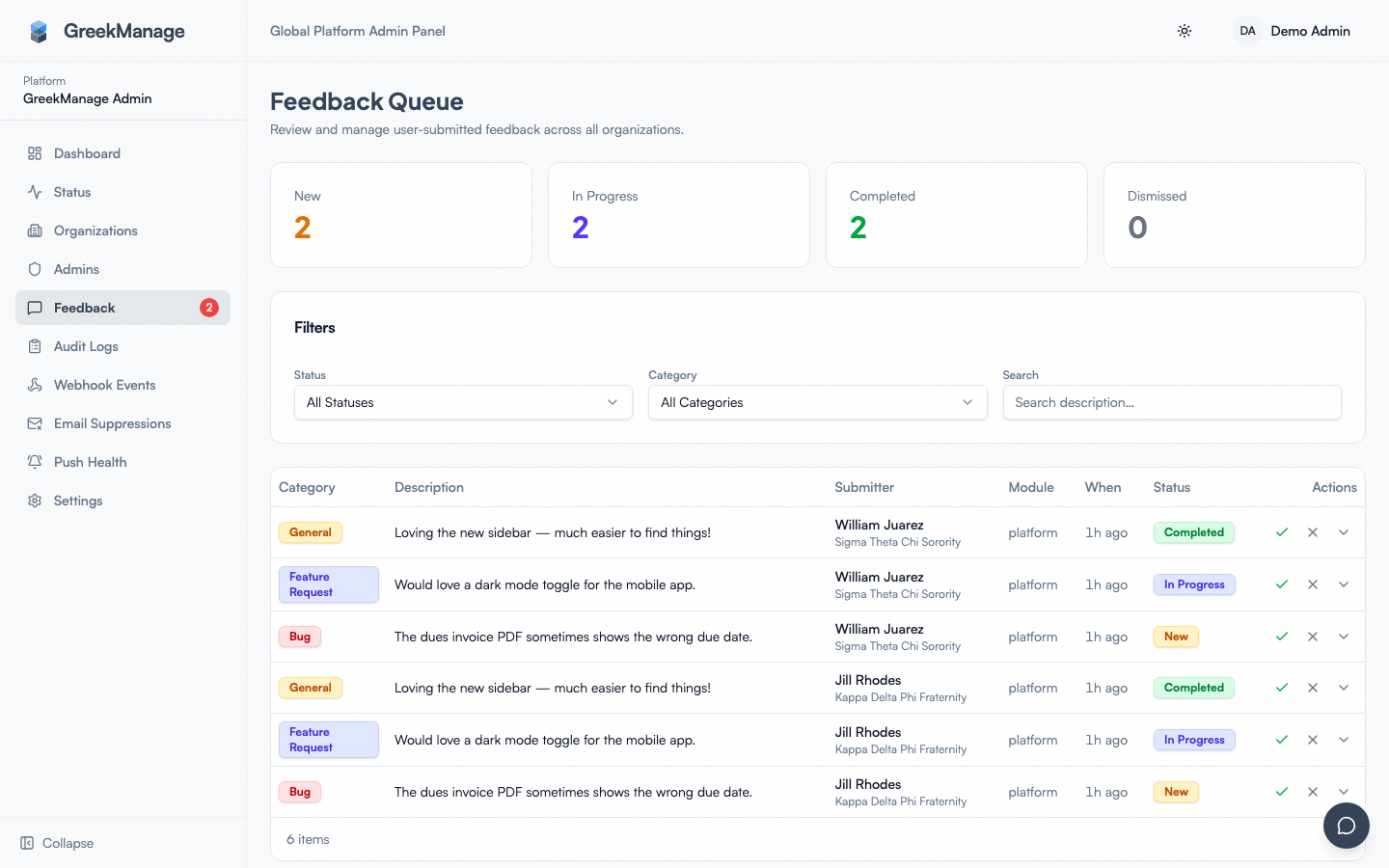 Platform → Feedback list view
Each row shows:
- Submitter (name, email; org if the user belongs to one)
- Date submitted
- Category (
Bug,Feature Request, orGeneral) - Description (truncated; click through for full text)
- Page URL the feedback was sent from
- Module the user was in (e.g.,
compliance,learning,engage) - User agent (parse OS/browser/mobile platform from this)
- Attachment indicator (if any — exactly one file per submission)
- Status (
New,In Progress,Completed, orDismissed) - Admin notes (free-text, internal, never visible to submitter)
Click a row to open the detail view, where you can edit the status and admin notes.
Status workflow
Four statuses, mapped to a simple lifecycle:
- New — just landed, nobody's looked at it yet
- In Progress — you've read it and are acting on it (or have filed it into an issue tracker)
- Completed — the underlying bug is fixed, the feature is shipped, or the question is answered
- Dismissed — won't fix, not a bug, duplicate of something already handled
There is no Acknowledged state, no automatic ageing from New to anything, and no "snooze until" timer. The lifecycle is whatever you make it.
Auto-captured context
When a user submits feedback, the system records:
- page_url — the route the user was on (e.g.,
/org/abc/compliance/requirements/123) - user_agent — full browser/OS/mobile UA string
- module — best-effort detection of the current GreekManage module
- organization — resolved from the user's role (org admin → their org; otherwise their first membership's chapter → org)
This is usually enough context that you don't need to follow up with the user for reproduction details.
Attachments
A submitter can attach exactly one file per submission. Common types — screenshots, short screen recordings, log exports — are all fine. The file is uploaded to the platform storage bucket alongside the feedback record. Click the attachment link in the detail view to download.
There is no preview pane — downloads always force-save. If you need to inspect a screenshot in-line, open it in a separate viewer.
Filters
The inbox supports six filters today:
- Status
- Category
- Organization
- Module
- Date from / Date to
- Search (keyword over the description text)
Submissions are paginated (newest first) and the filters compose with AND semantics.
There is no full-text search across admin notes, no submitter filter, and no attachment-present filter. If you need to find every Bug with no admin notes from a specific org over the last 30 days, filter by category + org + date range and scan visually.
Admin notes workflow
Admin notes are the only field that survives status transitions. Treat them as the system of record for your triage process:
- Bug reports: capture reproduction steps you can't infer from the description, browser/OS/mobile platform parsed from the user agent, the issue tracker link once you've filed it, and the eventual resolution
- Feature requests: roadmap decision (accepting, declining, deferring), any cluster you've informally grouped this with, the date you communicated back to the user (if any)
- General: who handled it and what you said back
The note field is internal. The submitter never reads it. Write to your future self three months from now, not to the customer.
Patterns to watch
- Same bug from multiple tenants in 24 hours — likely a fresh regression; escalate, don't queue
- Same feature request from large/strategic tenants — flag for product
- Repeated feedback from the same user — may indicate frustration or an unresolved earlier ticket; reach out personally over email
- Security or data-loss reports in any category — escalate immediately, don't wait for the next triage window
- Module column heavily skewed — recent work in that module may have shipped a UX regression
What's NOT in the box
Documenting the gaps so you don't go looking:
- No in-product reply. Email the submitter at their user-record address.
- No templated responses. Keep canned text in a shared doc and paste into admin notes (or your email).
- No bulk update or bulk reply. Each submission is moved through status individually.
- No cluster / grouping view. Group manually using consistent admin-note tags ("cluster: invoice-pdf-bug").
- No tagging field. Tags live inside admin notes as a convention.
- No notification to submitter when status changes. They don't know you closed it unless you email.
- No SLA timer or aging report. The "Don't let it pile up" rule is policy, not a system.
- No CSV/JSON export of the inbox. For ad-hoc analysis, pull from the database directly.
These are intentional v0.62.1 limits — keep the surface area small while we learn what teams actually need.
Triage cadence
Process the inbox at least weekly — more often if any of the patterns above are firing. The realistic minimum:
- Open Status =
New, Date range = since-last-triage. - For each item: read, decide, optionally promote to
In Progress, add admin notes, resolve. - Skim Status =
In Progressand close anything that's actually done. - Spot-check the older Dismissed / Completed buckets monthly to make sure nothing was wrongly closed.
A six-month backlog of New items signals to your users that submitting feedback is a black hole. Even a one-line acknowledgement email beats silence.
Related
Last verified against v0.62.1 (2026-05-11). Entry point moved from the old floating AI-only panel's Feedback tab to the avatar dropdown's Send Feedback item, v0.65.23 (2026-07-05); submission mechanics (categories, throttle, attachment) unchanged.