First-time bootstrap
There's a chicken-and-egg problem at the start of every GreekManage deployment: the platform admin UI is gated by the platform admin role, but the role can only be granted by an existing platform admin or by a server-side command. Until at least one admin exists, there's no way to use the UI.
This page documents the one-time bootstrap path — how the first platform admin gets created from a clean install — and the recovery path if you lose your last admin and need to start over.
When you need this page
- You've just deployed GreekManage for the first time and need to sign in.
- You're standing up a separate staging or dev environment and need an admin in it.
- You've accidentally removed your last active platform admin (the sole-admin guard normally prevents this, but a direct DB edit or migration could create the situation).
- You're rotating the founding admin to a new owner and need a clean handoff.
If you already have at least one working platform admin and just need to add another, use the UI flow at Managing platform admins instead — it's faster and leaves an audit trail.
The chicken-and-egg problem
Three constraints intersect:
- The Add Platform Admin form is gated. Only a signed-in platform admin can use it.
- SSO doesn't auto-create accounts. Even when an org has SSO configured, the platform itself has no SSO IdP, and SSO sign-ins don't provision new users. So you can't simply sign in via a corporate SSO and become a platform admin.
- Self-serve sign-up doesn't grant the role. New accounts created through the standard auth flow are plain
Userrecords with no privilege.
The escape hatch is a bundled management command — a server-side script that creates the PlatformAdmin row directly, bypassing the UI gate.
Prerequisites
Before running the bootstrap command, decide:
- What email the first admin will use. This is the email they'll sign in with and the email used for password resets and notifications. Pick a long-lived address —
admin@yourdomain.comorplatform-ops@yourdomain.comare better than an individual's address. - What title to label them with, if any. Free text, informational only.
- What password the user account should have. You can either pre-create the user account with a password and then promote it, or rely on the password-reset flow once email is working.
You also need:
- Shell access to the backend container (or wherever Django management commands run in your deployment).
- A Django shell or
manage.pyrunner reachable from that shell. - The database to be migrated and reachable (the command writes to it).
Step-by-step: create the first platform admin
The bootstrap requires two phases: create the user account, then promote it to platform admin.
Phase 1 — create the user account
The bootstrap command promotes an existing user; it does not create one. You'll need a User record first.
There are two ways to create the user:
Option A — use the sign-up flow (preferred if you have email working).
- Hit the sign-in screen at your deployed URL.
- Click "Request account" or use the public sign-up flow.
- Complete the email verification.
This gives you a normal user account with a known password.
Option B — create the user via Django shell (when email isn't working yet, which is common on first deploy):
From inside the backend container:
python manage.py shell
In the shell:
from django.contrib.auth import get_user_model
User = get_user_model()
User.objects.create_user(
    email="admin@yourdomain.com",
    password="a-strong-temporary-password",
    first_name="Platform",
    last_name="Admin",
)
Exit the shell. You now have a User record you can sign in with.
Phase 2 — promote the user to platform admin
From the same backend container:
python manage.py create_platform_admin --email admin@yourdomain.com --title "Founder"
Required argument:
--email— the email address of the user to promote. The user account must already exist (Phase 1).
Optional argument:
--title— free-text label for the new platform admin.
On success, the command prints:
Successfully created platform admin for admin@yourdomain.com
On failure, the command will say why:
No user found with email: admin@yourdomain.com— Phase 1 didn't actually create the user, or the email differs by typo or case.User admin@yourdomain.com is already a platform admin— already done.
Phase 3 — verify
Sign in at your deployed URL with the user's email and password. You should land on /platform/dashboard with the cross-tenant counts (organizations, chapters, members, platform admins, module adoption).
If the dashboard 404s or you land on a member view, the promotion didn't take effect:
- Confirm the
PlatformAdminrow exists by re-running the command — it will fail with "already a platform admin" if it does. - Confirm you're signing in with the same email you promoted (watch for casing).
- Clear your browser cookies and re-sign in.
You can also verify from the Django admin if it's exposed in your environment: /admin/platform/platformadmin/ will list the platform admin records.
Step-by-step: post-bootstrap setup
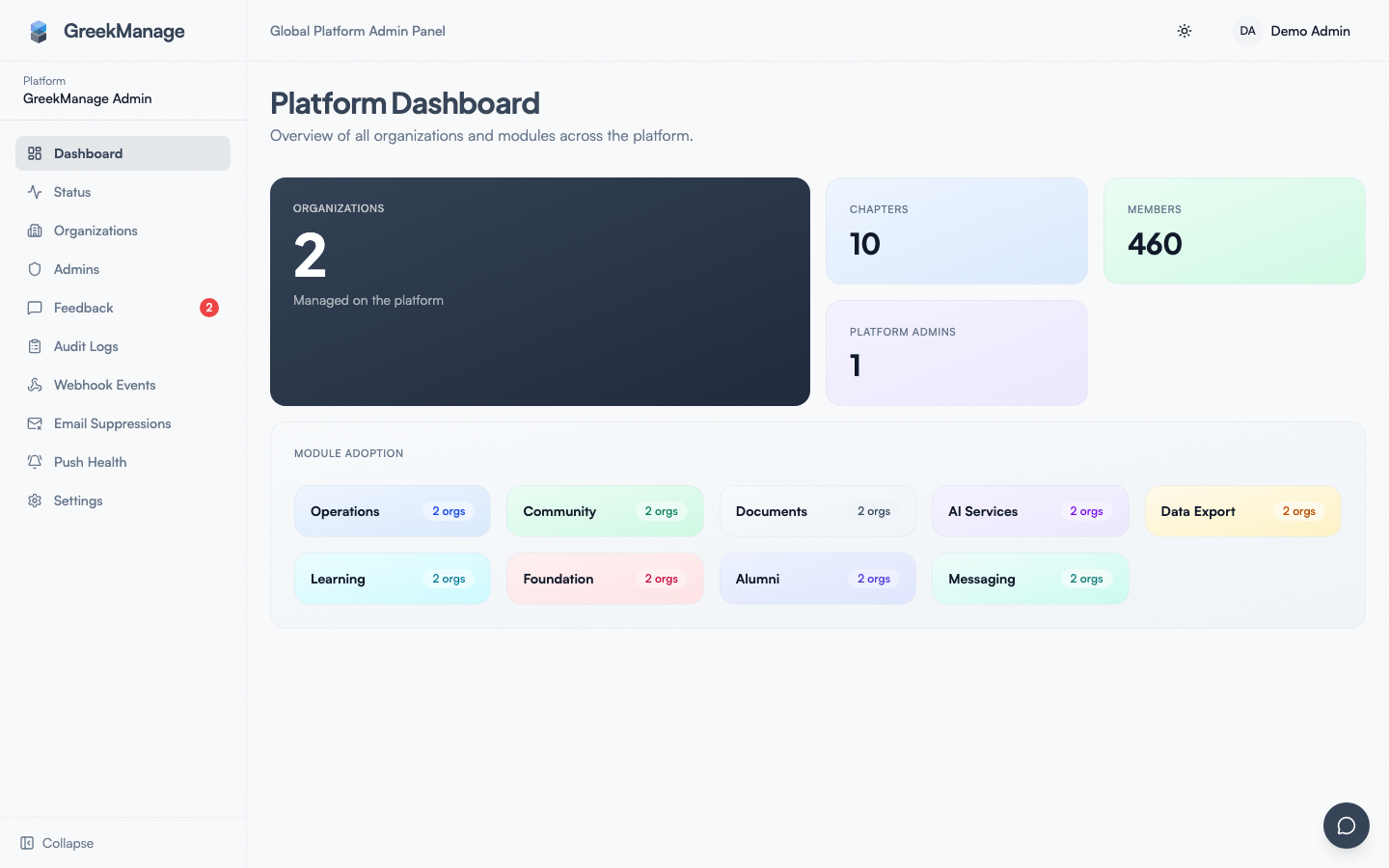 Platform dashboard immediately after a successful bootstrap — empty org list, ready for setup.
Once you have a working platform admin and can sign in, do these in order so the rest of onboarding doesn't pile up later.
1. Configure the platform email backend
Without email, your future invites won't deliver and your users can't reset passwords. Pick a provider, paste credentials, save, and send a test email.
→ Email config.
2. Add a second platform admin
Single-admin platforms are one absent person away from re-bootstrapping. Add a coworker or a shared ops account as a second admin.
3. Enroll a passkey on your account
GreekManage doesn't enforce 2FA, but passkeys are the strong-auth option. Enroll one before you handle any sensitive operations.
→ Account security → passkeys.
4. Create the first organization
With email working and a second admin in place, provision your first tenant.
→ Creating a new organization.
5. Configure backups
The default pg_dump schedule presets exist but schedule_enabled may be off out of the box. Confirm backup storage is wired up and a manual backup succeeds before any real data lands in the platform.
Recovery: lost the last platform admin
The sole-admin guard in the UI normally prevents you from removing your last active platform admin. But there are paths that can leave you locked out:
- A direct database
DELETEagainst theplatform_admintable. - A migration error that wiped seed data.
- An accidental
DROPand partial restore.
To recover, repeat the bootstrap procedure:
- From the backend container, run
python manage.py shelland confirm whether anyUserrecords exist:from apps.platform.models import PlatformAdminPlatformAdmin.objects.count() # should be 0 if you're locked out - Find or create a
Userrecord (Phase 1 above). - Run
python manage.py create_platform_admin --email <that user's email>. - Sign in.
There is no need to drop the database or restore from a snapshot to recover from this state — the bootstrap command always works as long as you have shell access.
SSO does not auto-create accounts
A common misunderstanding: "Can I just sign in with my company SSO and become a platform admin?" No.
- The platform itself has no SSO IdP. SSO (SAML or OAuth) is configured per organization, not platform-wide. The sign-in screen for the platform admin surface uses email + password.
- SSO sign-ins on tenants do not provision new users. When a tenant has SSO configured and a member signs in for the first time, the SSO flow expects to find an existing user that matches by email. It does not create the user from scratch.
Implications:
- The very first platform admin must use email + password during bootstrap.
- Subsequent platform admins also sign in with email + password unless and until platform-level SSO is added (not on the current roadmap).
- Don't rely on "we'll just SSO in" as your bootstrap plan.
If your security policy requires strong auth for platform admins, the right path is to enroll passkeys on each platform admin's account. Passkeys work on the email-plus-password sign-in screen as the second factor.
Operational notes
Where the management command lives
The command is bundled into the backend container and runs against the live database. There's no separate installer or admin-tool image to pull — if you can run python manage.py <anything> you can run python manage.py create_platform_admin.
Running it from a Django shell
The Django shell works too — sometimes more convenient if you're already in there for Phase 1:
from django.core.management import call_command
call_command("create_platform_admin", email="admin@yourdomain.com", title="Founder")
Same effect.
Running it against staging vs production
The command operates on whatever database the backend container is currently configured to point at. There's no --env flag or --database flag. Make sure you're in the right container before running.
Auditing the bootstrap event
The bootstrap command writes to the PlatformAdmin table directly and does not write an audit log entry (the audit middleware is HTTP-request-scoped; CLI commands sidestep it). If your compliance regime requires bootstrap evidence, capture the shell history and command output separately — for example, paste the success line into a runbook ticket.
Errors and edge cases
No user found with email: ... — Phase 1 didn't produce a user, or the email differs (case, typo, trailing whitespace). User.objects.filter(email__iexact=...).exists() in the shell will tell you whether the user actually exists under a different casing.
User ... is already a platform admin. — The row already exists. Sign in and check the admins list. If the row is marked inactive (is_active = false), engineering will need to flip it back; the bootstrap command refuses to re-create an existing admin.
Command exits silently, no output. — Almost certainly an import error before main(). Run python manage.py check to verify Django can import cleanly. If check itself fails, that's a deployment-config problem, not a bootstrap problem.
Sign-in fails after bootstrap with "Invalid credentials." — Wrong password (most common — verify what you actually set in Phase 1), or you used a different email casing than the user record. Reset the password via the shell:
from django.contrib.auth import get_user_model
u = get_user_model().objects.get(email="admin@yourdomain.com")
u.set_password("new-temporary-password")
u.save()
Sign-in succeeds but dashboard 404s. — The platform admin record exists but probably for a different user (different email casing, or a stale row). Verify with:
from apps.platform.models import PlatformAdmin
list(PlatformAdmin.objects.values_list("user__email", flat=True))
Troubleshooting
| Symptom | Likely cause | Fix |
|---|---|---|
No user found | User wasn't created in Phase 1 | Create the user via shell or sign-up flow |
User is already a platform admin | Already done | Just sign in |
| Command not found | Backend image too old | Rebuild and redeploy to current version |
| Sign-in says "Invalid credentials" | Wrong password | Reset via u.set_password() in shell |
| Dashboard 404 after sign-in | Promoted a different user than the one signing in | Check email casing; promote the right one |
| Can't run shell | Container restarting / unhealthy | Check container logs; fix the underlying issue first |
Tips
- Don't bootstrap with an individual's personal email. Use a role-based address that survives the individual leaving.
- Add a second admin immediately. The whole point of having a guard against removing the last admin is that re-bootstrapping is a recovery operation, not a routine one.
- Capture the shell session. Keep a record of who ran the command, when, on which environment. Even though it's not auto-audited, the operational record matters.
- Test bootstrap on staging first. If you're standing up production, prove the procedure on a throwaway environment first so production bootstrap is muscle memory.
- Set a strong password. Anything you'll later replace with a reset-link-driven password works; just don't leave a weak one in place once email works.
What's not built today
- A UI-driven bootstrap flow for the very first admin. CLI only.
- An audit log entry for the bootstrap event. Out-of-band; capture in a runbook ticket.
- Platform-level SSO for admin sign-in. Email + password (with optional passkey) only.
- SSO auto-provisioning of users. Existing-account matching only.
- A
--passwordflag on the bootstrap command. Pre-create the user with a password (Phase 1) and then promote. - A
--soft/--inactiveflag to create an inactive admin record. Active by default.
Related
- Managing platform admins — adding every admin after the first
- Email config — required before invites and password resets work
- Creating a new organization — the next step after bootstrap
- Backups & export — configure before real data lands
Last verified against v0.62.1 (2026-05-11).