Managing platform admins
Platform admins have full cross-tenant access to GreekManage. They provision new orgs, configure shared services like email, run backups, and can read every audit log. Treat the role with caution — there is no narrower "platform read-only" or "platform support" role today, so granting platform admin grants the keys to everything.
What "platform admin" actually means
A platform admin record is two things:
- A
Useraccount (the same kind every other user has). - A
PlatformAdminrow that points at that user, with an optional title and an is_active flag.
If both exist and the row is active, the user gets platform-wide bypass: every permission class on every API endpoint treats them as authorized. They can view any org's data, change any org's modules, read every audit log, and configure shared platform settings.
Removing the platform admin row leaves the user account intact. The user simply stops having platform privilege — they keep whatever org-level roles they already had (national admin, member, etc.) untouched.
Active vs deleted
There are two ways to take away platform privilege:
- Delete the record. The default "Remove" action on the Admins page deletes the
PlatformAdminrow. The user account stays untouched. This is the right choice when the person has permanently left the role. - Mark inactive (v0.63.30+). Each admin row now has a Power icon toggle next to Remove. Clicking it PATCHes
/api/platform/admins/<id>/with{is_active: bool}, flipping the Active / Inactive badge in-place. The user's platform privilege drops onis_active=falsebut the row is retained so reactivation is one click. A sole-admin guard prevents deactivating the last active admin (otherwise you'd lock yourself out of the platform).
Use Inactive for short-lived "this person is on leave, hold their access" cases — it's reversible without re-entering metadata. Use Delete when the person has permanently left the role.
Every toggle / remove emits an AuditLog row (resource_type="platform-admin", action=UPDATE) with the from/to state and target email in metadata.
Open platform admin management
Platform → Admins.
You'll see three sections on this page:
- Platform Admins — the cross-tenant admins themselves.
- Organization Admins — pick an org, manage its national admins.
- Foundation Admins — pick an org, manage its foundation-level admins.
Only the first section is covered here. Adding a national admin to a tenant is covered under Creating a new organization.
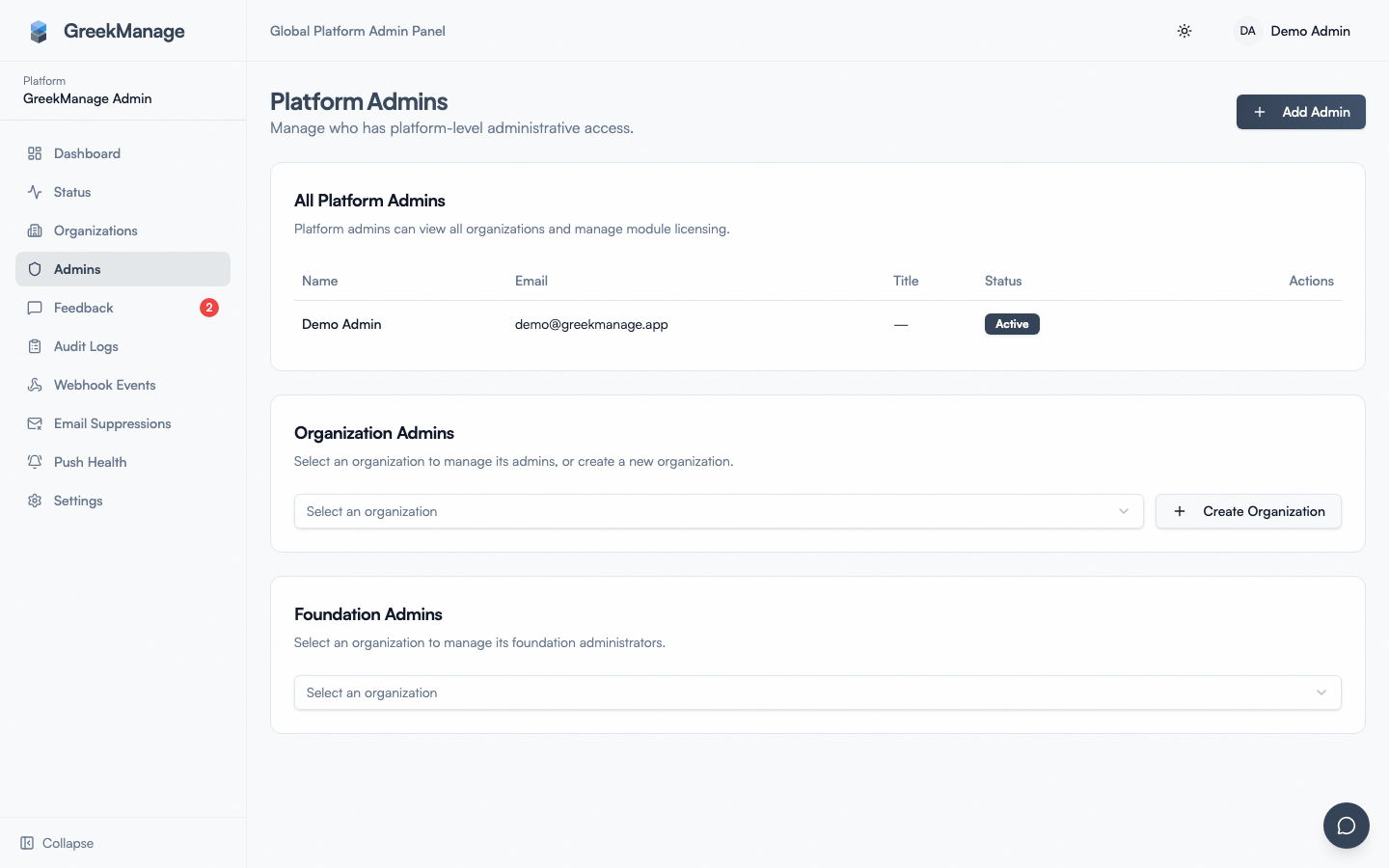 platform admins list with the Add Admin button highlighted
The Platform Admins list shows each admin's name, email, title, an Active/Inactive badge, and a hover-revealed remove action.
Step-by-step: add a platform admin
- Click Add Admin in the top-right.
- In the dialog, Search User by Email — start typing the user's email.
- Search requires at least 2 characters before any results appear; this keeps the user dropdown lean.
- Up to 20 matches are returned, ordered by email.
- Pick the user from the results.
- Or if no match exists, the Create New User button appears below the empty state. Click it and fill in:
- Email (required)
- First name (required)
- Last name (required)
- Password (optional) — leave blank to auto-generate a random one. The user can reset it from the sign-in page once the platform email backend is live.
- Or if no match exists, the Create New User button appears below the empty state. Click it and fill in:
- Optionally set a Title (e.g., "Platform Director", "Security & Compliance").
- Click Add Admin.
The user has platform admin privilege immediately. They do not need to sign out and back in — their next request hits the new permissions on the server side.
When to use search vs Create New User
- Search first for everyone. Users on the platform can hold roles across multiple orgs, so the person you're about to promote may already have an account from their org-admin or member role.
- Create New User only when no record exists at all. Most internal staff at the platform operator company should be created here once and reused.
Title is free text
The title field is purely informational — it shows up on the admins list and that's it. There's no permission gradient based on title. "Senior Platform Admin" and "Junior Platform Admin" have identical platform powers. Use it for human context (org chart, paging escalation order) but don't expect it to gate anything.
Step-by-step: remove a platform admin
- Find them in the list.
- Hover the row — the Remove icon appears on the right.
- Click Remove and confirm in the browser prompt.
The platform admin record is deleted. The user account stays intact and loses only platform privilege.
This guard exists because losing all platform admins requires re-bootstrapping via the CLI from inside a backend container, which is recoverable but not fun. See First-time bootstrap for the recovery procedure.
Remove vs deactivate
Both are reversible-with-effort, but they leave different audit trails:
- Remove deletes the row. To re-add, search for the user and re-promote — title and any other metadata you'd previously set is gone.
- Deactivate (Power icon toggle, v0.63.30+) flips
is_active=false. Reactivation is a single click on the Inactive row. Metadata is preserved.
Use deactivate for "they'll be back" cases (sabbatical, parental leave); remove for "they've left the role permanently." Both write to the audit log.
Strong authentication for platform admins
GreekManage does not ship a separate TOTP/2FA enforcement system. There is no "require 2FA for platform admins" switch, no SMS-based second factor, and no admin-side toggle that forces strong auth.
The strong-auth option that exists today is WebAuthn passkeys (Face ID, Touch ID, hardware security keys, and platform authenticators). Each platform admin can register passkeys from their own Account Security page and use them on subsequent sign-ins; the system supports discoverable passkeys, so an enrolled passkey works on web and on iOS/Android via Associated Domains and Digital Asset Links.
Because there's no enforcement switch, passkey enrollment is a policy you communicate, not a switch you flip. Recommended pattern:
- Require every platform admin to enroll at least one passkey within their first 24 hours.
- Require a second passkey (a hardware key) as a recovery factor before they handle anything sensitive.
- Audit quarterly via the admins list to confirm everyone with platform privilege still works at the company.
→ Passkey enrollment instructions for your own account: Account security → passkeys.
What about SSO for platform admins?
SSO (SAML or OAuth) is configured per organization. The platform itself does not have an SSO IdP attached. Platform admins sign in with their email + password (and a passkey, if they've enrolled one) at the standard sign-in screen. There is no current path for a platform admin to authenticate via the customer's SSO.
This is important to remember during bootstrap: the very first platform admin must use email + password, regardless of what SSO is configured for any tenant.
Best practices
- Always have at least 2 platform admins. Single-admin platforms are one absent person away from losing access — and re-bootstrap requires the CLI, which is recoverable but adds an outage window.
- Enroll a passkey on every platform admin account within day one. Passwords alone are not sufficient for tenant-wide access.
- Audit the list quarterly. Remove anyone who no longer needs the role, and confirm every active admin still has a working email and is still at the company.
- Document who's a platform admin. A board member or an auditor will ask, and the answer "go look at the database" is not a good answer.
- Don't promote customer-facing staff to platform admin. Org admin or org admin equivalent is enough for almost all customer support work. Platform admin grants tenant-wide visibility, which is overkill for "help one customer reset a password."
- Use distinct accounts for distinct purposes. A platform admin who is also a national admin of a customer org should consider holding those as separate logins. Reuse increases the blast radius when a credential is compromised.
Audit trail
Platform admin changes are captured in the platform audit log. To find them:
- Open Platform → Audit logs.
- In Resource Type, type
PlatformAdmin. - Optionally narrow with date filters.
The metadata payload on each row includes the actor (which existing platform admin made the change), the target user, the IP address of the request, and whatever change-detail context the request carried.
The platform admin list itself does not have a per-row history view today; you have to use the audit log for "who did what when."
→ Audit logs.
Errors and edge cases
"User is already a platform admin." Search the platform admin list first. The record may exist but be marked inactive — those are visible in the list with the grey "Inactive" badge.
"User not found" when adding. The user account doesn't exist. Use the Create New User form in the same dialog.
"Cannot remove the last active platform admin." The sole-admin guard. Add another platform admin first.
The Add Admin form keeps showing search results from the wrong user. Search is email icontains-match — "alex" matches alex@a.com, ralex@b.com, and alex.support@c.com. Type more of the email to narrow.
A platform admin you just added can't sign in. The platform email backend probably isn't configured, so the password-reset email didn't go through. Check Email config is active. If the account was created with password=blank, no one knows the password — they must reset, which requires working email.
Troubleshooting
| Symptom | Likely cause | Where to look |
|---|---|---|
| Search returns nothing | Query is <2 characters | Type more of the email |
| Search returns the wrong users | icontains matches anywhere in the email | Type more of the email |
| Remove icon is missing | You're looking at yourself, or the row is the last active admin | Add another admin first |
| New admin can't sign in | Password reset email not delivered | Email config, provider console |
| Admin sees an old org's data after losing the role | Stale browser session; expected to clear on next request | Hard-refresh; if still bad, sign them out via the standard auth flow |
CLI: bootstrap admins or create-then-promote (v0.63.30+)
The create_platform_admin management command grew flags for create-then-promote in one shot. Useful for first-time bootstrap and for headless onboarding when the UI isn't available.
# Promote an existing user (legacy behavior, still works):
python manage.py create_platform_admin --email aman@example.com

# Create a new user AND promote in one shot (v0.63.30+):
python manage.py create_platform_admin \
  --email new-admin@example.com \
  --first_name "First" \
  --last_name "Last" \
  --password "<long-random-string>"
When --email matches no existing user and --password is supplied, the command provisions the User row and the PlatformAdmin row atomically. If the user already exists, the credential args (--password, etc.) are ignored — the command will not overwrite an existing password.
Every CLI invocation emits an explicit AuditLog row:
AuditLog.objects.create(
  action=CREATE,
  resource_type="platform-admin",
  resource_id=admin.id,
  user=None,
  metadata={
    "source": "cli:create_platform_admin",
    "email": email,
    "title": title,
    "user_was_created": True_or_False,
  },
)
Look for source: cli:create_platform_admin in the platform audit log to find every CLI-bootstrapped admin.
What's not built today
- TOTP / SMS / app-based 2FA. Strong auth is passkey-only, enforced by policy.
- 2FA enforcement toggle. No admin-side "require strong auth" switch.
- Last-sign-in column on the admins list. You can find this in the audit log by filtering for sign-in actions by the user, but not on the list directly.
- Bulk add / CSV import of admins. One at a time.
- Per-row history view on the admins list. Use the audit log for "who added this admin, when."
- Self-serve invite for new platform admins. Existing admins must add them by hand, or bootstrap via CLI for the very first admin.
Related
- First-time bootstrap — how the very first platform admin is created via CLI
- Creating a new organization — the broader provisioning flow
- Email config — required for password-reset delivery
- Audit logs — investigating platform admin changes
- Inviting admins (org admin) — for adding national admins inside a single tenant
- Account security (your own passkeys)
Last verified against v0.63.39 (2026-06-26). Power-icon set-inactive toggle, create_platform_admin --password flag, and CLI bootstrap audit log all shipped v0.63.30.